Hello,
I apologize for the inconvenience you are facing while trying to connect your website to Google Webmaster Tools using Rank Math. It seems like you have tried several troubleshooting steps already, but the issue persists.
Based on the information provided, it appears that the error message "Warning: You have not given the permission to fetch this data. Please reconnect with all required permissions" is related to the permissions granted during the connection process.
To resolve this issue, please follow these steps:
-
Reconnect Google Account with All Required Permissions:
- Navigate to Rank Math SEO → General Settings → Analytics.
- Click on the Reconnect button to connect your Google account again with all the necessary permissions.
-
Test Connections:
- In the Analytics settings, click on Test Connections to validate the existing connections. Ensure all connections show a green signal, indicating a valid connection.
If the issue persists after following these steps, please ensure that you have granted all the required permissions during the connection process. If the problem continues, you may need to reconnect with the correct permissions.
If you encounter any further difficulties, please reply to this ticket, and a human agent from the Rank Math Support team will assist you promptly.
Thank you for your understanding and cooperation.
Closing spiel.
Sources:
What to Do When Rank Math Analytics Shows Zero Search Traffic » Rank Math
How to Delete Old Analytics Data & Start a Fresh Import
Resolving Rank Math Analytics Related Issues » Rank Math
How to Install Google Analytics With Rank Math SEO » Rank Math
How To Fix Blocked Due to Access Forbidden (403) Error in Google Search Console » Rank Math
Hello,
I have tried all the suggested steps multiple times:
– Deleted and reinstalled the plugin.
– Removed and re-granted permissions from Google.
– Tested with a different Gmail account.
– Reset everything from the Database Tools section.
– Tested with a different computer and internet connection.
Please escalate my case to human support for further assistance.
I am providing you access to the site for further investigation in Sensitive Data section
Thank you.
Hello,
Thank you for contacting us and sorry for any inconvenience that might have been caused due to that.
To resolve this, you would need to have a verified Google Search Console property, if you do not have one, please follow the attached link to create one.
To make sure that everything works correctly please go through this article to connect your Google Account with Rank Math properly: https://rankmath.com/kb/connect-your-google-account/
Also, please verify using the URL prefix and ensure that you have verified the correct version of your website on the Google Search Console (HTTP or HTTPS, www or non-www).
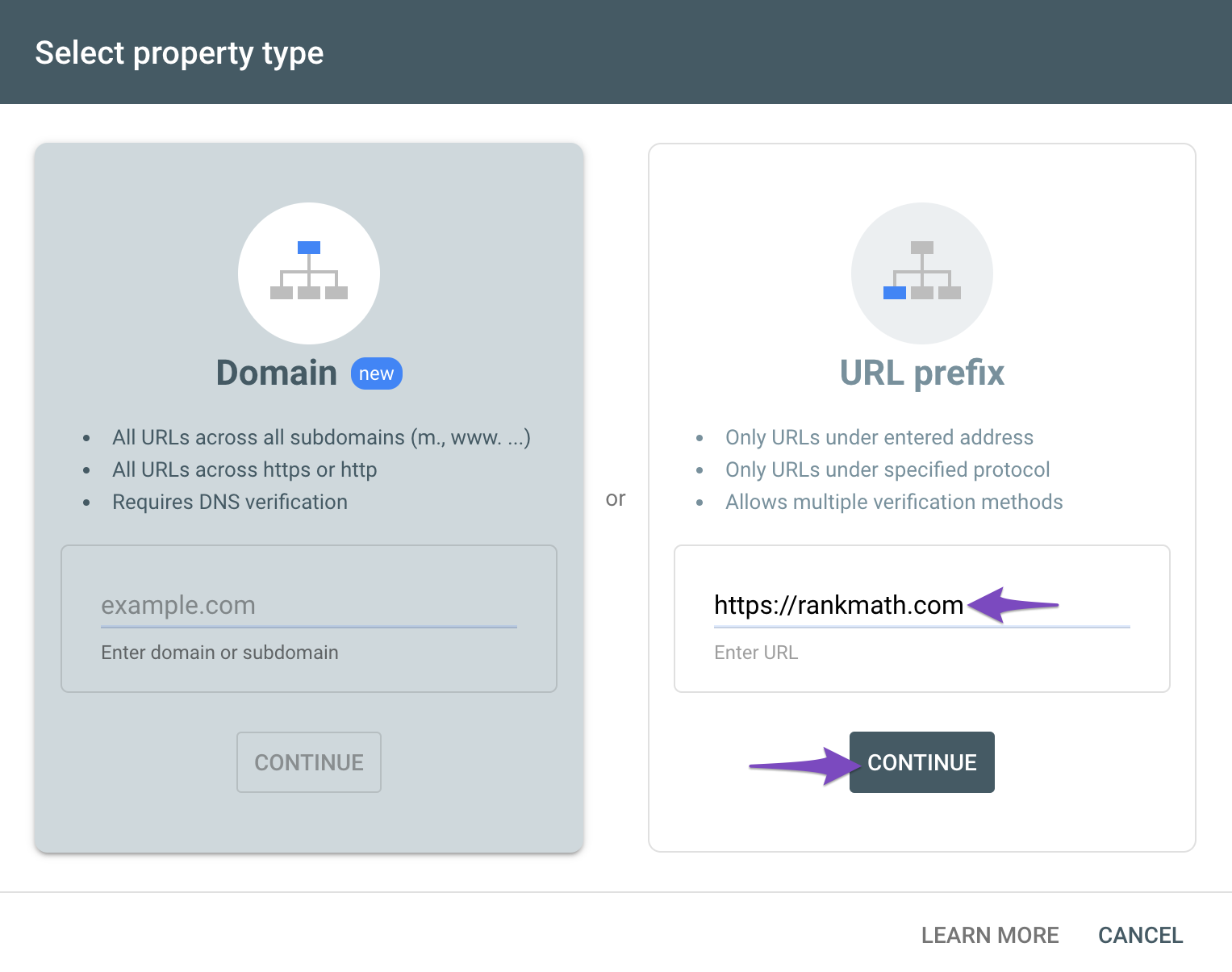
You can follow our guide here to create the URL Prefix property:
https://rankmath.com/kb/google-site-verification/#num-1-1-open-google-search-console
The URL-prefix property also helps keep your sitemap in sync with Google Search Console as we submit it automatically for you. In addition, the domain property won’t work correctly on some sections of the Analytics module such as the IndexStatus.
Let us know how this goes.
Thank you.
Hello again,
I think you did not fully understand my issue. As I mentioned above, I have already done all the suggested steps, and the problem persists. Please watch this video (all the steps you mentioned have been followed):
https://intelligentglo.fi/rankmath.mp4
**** Please note that on the same server with the same IP, I have other websites that connect to Webmaster Tools via Rank Math without any issues. ****
The website access has been sent to you.
Hello,
Since you have already tried removing and re-granting the Google permissions and the issue persists, we may need to check this further by accessing your Google account.
Please add these email addresses as a user to your Google Analytics and Google Search Console account so we could check the issue further:
j*******@r***********
m*******@r***********
Looking forward to helping you.
Hi,
Done.
both emails are added to webmaster tools (Google Search Console)
for now, we don’t need Google Analytics
Hello,
Our developers were able to connect your website to the Google account and you can see the same under WordPress Dashboard > Rank Math SEO > General Settings > Analytics.
Having said that, we noticed that you don’t have any data for that GSC property so it’s normal that the values will remain null until there is data populating for the website on this property.
Don’t hesitate to get in touch if you have any other questions.
hi, thanks
the problem has been solved
please let me know what was the problem ?
Please tell me how you solved this problem?
Hello,
We noticed there was a 503 timeout issue from the API response (this is usually server or memory related).
So we temporarily installed and activated the plugin: Health Check & Troubleshooting (this helps you debug issues on a site without affecting live users of the site).
Then, we disabled all plugins except Rank Math and connected the GSC account and it connected successfully.
You had not submitted the sitemap to Google Search Console(GSC) so we did that for you since you shared access to GSC with us.
There was no data in GSC when we accessed it.
After some time the analytics data will gather in ga, gsc, and you should see it on the dashboard screen.
Hope that helps, and please do not hesitate to let us know if you need our assistance with anything else.
Hello,
Since we did not hear back from you for 15 days, we are assuming that you found the solution. We are closing this support ticket.
If you still need assistance or any other help, please feel free to open a new support ticket, and we will be more than happy to assist.
Thank you.





