Hello,
Thank you for contacting Rank Math and bringing your concern to our attention. I’m sorry for any inconvenience this issue may have caused you.
From your screenshot, it seems that you have inspected your sitemap URL. The sitemaps, by default, are set to noindex as it is not meant to be indexed and appear in the search results.
The sitemap should only be submitted in the sitemaps sections in the Search Console.
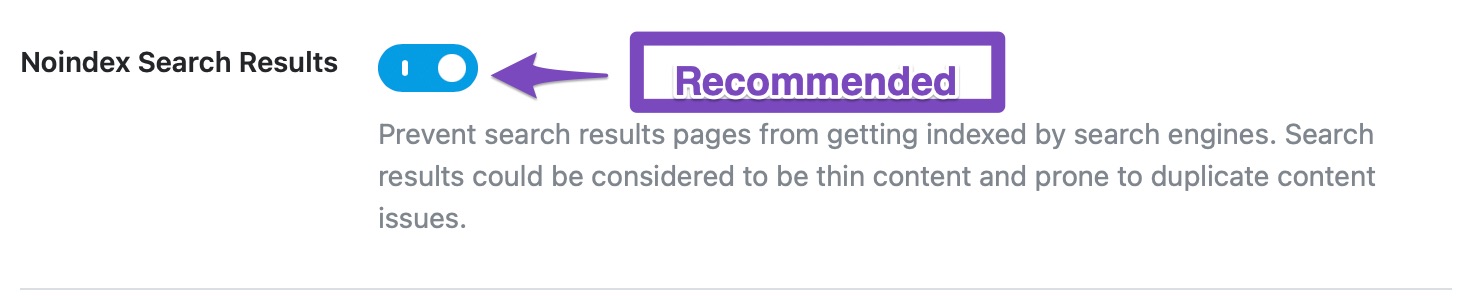
Regarding the canonical issue, it seems that your search function and filtered pages are set to index. Search result pages are usually not heavy on content, and they will not be indexed anyway. So, we recommend that you turn this setting on and No index your search results pages in Rank Math > Titles & Meta > Misc Pages
For the filtered pages, you can add this code to set them to noindex:
// Noindex filter queries
add_filter( 'rank_math/frontend/robots', function( $robots ) {
$url = home_url( $_SERVER['REQUEST_URI'] );
if (strpos($url,'?utm_') !== false || strpos($url,'?filter_') !== false || strpos($url,'?orderby=') !== false) {
$robots['index'] = "noindex";
$robots['follow'] = 'nofollow';
};
return $robots;
});
And here’s a link to how to apply this to your site:
https://rankmath.com/kb/filters-hooks-api-developer/#adding-filters-and-hooks-in-rank-math-php
I hope that helps.
Thank you.
Thanks for your reply to sorting out my problems!
I have different kinds of filter issues in my product categories and in products.
example:
https://sanfurniture.ae/product-category/chaise-lounge/?filter_color=ash,light-grey,wine-red
https://sanfurniture.ae/product/verona-one-left-arm-chaise-lounge/?filter_color=ash,light-grey,wine-red
all categories and products have the same kind of problems.
but right now my problem URLs like(because i did Strip Category Base and product base)
https://sanfurniture.ae/chaise-lounge/?filter_color=ash,light-grey,wine-red
https://sanfurniture.ae/verona-one-left-arm-chaise-lounge/?filter_color=ash,light-grey,wine-red
like screenshot:
https://imgur.com/Fk7J9VQ
My question is whether your provided code about filters will work for all pages (categories and products)or only for home page URLs.
($url = home_url( $_SERVER[‘REQUEST_URI’] );)
2nd question is that after updating your according to your recommendations problems will sort out from the google search console (when start validation) or need to remove all URLs?
Hello,
1. The filter will work for all the URLs that have ?filter, ?utm, and ?orderby in them. You can add more conditions if you want to apply it to more URLs with different parameters.
2. Once the filter is applied, you just need to validate the fix in your GSC account and the issue should be resolved once Google recrawls the URLs.
Let us know if you need any other assistance.
can I add canonical add on filter pages
https://sanfurniture.ae/chaise-lounge/?filter_color=ash,light-grey,wine
https://sanfurniture.ae/verona-one-left-arm-chaise-lounge/?filter_color=ash,light-grey,wine
https://sanfurniture.ae/chaise-lounge/?filter_size=90
// Noindex filter queries
add_filter( ‘rank_math/frontend/robots’, function( $robots ) {
$url = home_url( $_SERVER[‘REQUEST_URI’] );
if (strpos($url,’?utm_’) !== false || strpos($url,’?filter_’) !== false || strpos($url,’?orderby=’) !== false) {
$robots[‘index’] = “noindex”;
$robots[‘follow’] = ‘nofollow’;
};
return $robots;
});
if want to add canonical tag of
1st: https://sanfurniture.ae/chaise-lounge/
2nd: https://sanfurniture.ae/verona-one-left-arm-chaise-lounge/
$robots[‘canonical’] = ‘????’; what i will write here?
Hello,
The meta robots is a separate tag from canonical. You need a different filter if you want to set the canonical. Please also note, both of the example pages you linked to already have self-canonicals.
Hope that helps. Please let us know if you have questions.
Hello,
Since we did not hear back from you for 15 days, we are assuming that you found the solution. We are closing this support ticket.
If you still need assistance or any other help, please feel free to open a new support ticket, and we will be more than happy to assist.
Thank you.



