
-
Hi guys!
I have a problem with Rank Math SEO
It shows me a Warning on the screen, deactivate the Plugin and the warning disappears


-
Hello,
I apologize for the issue you are facing with Rank Math SEO. The warning you are seeing is likely related to a false positive triggered by Wordfence after installing the latest version of Rank Math.
To resolve this issue, you need to update Rank Math SEO to the latest version (v1.0.217). You can do this by heading over to the Plugins section in your WordPress dashboard and clicking the Update Now button as shown in the screenshot below:
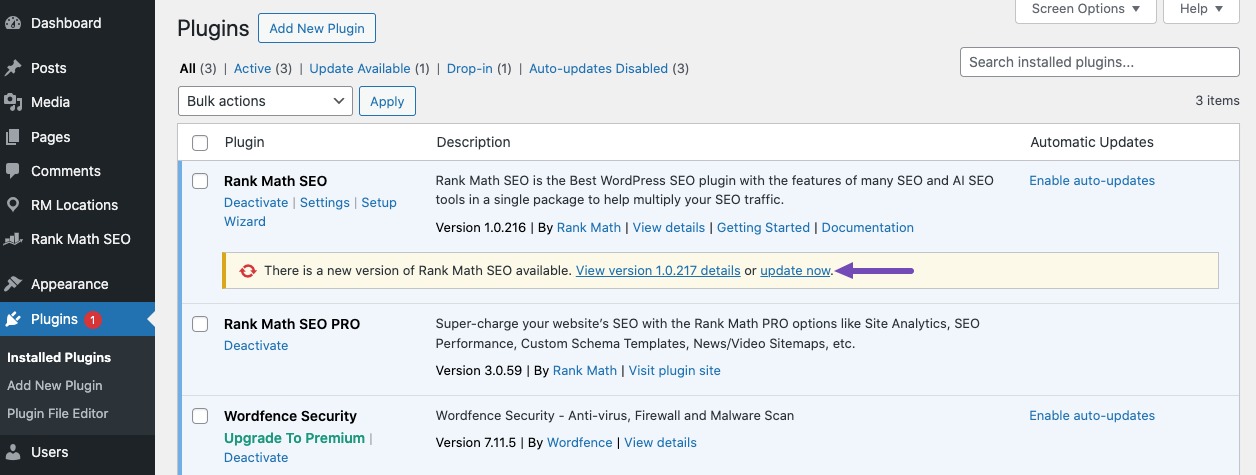
Once you update the plugin, the warning from Wordfence should no longer appear.
If you continue to face issues or if the warning persists after updating, please feel free to open a support ticket here, and our support team will assist you further.
Thank you for bringing this to our attention, and we appreciate your patience as we work to resolve this matter for you.
If you need any further assistance, please let us know.
Sources:
How to Resolve Wordfence Warning for update-1.0.42.php? » Rank Math
How to Fix Problems While Connecting Account Using Rank Math » Rank Math
How to Fix ‘Action Scheduler: 0 past-due actions found; something may be wrong’ » Rank MathThe Plugin updated it but the Warning still appears
Hello,
Thank you for contacting Rank Math support.
This issue occurs when the archive page is unable to retrieve the image from the first post or product of that archive to use it as the ‘og:image’.
To solve this problem, you can set an image in the Rank Math SEO meta box in the Social tab:
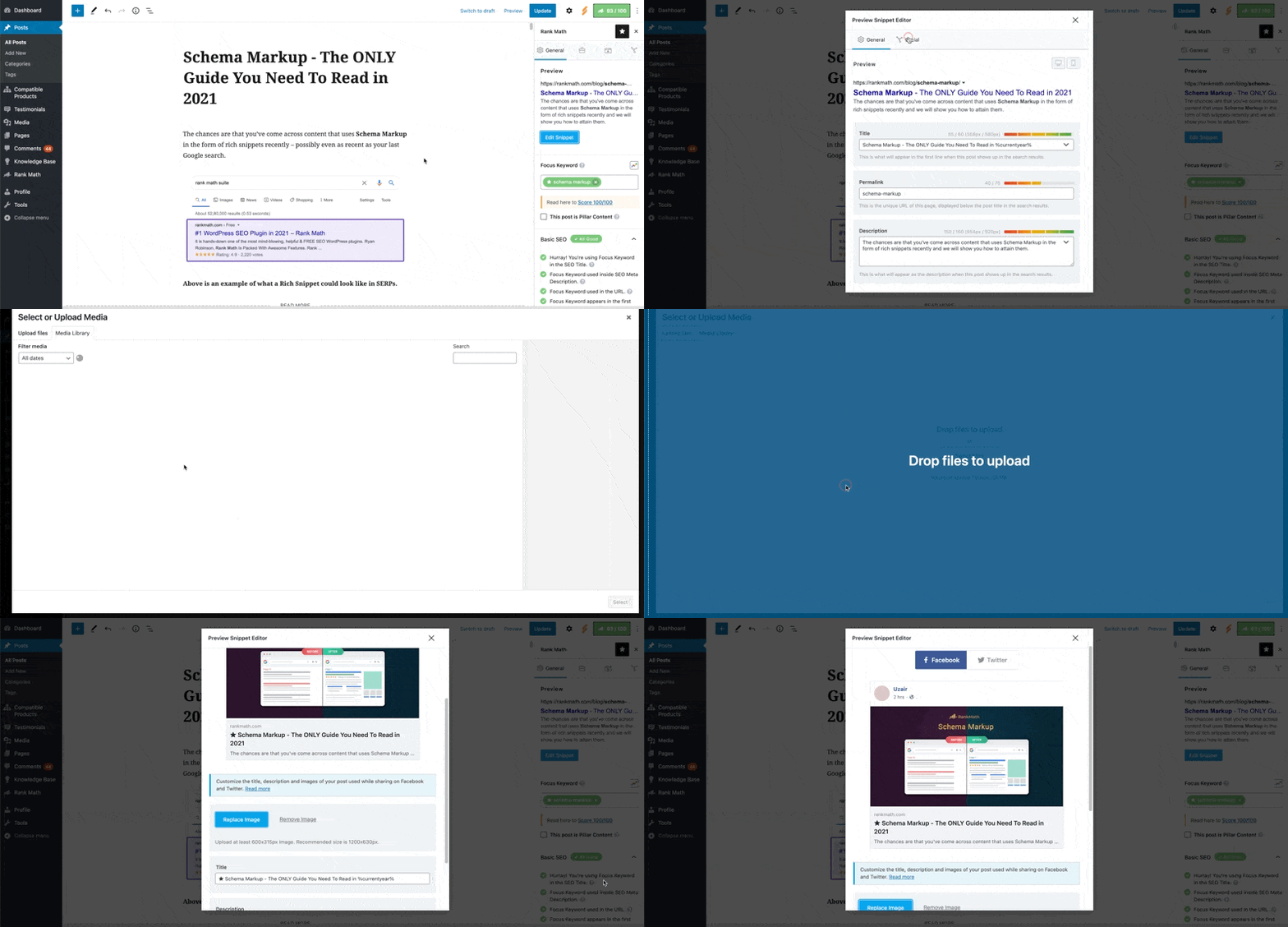
Please let us know how it works for you. We are eager to assist you.
Thank you.
This is configured, it still shows the warning
https://pali.com.co/wp-content/uploads/rank-math.mp4Hello,
Thank you for reaching out to Rank Math support.
To ensure the correct archive format, please go to your WordPress Dashboard, then navigate to Rank Math > General Settings > Breadcrumbs. Make sure that the archive format contains the following:
Archives for %sPlease note that the
%smust remain as is and cannot be changed. You can modify the rest of the text as needed.If this does not resolve the issue, then please share access to your website with us. Please follow these steps:
- Edit the first post on this ticket and include your WordPress logins in the Sensitive Data section. This is a secure section that only our support staff can access.
- Make sure you take a complete backup of your website before sharing the information with us.
- If you prefer, you can use this plugin to generate a temporary login URL to your website and share that with us instead: https://wordpress.org/plugins/temporary-login-without-password/
- You can also use this plugin to monitor what changes our staff might make on your website (if any): https://wordpress.org/plugins/wp-security-audit-log/
We appreciate your cooperation and patience. Thank you for choosing Rank Math.
Hello,
I have updated the sensitive data as requested. Can you please check further?
Thank you.
Hello,
We released a quick Beta update you can try to see if that helps.
Please enable the Beta update by following this:
https://rankmath.com/kb/version-control/#beta-updatesIf you are unable to see an update, please clear Rank Math’s transients from:
WP Dashboard > Rank Math > Status & Tools > Database Tools > Remove Rank Math Transients > Remove transients
Please clear the caches, server, and WordPress after updating.
You can disable the Beta updates once you update to the latest version and if the issue is fixed.
We are here to assist. Thank you.
Hi guys!
I did the indicated steps and it worked, the errors are no longer shown
Hello,
We are super happy that this resolved your issue.
If you do have another question in the future, please feel free to create a new forum topic, and it will be our pleasure to assist you again.
Thank you.



The ticket ‘Warning: Rank Math SEO’ is closed to new replies.