Hello,
We apologize for the issue you are facing with the SEO notice banner not disappearing. It seems that even after clicking close, the notice reappears upon refreshing the page.
To resolve this, please try the following steps:
- Clear your browser cache to ensure that any old data is removed.
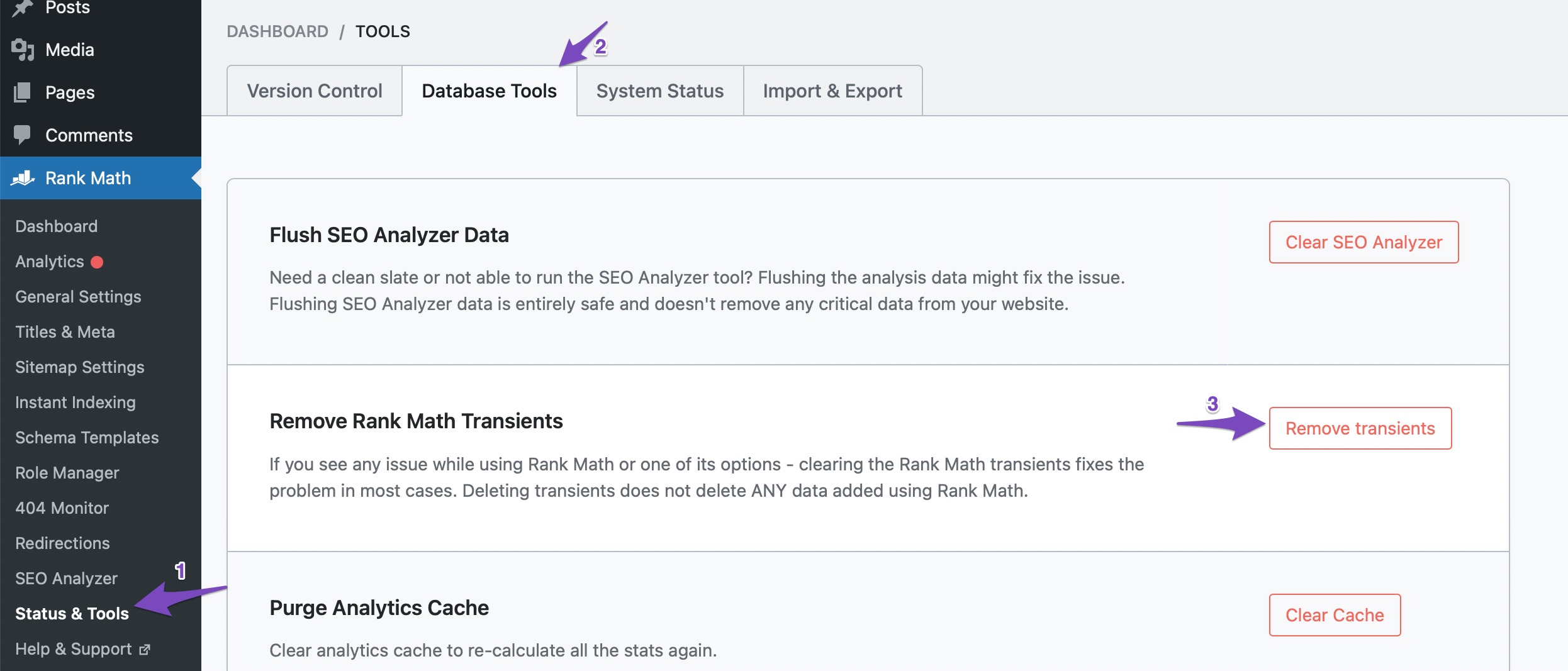
- Navigate to Rank Math SEO → Status & Tools → Database Tools in your WordPress dashboard.
- Click on Remove Transients. This action should help in fixing the error and allow the notice to be dismissed properly.
If you continue to see the notice even after following these steps, please reply to this ticket, and a human agent from the Rank Math Support team will assist you further. Thank you for bringing this concern to our attention!
Sources:
We Detected New Post Type(s) » Rank Math
I have tried, not worked for me
Hello,
This could be due to heavy caching on your website. Can you please clear your website and browser caches? Also, if you have any server-level caching services, please try clearing that as well.
If the issue persists, we might need to take a closer look at the settings. Please edit the first post on this ticket and include your WordPress & FTP logins in the designated Sensitive Data section.
Please do take a complete backup of your website before sharing the information with us.

It is completely secure and only our support staff has access to that section. If you want, you can use the below plugin to generate a temporary login URL to your website and share that with us instead:
https://wordpress.org/plugins/temporary-login-without-password/
You can use the above plugin in conjunction with the WP Security Audit Log to monitor what changes our staff might make on your website (if any):
https://wordpress.org/plugins/wp-security-audit-log/
We really look forward to helping you.
Hello,
Since we did not hear back from you for 15 days, we are assuming that you found the solution. We are closing this support ticket.
If you still need assistance or any other help, please feel free to open a new support ticket, and we will be more than happy to assist.
Thank you.




