
-
Hi
My website https://easyhomebuilds.com/ getting canonical URL error.I have done all the recommendations given in Rankmath blog.but still error showing in Pagespeed lnsights.
Kindly help in resolving this issue.Thanks and regards
Ashwini Kumar

-
Hello,
I’m sorry to hear that you are facing issues with the canonical URL error on your website. To resolve this problem, you can follow these steps:
-
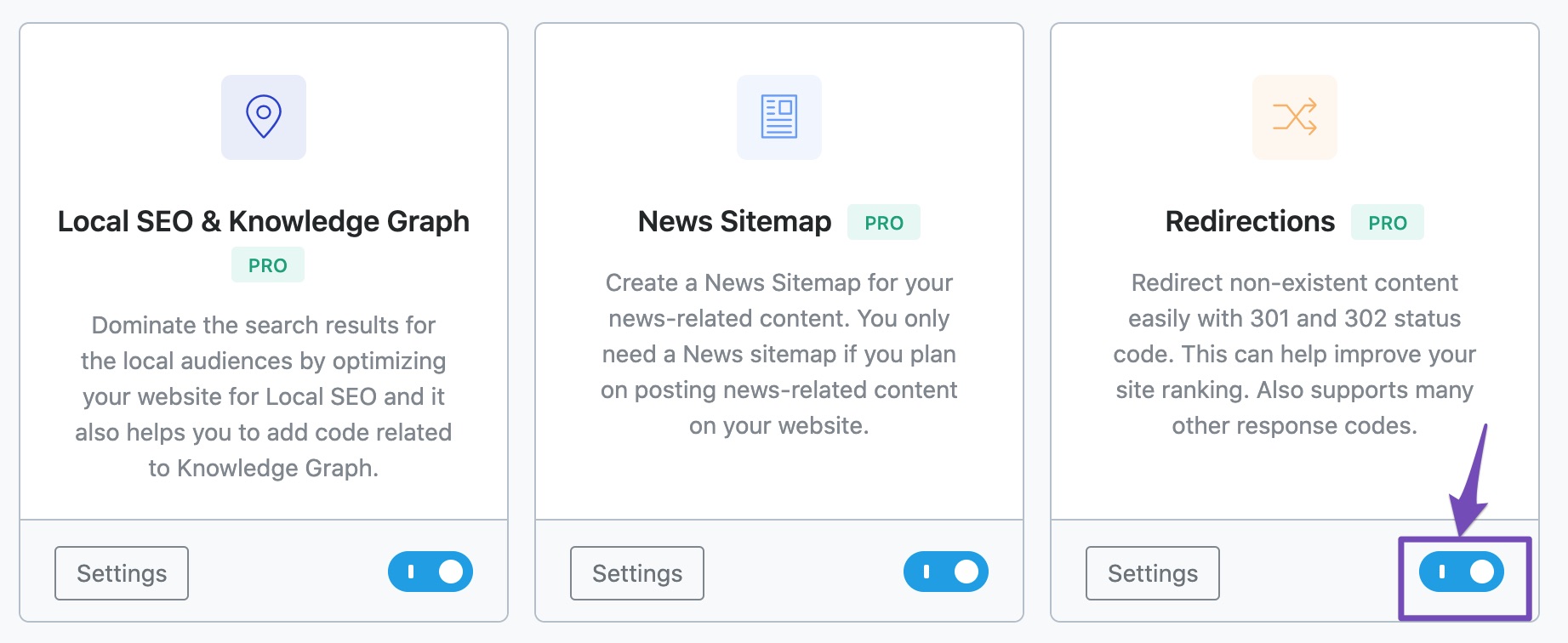
Redirect Traffic to Canonical URL: You can redirect all traffic from the non-canonical version of your site to the canonical version using a 301 redirect. This can be done easily with the Redirection Manager in Rank Math. Make sure the Redirections module is enabled in your Rank Math dashboard.
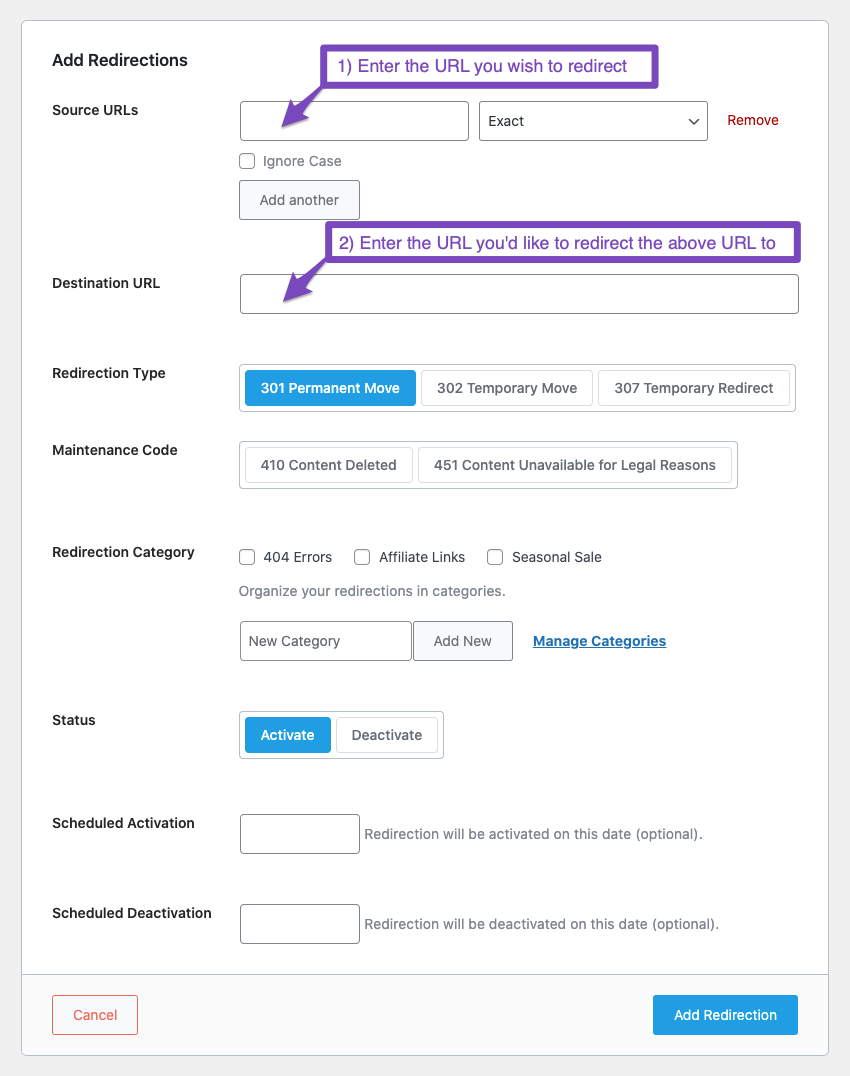
Add a new redirection by navigating to Redirections in your Rank Math dashboard, then click on Add New Redirection. Enter the Source and Destination URLs and select the redirection type as 301 Permanent Move.
-
Choose a Different Canonical URL: You can also choose a different canonical URL for the affected pages using Rank Math’s meta box. This can be done under the SEO tab when editing a post or page.
-
Use Rank Math’s Instant Indexing: If needed, you can use Rank Math’s Instant Indexing feature to submit your URL for indexing.
If you have already tried these steps and the issue persists, please reply to this ticket, and a human agent from the Rank Math Support team will assist you further.
Thank you for reaching out, and we appreciate your patience in resolving this matter.
Best regards.
Sources:
How to Fix ‘Duplicate, Submitted URL Not Selected as Canonical’ Issue in Google Search Console » Rank Math
How to Fix “Duplicate, Google Chose Different Canonical than User” » Rank MathHello,
Thank you for contacting us and sorry for any inconvenience that might have been caused due to that.
We checked your website and looks like the canonical URLs are not getting generated properly. This issue could be caused by conflicting plugins/themes on your website. Kindly make sure you are using the latest version of all the plugins and themes, please update if not yet.
Here’s a guide for troubleshooting further if the issue persists:
https://rankmath.com/kb/check-plugin-conflicts/You can also follow the steps in this video:
https://www.youtube.com/watch?v=FcIWRhcUP2cOnly the site admin would know and your users won’t be affected by this troubleshooting.
Let us know how it goes. Looking forward to helping you.
Thank you.
Still I couldn’t figure out the issue.
Kindly help in producing canonical urls for my websiteHello,
Rank Math generates a self-referencing canonical URL by default for your site’s pages/posts/CPTs.
If you had added a custom canonical URL on any page you want to be self-referencing, kindly remove it and leave it blank so Rank Math can do so for you.
If you have not added a custom canonical URL and this issue persists, we might need to take a closer look at your site and its settings.
Please edit the first post on this ticket and include your WordPress logins in the designated Sensitive Data section.
Please do take a complete backup of your website before sharing the information with us.
It is completely secure and only our support staff has access to that section. If you want, you can use the below plugin to generate a temporary login URL to your website and share that with us instead:
https://wordpress.org/plugins/temporary-login-without-password/
You can use the above plugin in conjunction with the WP Security Audit Log to monitor what changes our staff might make on your website (if any):
https://wordpress.org/plugins/wp-security-audit-log/
We really look forward to helping you.
Hello,
I have updated the sensitive data as requested. Can you please check further?
Thank you.
I have shared temporary login details, kindly check and resolve this canonical URL error
Hello,
We’ve checked your site using the Health Check plugin, and it seems that the
Minify HTMLplugin is affecting the generation of the canonical URL becoming relative (removing the protocol and domain).You can also try deactivating it temporarily and check the canonical URLs.
In this case, you may get in touch with their development team to investigate the issue further. It is also possible that they already have a fix ready for this situation.
Let us know how this goes.
Canonical URL error resolved after removing Minify HTML plugin.
Thankyou for your supportHello,
You’re welcome.
We are super happy that this issue is already resolved. If you have any other questions in the future, know that we are here to help you.
If you don’t mind us asking, could you please leave us a review (if you haven’t already) on
https://wordpress.org/support/plugin/seo-by-rank-math/reviews/#new-postabout your overall experience with Rank Math? We appreciate your time and patience.
If you do have another question in the future, please feel free to create a new forum topic, and it will be our pleasure to assist you again.
Thank you.
-



The ticket ‘Showing canonical URL error’ is closed to new replies.