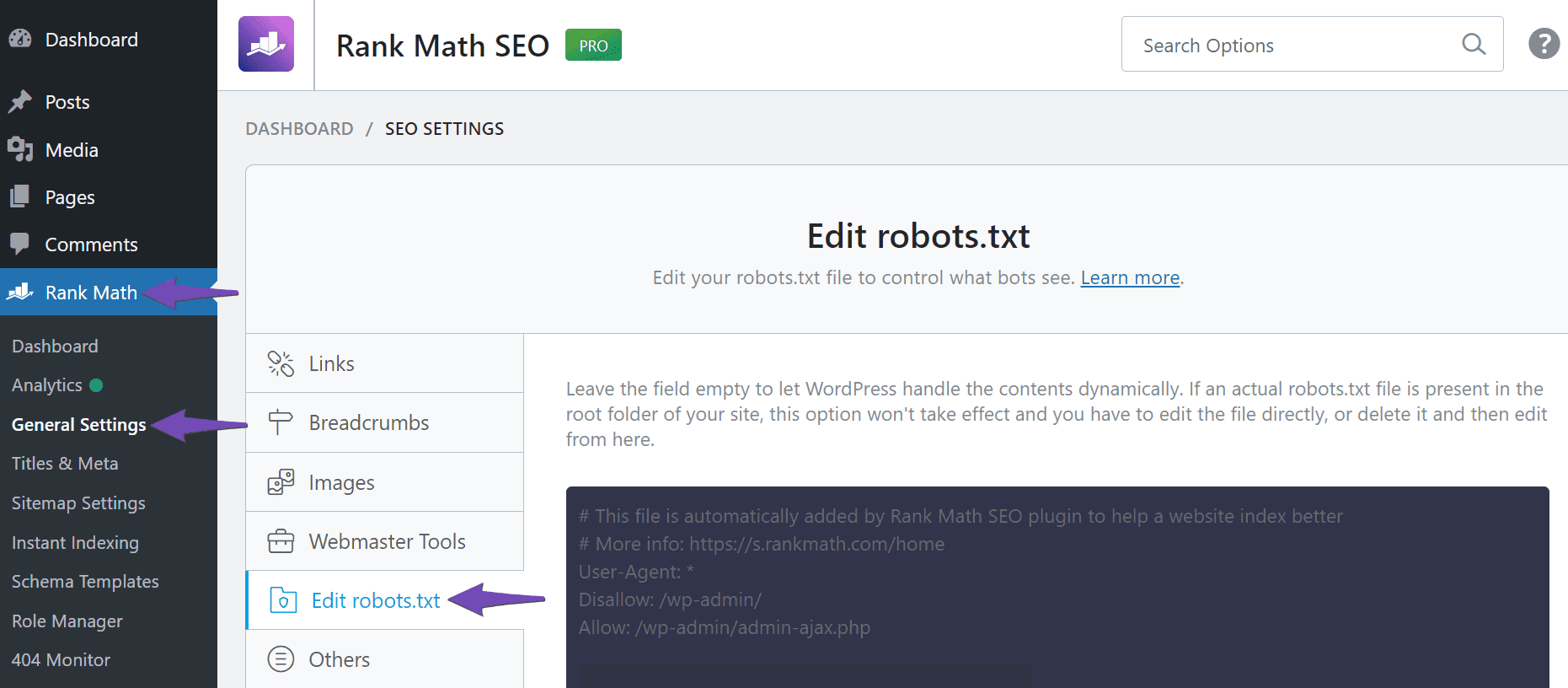
Hello,
I apologize for the inconvenience you are facing with the robots.txt file on your website. If Rank Math is not creating a virtual robots.txt file for your domain and you have confirmed that there is no other plugin creating this file or any other robots.txt file in the root directory, we can investigate this further.
Since you are experiencing a 404 error when navigating to https://rankmath.com/wp-content/uploads/2023/05/Navigate-to-Edit-robots.txt-to-edit-your-robots.txt-file.png it indicates that the robots.txt file is not being generated as expected.
To assist you better, could you please assign this ticket to a human agent by using the available buttons? Our team will investigate the issue and provide you with a solution to resolve the problem with the robots.txt file on your website.
Thank you for bringing this to our attention. We will work on resolving this issue promptly for you.
Looking forward to assisting you further.
Sources:
Common robots.txt Issues & How to Fix Them » Rank Math
I Can’t Edit My Website’s Robots.txt » Rank Math
Hello,
Thank you for contacting us and sorry for any inconvenience that might have been caused due to that.
We’ve tested your Rank Math robots file on the following URL: https://www.krakencleaning.co.uk/?robots=1 and it’s working properly without any issues. It looks like the rewrite rules for the robots file might not be working on your site. Please add the following rewrite rules to your website:
# For Nginx server:
# START Nginx Rewrites for Rank Math Robots.txt File
rewrite ^/robots.txt$ /?robots=1 last;
rewrite ^/([^/]+?)-robots([0-9]+)?.txt$ /?robots=$1&robots_n=$2 last;
# END Nginx Rewrites for Rank Math Robots.txt File
Here’s an article you can check as well: https://ubiq.co/tech-blog/rewrite-url-parameters-nginx/
# For Apache server:
# START of Rank Math Robots.txt Rewrite Rules
RewriteEngine On
RewriteBase /
RewriteRule ^robots.txt$ /index.php?robots=1 [L]
# END of Rank Math Robots.txt Rewrite Rules
If you’re not sure how to apply this rule, you can get in touch with your hosting provider to do that for you.
Let us know how it goes. Looking forward to helping you.
Thank you.
We have added the Nginx directives to the configuration file on the domain and this seems to have at least made the file now display. Why does the content of the robots.txt file not include the “This file is automatically added by RankMath” text? and why does the plugin not create these rules and why is it necessary to add these manually?
Hello,
You can verify the content of your robots.txt file generated by Rank Math by navigating to WordPress Dashboard > Rank Math > General Settings > Edit robots.txt.
Rank Math relies on the server’s rewrite rules to serve the virtual robots.txt file. While most servers handle these rules automatically, certain server configurations (like Nginx) may require manual additions.
This is primarily due to differences in how different web servers handle URL rewrites and the virtual files generated by plugins. Adding these rules ensures that your server correctly interprets and serves the virtual robots.txt file generated by Rank Math.
If you are unsure about the configuration or face any difficulties, your hosting provider can assist in implementing these rules.
We appreciate your understanding and are here to help you with any further issues. Please let us know if you need any additional assistance or if there are other questions we can help with.
I know I can view the contents of the robots.txt file from within the settings. My question is why is the file shown including the comments not the file delivered!?
Hello,
Could you please confirm if you’re referring to the comments shown in the editor?
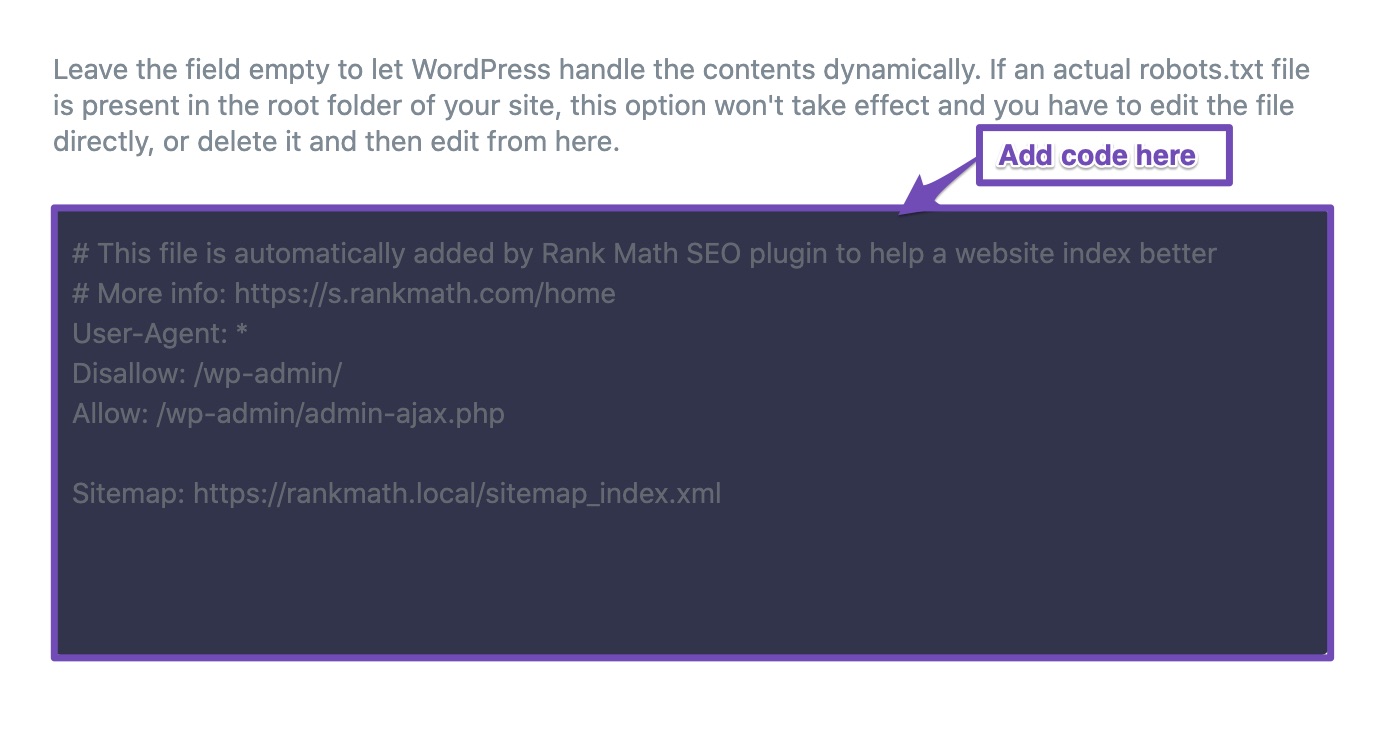
If so, they are only placeholders for instructions and are not included in the generated robots.txt.
You should only show the user agent, rules, and sitemap in the robots.txt just like your current robots.txt file now.
Looking forward to helping you.
Hello,
Since we did not hear back from you for 15 days, we are assuming that you found the solution. We are closing this support ticket.
If you still need assistance or any other help, please feel free to open a new support ticket, and we will be more than happy to assist.
Thank you.