Hello,
We apologize for the issue you are facing with connecting Search Console to Rank Math. It seems like you’ve already taken several steps to troubleshoot the problem, which is great. Here are a few additional steps you can try:
-
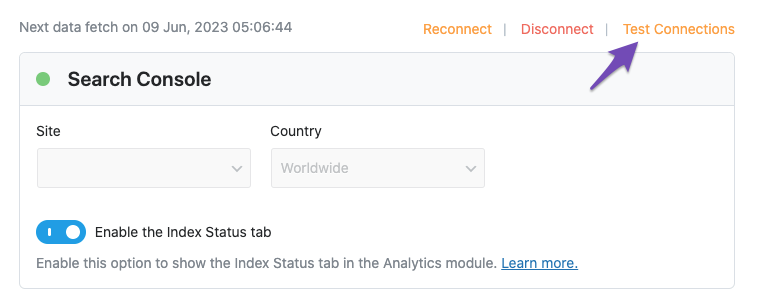
Test Connections: Go to Rank Math SEO → General Settings → Analytics and click on the Test Connections option at the top right. This will help validate the existing connections. A green signal indicates a valid connection, while a red signal indicates an issue.
-
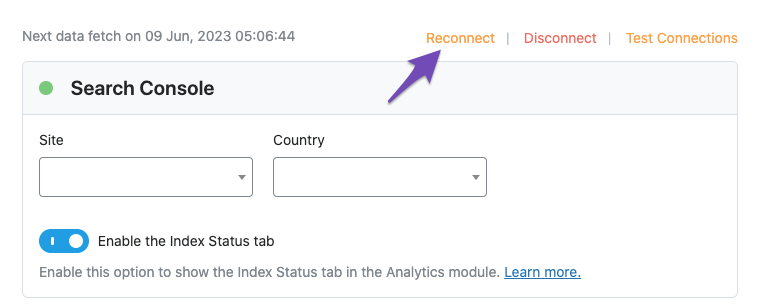
Reconnect Your Google Account: If you see a red signal, try reconnecting your Google account again. You can do this by going to the same Analytics settings and following the prompts to reconnect.
-
Check Permissions: Ensure that Rank Math has the necessary permissions in your Google account. You can check this by visiting the Google Account permissions page and ensuring Rank Math SEO is listed and has access.

-
Clear Authorization Tokens: If the issue persists, it might be due to expired authorization tokens. You can delete the Rank Math app from your Google Account permissions and then reconnect it through Rank Math.
If you continue to experience issues after trying these steps, please reply to this ticket, and a human agent from the Rank Math Support team will assist you further. Thank you for raising this concern!
Hello,
Thank you for contacting us and sorry for any inconvenience that might have been caused due to that.
Please note that our plugin is only compatible with the URL prefix properties and it doesn’t fully support fetching data from domain properties. Also, the IndexStatus feature doesn’t work with it.
You can follow the steps we shared above to create URL prefix properties: https://support.rankmath.com/ticket/connect-connect-through-google-connect/?view=all#post-745021
Once done, please try to reconnect your Google account again from WordPress Dashboard > Rank Math > General Settings > Analytics and see if that works for you.
Let us know how it goes. Looking forward to helping you.
Thank you.
Yes, this is the problem! Thanks
Hello,
We are super happy that this resolved your issue. If you have any other questions in the future, know that we are here to help you.
If you don’t mind me asking, could you please leave us a review (if you haven’t already) on https://wordpress.org/support/plugin/seo-by-rank-math/reviews/#new-post about your overall experience with Rank Math? We appreciate your time and patience.
If you do have another question in the future, please feel free to create a new forum topic, and it will be our pleasure to assist you again.
Thank you.



