Hello,
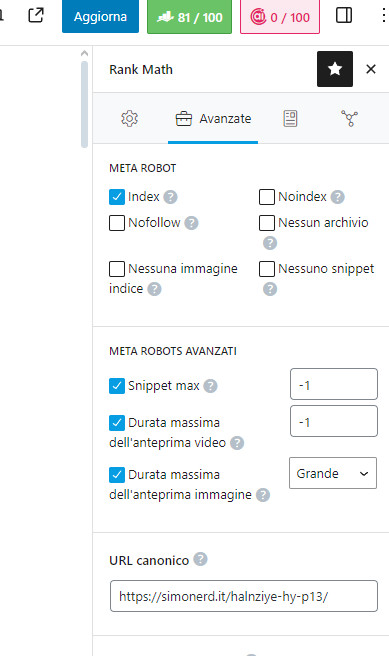
Thank you for reaching out with your question about the Rank Math Canonical Rel. Based on the images you provided, it seems like you are trying to understand how to set the canonical URL using Rank Math.
In Rank Math, setting the canonical URL is done within the plugin itself and does not require adding any code to the head section of your site. You can easily set the canonical URL using the Rank Math meta box when editing a post or page.
Here is a step-by-step guide on how to set the canonical URL using Rank Math:
- While editing a post or page, scroll down to find the Rank Math meta box.
- Look for the Advanced tab within the Rank Math meta box.
- In the Canonical URL field under the Advanced tab, enter the URL that you want Google to index as the canonical URL for that specific post or page.
- Save your changes.
By following these steps, you can effectively set the canonical URL using Rank Math without the need to add any code to the head section of your site.
If you have any more questions or need further assistance, please feel free to ask. We’re here to help!
Thank you for your inquiry.
Sources:
How to Fix ‘Duplicate Without User-Selected Canonical’ Status in Google Search Console » Rank Math
How to Fix ‘Duplicate, Submitted URL Not Selected as Canonical’ Issue in Google Search Console » Rank Math
Analyzing Your Site’s SEO with Rank Math’s SEO Analysis Tool
How to Fix “Duplicate, Google Chose Different Canonical than User” » Rank Math
Perfect, so having added the code to Head myself, I can delete it without any problem, right?
Thanks
Hello,
Yes, you can delete the canonical URL you have set under the Advanced tab from your screenshot.
However, please be informed that the canonical box’s purpose would be to inform search engines that it is a duplicate page and should not be indexed. Hence, removing them from the sitemap.
Here’s a link for more information:
https://rankmath.com/kb/url-not-in-sitemap/#custom-canonical-url
Looking forward to helping you.
Thanks for the reply, unfortunately I had a Webmaster who told me to copy and paste the title to indicate Canonical url, but he did more damage than good, I stopped his ‘help’ to fix it myself.
For all intents and purposes it’s the usual URL 🙂
I got it, thanks
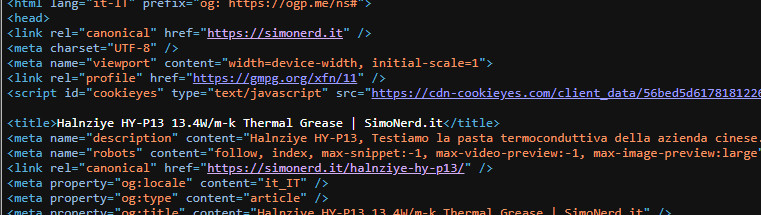
Finally, I can delete this highlighted in the head. I deleted the custom canonical and Rankmath automatically inserts the title as a canonical URL, right?
https://postimg.cc/f3Rc3JCC
Thanks
Hello,
Yes, Rank Math automatically adds a self-referencing canonical tag on your indexed URLs (by leaving the canonical box empty).
However, from your screenshot, the canonical is added twice. You should notice the canonical from Rank Math below with the URL: https://simonerd.it/halnziye-hy-p13/
If you have added canonical manually, you can remove it as Rank Math adds it on your site automatically.
Looking forward to helping you.
Yes, unfortunately it has been an a “webmaster’s” suggestion, i took the manually added off.
Thanks
Hello,
We are glad to know that this issue has been resolved. Thank you for letting us know.
This ticket will be closed now, but you can always open a new one if you have any other questions or concerns. We are here to help you with anything related to Rank Math.
We appreciate your patience and cooperation throughout this process.
Thank you for choosing Rank Math.