Hello,
We apologize for the issue you are facing with the schema data in your WooCommerce setup. Thank you for raising this concern.
To resolve the missing "Offers" field in your schema data, please ensure that you have set the Schema Type to WooCommerce Product for your products. Here’s how you can do that:
-
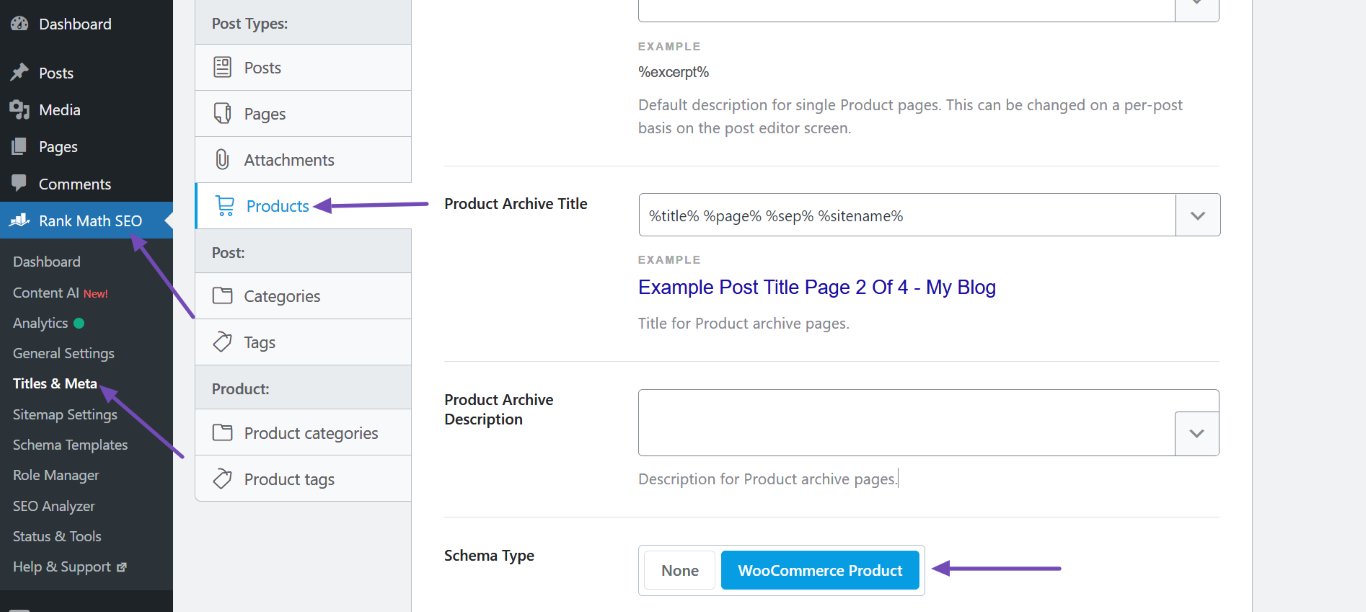
Navigate to WordPress Dashboard → Rank Math SEO → Titles & Meta → Products and set the Schema Type to WooCommerce Product.
-
Next, go to WordPress Dashboard → Products and select the affected products.
-
Click on the Bulk actions dropdown and select Set Schema: Default (product), then click Apply.
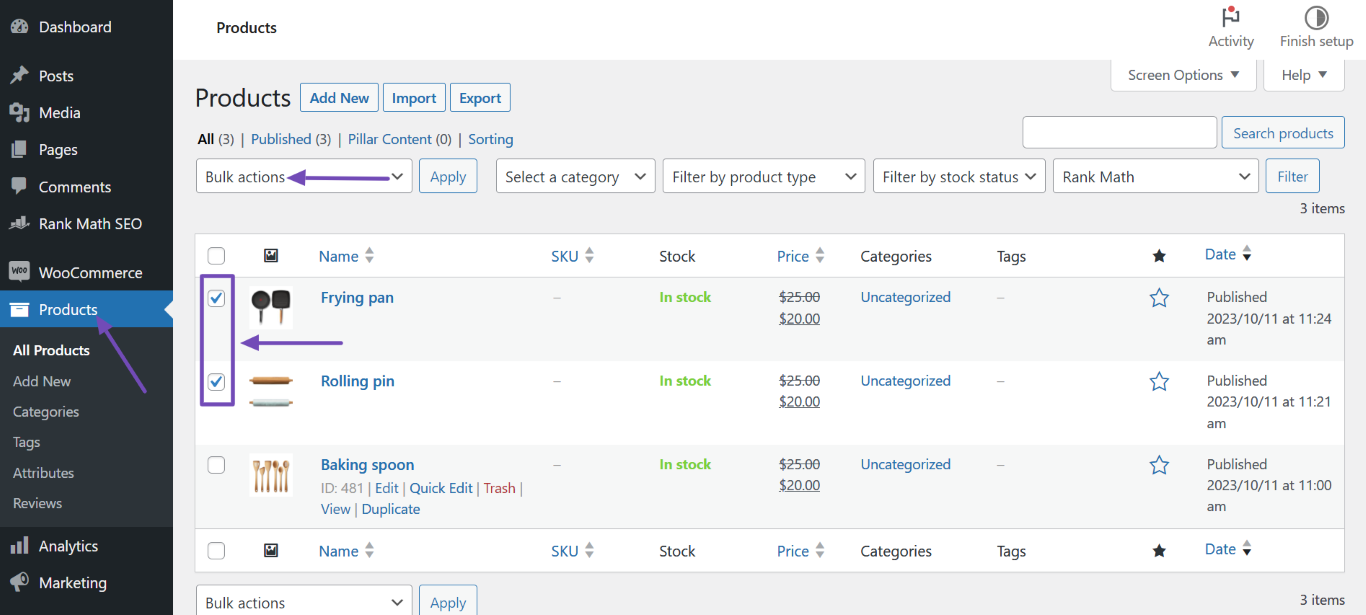
This should apply the WooCommerce Product Schema to your products, including the "Offers" field with the correct pricing information.
If you have already done this and are still experiencing issues, please reply to this ticket, and a human agent from the Rank Math Support team will assist you further.
Thank you for your patience, and we hope this helps resolve your issue!
Sources:
Resolving Rank Math Schema Markup Related Issues
Thanks for your fast response. But I just tried step 3:“Click on the Bulk actions dropdown and select Set Schema: Default (product), then click Apply.” It seems like this feature is only available to subscribed users? Is there no solution for free users?
Hello,
Thank you for contacting us and sorry for any inconvenience that this issue might have caused.
Please enable the option to Remove Snippet Data at Rank Math SEO → Titles & Meta → Product categories.
You may refer to this guide to resolve this issue.
Let us know how it goes. Looking forward to helping you.
Thank you.
Thank you for your response. I have already read the article you mentioned. I understand that enable it will solve the issue, but I need the schema data to enhance my SEO rank. Is there any way to modify this through a hook? Please assist me!
Hello,
Due to the way WooCommerce loads the products on taxonomy pages, if you don’t enable the Remove Snippet Data option for the taxonomies, the schema of those products will be added to the category pages. That’s why we recommend enabling the Remove Snippet Data option to avoid adding the Product Schemas on the page, as they should only be used on single product pages.
If you want to access the Schema tab on the category pages and don’t want to enable the Remove Snippet Data option, you should add the following filter to your site to remove the incomplete Product Schema markups from the category pages:
add_filter( 'rank_math/json_ld', function( $data, $jsonld ) {
    if( is_product_category() ) {
        unset($data['ProductsPage']);
    }
    return $data;
}, 99, 2);
Here’s how you can add filter/hook to your WordPress site: https://rankmath.com/kb/wordpress-hooks-actions-filters/
We hope this helps. Please let us know if you have further questions or concerns.
Thank you.
OK, I understand. Thank you very much for your patience in explaining
Hello,
Glad that helped.
Please feel free to reach out to us again in case you need any other assistance.
We are here to help.
Thank you.




