-
Hi there,
I installed RankMath a few days ago, the site is showing date in Google Search Console and also Google Analytics but whenever i click the Index Status tab with WP > RankMath > Analytics I just get a blank page like this:
I have tried reconnecting the Google Search Console authorisation but am still getting the same issue.
Please can you help?
-
Hello,
Thank you for contacting the support, and sorry for any inconvenience that might have been caused due to that.
Please follow these steps:
If you do not see any data inside your Analytics module, this guide might help you.
A. Pre-check List
1. You should not be using any other Google Analytics plugin.
2. Update to the latest versions of Rank Math Free & PRO
3. Ensure that you are logged in to your account:
4. Disconnect and reconnect your account from inside WordPress:
B. Refresh Tokens
1. Please delete RankMath’s app from here:
https://myaccount.google.com/permissions
2. Re-create tables by clicking WP Dashboard > Rank Math > Status & Tools > Database Tools and click the
Re-create database Tablebutton.
3. Reconnect the account inside Rank Math by clicking here and ensure that you approve all the permission notices that show up:
WP Dashboard >> Rank Math >> General Settings >> Analytics tab, and click theReconnectlink
Allow all the permissions on the next screen.
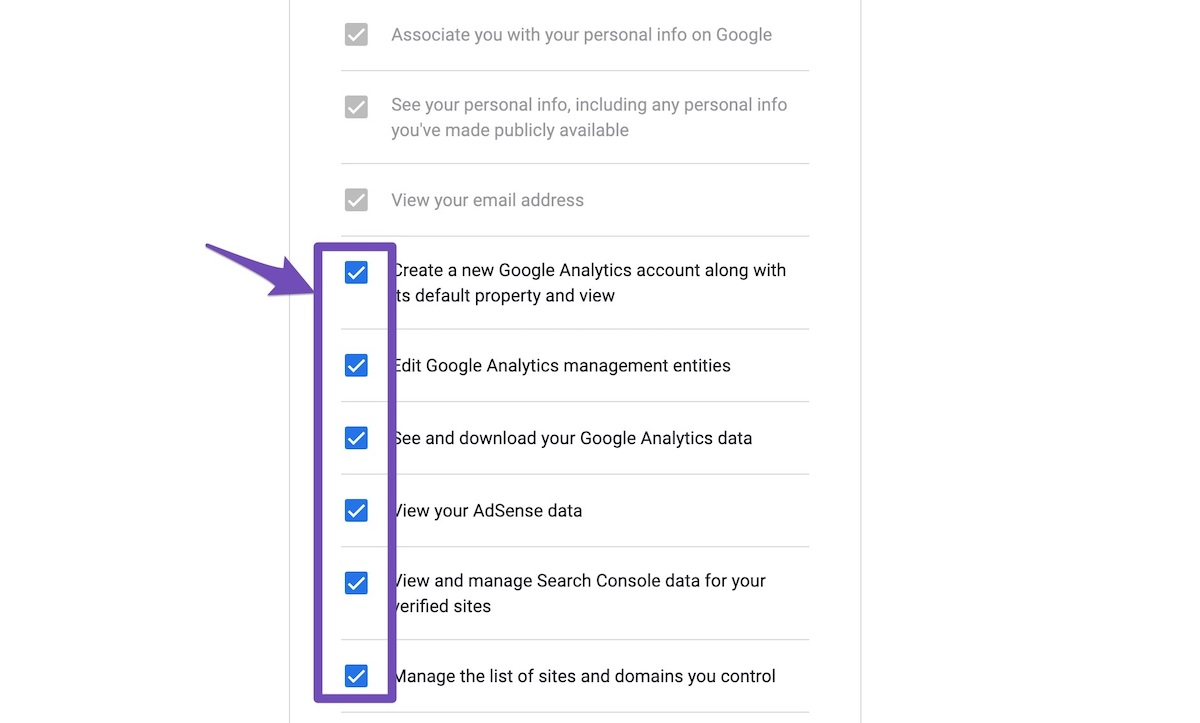
4. Let the process complete, which might take around 30 minutes.
5. Now head over to WP Dashboard > Rank Math > Status & Tools > Database Tools and click the
Rebuild Index for Analyticsbutton.
6. Please check if the data shows up here:
/wp-admin/admin.php?page=rank-math-analytics#/
If that does not help, please paste the data from here:
WP Dashboard > Rank Math > Status & Tools > System Status and click theCopy System Info to Clipboardbutton
Looking forward to helping you.
Thank you.

Hello,
I have updated the sensitive data as requested. Can you please check further?
Thank you.
Hello,
Please increase the PHP limits for the following server variables to the corresponding values:
time_limit: 120 max_input_time: 150You can contact your host for assistance doing this. Once you have updated the PHP variables you can run “Rebuild index” one more time and check if that worked.
Hope that helps. Please let us know if you have questions.
Hi there,
Thanks for your reply.
I have just checked with Elementor Cloud who is hosting the site and they said:
“ sadly we are not able to increase the PHP limit, PHP vars, or any setting (PHP.ini modifications) at the moment. The server environment is the same for everyone”
Please can you let me know if there is any other way to resolve this?
Kind regards,
Hello,
The issue seems to be related to the server resources not being enough to get the data for the Index Status feature.
In this case, you would need to have the minimum required server variables to run the plugin consistently.
Don’t hesitate to get in touch if you have any other questions.
Can you explain why you think it relates to server resources?
There are many many people using elememtor cloud along with RankMath who do not appear to have this issue (looking through the support tickets).
Also… i have just tested the plug-in via Chrome rather than Safari and can now see the following:
Wouldn’t this mean the issue is *not* with the server?
Hello,
Yes, it now seems to be an issue with the browser, not the server.
However, as it’s working on the Chrome browser, it might be having trouble loading on Safari.
In this case, you can continue with Chrome instead of Safari to avoid such issues.
Hope that helps, and please do not hesitate to let us know if you need our assistance with anything else.
Thank you.
Yes – can you help troubleshoot so i can get it working with Safari, please?
Hello,
The issue is related to server resources “time_limit” and “max_input_time”. Since they cannot be increased on your setup, you would need to either reduce the demand on your server’s resources or use a different browser like Chrome.
To reduce the demand on resources, you can try reducing the number of days for which Rank Math fetches analytics data. You can reduce it from 90 to 30. https://rankmath.com/kb/general-settings/#analytics-database. If reducing the database analytics storage does not work, you can try deactivating other WordPress plugins.
Hope that helps. Please let us know if you have questions.
Hello,
Since we did not hear back from you for 15 days, we are assuming that you found the solution. We are closing this support ticket.
If you still need assistance or any other help, please feel free to open a new support ticket, and we will be more than happy to assist.
Thank you.
The ticket ‘Index Status not showing any data’ is closed to new replies.
