-
I have a problem with connecting and finishing the set up. I try to reconnect the site but the same problem keeps showing up. I check all the squars, and i am folowing the video.
I will link you the problem. https://imgur.com/a/auNG26Ni hope you can help me
-
Hello,
We apologize for the issue you are facing while trying to connect and finish the setup with Rank Math. It seems like you might be encountering the warning that states, "Seems like your site URL has changed since you connected to Rank Math."
To resolve this issue, please follow these steps:
-
Ensure you are using the latest version of Rank Math. You can check for updates in your WordPress dashboard.
-
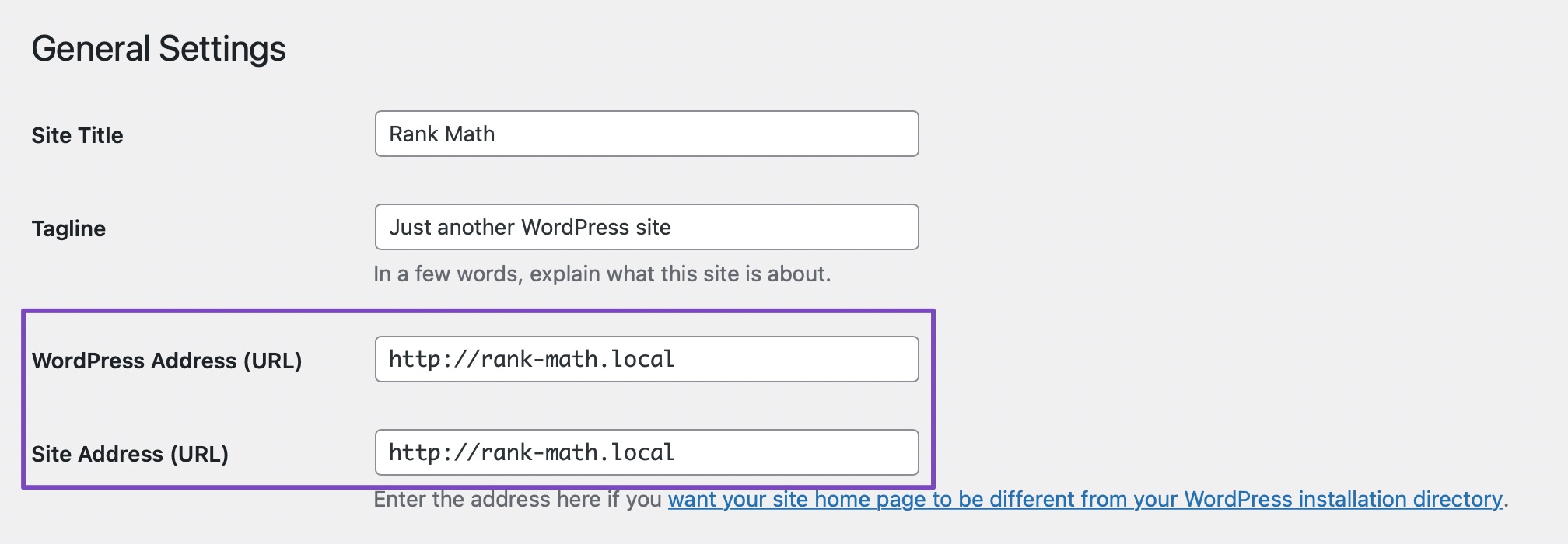
Check your WordPress URL and Site URL:
- Navigate to WordPress Dashboard → Settings → General.
- Ensure that both the WordPress URL and Site URL are the same. If they do not match, update them accordingly.

-
Disconnect and Reconnect:
- Try disconnecting your Rank Math account and then reconnecting it again.
-
Clear Cache:
- If the warning still appears, please disconnect your Rank Math account and clear your browser, website, and site-level cache before attempting to reconnect.
-
Add a Filter (if necessary):
- If the issue persists, you can add the following filter to your website:
/** - Filter whether we need to check for URL mismatch or not.
*/
add_filter( ‘rank_math/registration/do_url_check’, ‘__return_false’ );You can refer to our dedicated guide on [adding filters to your site](https://rankmath.com/kb/wordpress-hooks-actions-filters/) for more information.
- If the issue persists, you can add the following filter to your website:
If you continue to experience problems after following these steps, please reply to this ticket, and a human agent from the Rank Math Support team will assist you further.
Thank you for raising this concern!
Sources:
How to Fix Problems While Connecting Account Using Rank Math » Rank MathHello,
Thank you for contacting us and sorry for any inconvenience that might have been caused due to that.
The Red Dot in Analytics means that you have either not configured the Analytics module or have not given it sufficient permissions when connecting to it.
To make sure that everything works correctly please go through this article to set up the Analytics module: https://rankmath.com/kb/install-google-analytics/
If however, you are having challenges with this, then follow the steps below to fix it.
Please make sure you have the latest version of the Rank Math plugin installed on your site. You can check the latest version here: https://rankmath.com/changelog/free/
Once you have updated the plugin, please follow these steps to reconnect Rank Math with your Google account and grant all the necessary permissions:
First of all, check to make sure that you have a verified Google Search Console if not follow the attached link to create one.
If you already have verified properties and you’re still unable to connect them – then follow these steps
1) Remove Rank Math’s access from Google Please remove RankMath’s app from your Google apps permissions: https://myaccount.google.com/permissions
2) Re-connect to regenerate the auth token from Google
After that, reconnect the Google account again to regenerate the auth token from Google, by going to WordPress Dashboard > Rank Math > General Settings > Analytics and configure the Search Console and Analytics settings again:
3) Grant all necessary permissions
Kindly check all necessary checkboxes to allow Rank Math to access some of the Google Services. Please check my screenshot below for reference:
4) Follow the instructions to sign in with your Google account and allow Rank Math to access your data. https://rankmath.com/kb/connect-your-google-account/
You can also refer to this guide for more details: https://rankmath.com/kb/analytics-issues/#expired-google-oauth-token
The red dot will become green when the Analytics module is configured completely with the required permission.
We hope this resolves the issue for you.
If you still face any problems or have any questions, please let us know. We’re always here to help.

Hello,
Since we did not hear back from you for 15 days, we are assuming that you found the solution. We are closing this support ticket.
If you still need assistance or any other help, please feel free to open a new support ticket, and we will be more than happy to assist.
Thank you.
-
The ticket ‘Hello’ is closed to new replies.