error 403

#214538
  • Resolved Nsemka.com
    Rank Math free

    Hello again. i think i need your assistance again please.

    i purchased a new domain name and migrated all news continent from an old website ( nsemka.com) to this one (firstghananews.com). i used the MigrateGuru plugin.

    Posts are successfully indexed on the old website (nsemka.com)

    But after the migration, I cannot successfully index my post on this new website www.firstghananews.com

    when I try this is what I get > update https://www.firstghananews.com/video-kennedy-agyapong-flies-all-his-16-daughters-to-dubai-for-his-birthday/
    Error 403
    Permission denied. Failed to verify the URL ownership. <

    I have gone through the process to verify this new domain on google and it’s been successful but the challenges still remain.

    can you guys please fix this for me, please?

Viewing 14 replies - 1 through 14 (of 14 total)
  • Ankit
    Rank Math business

    Hello,

    Thank you for contacting Rank Math and sorry for any inconvenience that might have been caused due to that.

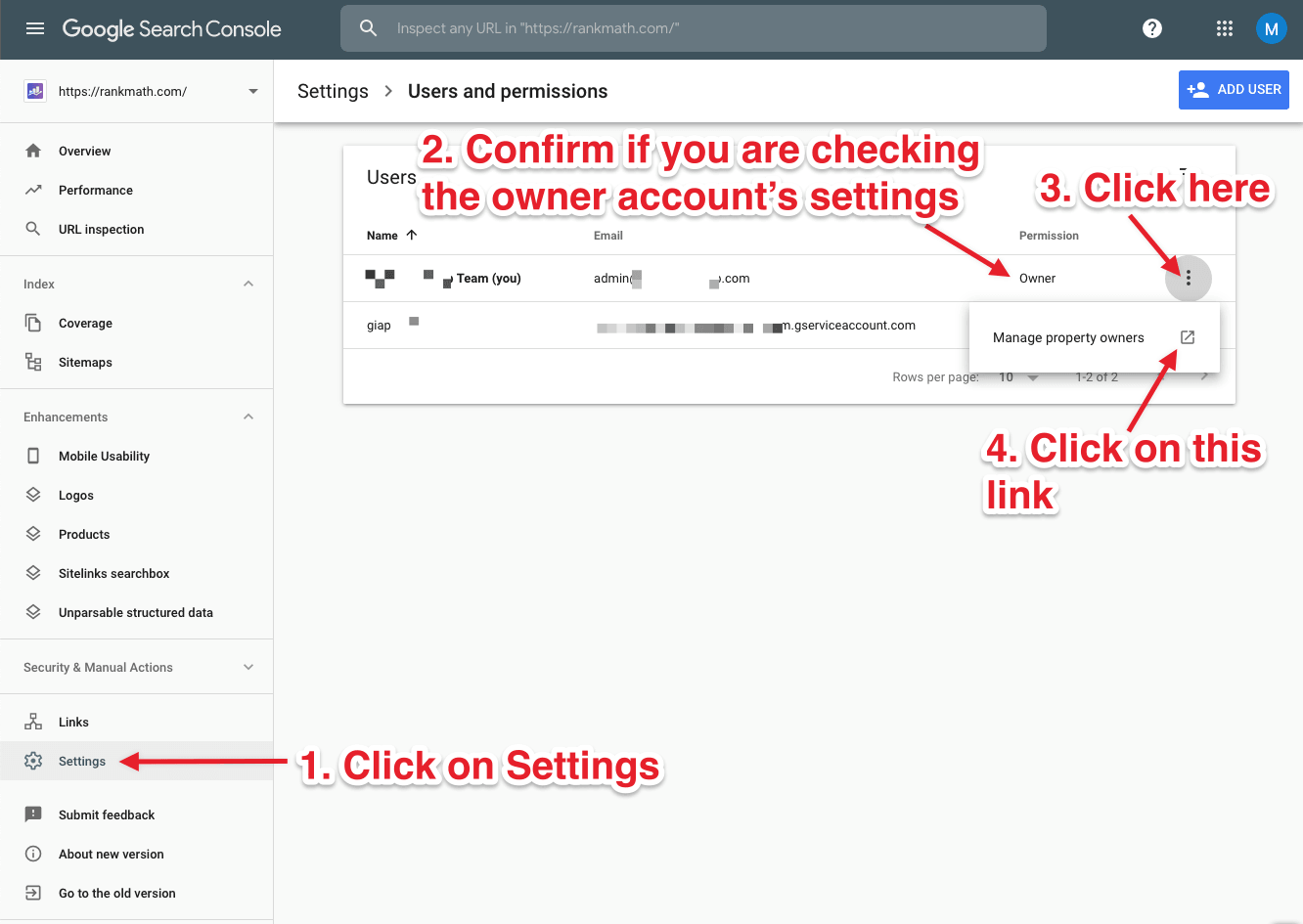
    Could you please follow these steps to fix this:
    Screenshot
    On the next page, add the service account as an owner with the button:
    Screenshot
    Then, head back to the Search Console and refresh to confirm that the service account has been added correctly.

    Looking forward to helping you. Thank you.

    ok, Ankit.
    trying it now. will keep you posted pls

    Ankit
    Rank Math business

    Hello,

    Thank you for your reply.

    Sure, Do let us know how that goes so that we can help you further if needed.

    Thank you.

    hello again and thank you very much for your patience. i have followed your steps and all indications are that the website has successfully been verified now.
    However, if I try to ‘instant index’ any post, I am still getting error 403

    pls, advise –
    am ok if you can log in to my dashboard and do it –
    where do we start from, to secure your login pls?

    Hello,

    You might have missed some steps mentioned in the tutorial.

    Here is a detailed video on setting up instant indexing:
    https://www.youtube.com/watch?v=tEmcwCc73Mc

    Please follow all the steps and instant indexing should work fine.

    If you have followed all the steps correctly and still getting this error then can you try using the http:// version of your URL instead of https://?

    Or check if you have verified the website on the Google Search Console using https and if not then please do and try again.

    Hope this helps. Let us know if it works or not.

    ok, let me do what your video guides. will update you soon as I complete the guide.
    thanks for the attention and support in advance.

    Ankit
    Rank Math business

    Hello,

    Thank you for your reply.

    Sure, Do let us know how that goes so that we can help you further if needed.

    Looking forward to helping you. Thank you.

    Hello again,

    thank you for the patience and for the video but its rather unfortunate that certain sections of the video are not clear, straight forward and as simple as the instructor was speaking..some of his explanations went faster than the clicks and I found myself lost and stuck..pls is there another way this error can be fixed?
    THe video is not helping me

    Anas
    Rank Math business

    Hello,

    The process in the video tutorial has slightly changed since the video was recorded – please refer to this up-to-date written tutorial:
    https://rankmath.com/blog/google-indexing-api/

    I hope this helps. Looking forward to helping you.

    ok buddy, let me try that and revert pls

    thanks

    Hello,

    Did you have a chance of following the written tutorial? Did that help complete the process successfully?

    Looking forward to hearing back from you.

    hello sir, i have tried to copy and paste but nothing is loading ..sorry to bother you but it is not working for me. pls is there a way I can send you my google email address and password including the password for my WordPress account so that you do the set-up for me please, please

    yes i have followed the tutorials but uploading the JSON file is refusing to upload into the plugin no matter how many times I have tried.

    pls is there a way I can send you my google email address and password including the password for my WordPress account so that you do the set-up for me please

    Hello,

    Sure, you can add those credentials in the sensitive data section
    Sensitive Data Section

    It is completely secure, and only our support staff has access to that section.

    Please also disable 2 Factor Authentication (if any) to log in successfully to your accounts.

    Looking forward to helping you.

    Thank you.

    Hello,

    Since we did not hear back from you for 15 days, we are assuming that you found the solution. We are closing this support ticket.

    If you still need assistance or any other help, please feel free to open a new support ticket, and we will be more than happy to assist.

    Thank you.

Viewing 14 replies - 1 through 14 (of 14 total)

The ticket ‘error 403’ is closed to new replies.