
-
I purchased content ai starter plan yesterday. It is not active on my wordpress site, armorcoat.pro I hired a designer/seo agent and they installed rankmath on my site. I dont how how to use the content ai now. I havent seen any login areas within the plugin.

-
Hello,
I’m sorry to hear that you are facing issues with activating the Content AI feature on your WordPress site after purchasing the Content AI starter plan. To activate Content AI, you need to follow these steps:
-
Ensure Content AI Subscription is Active: If you are seeing messages like "To access this Content AI feature, you need to have an active subscription plan," it means your subscription might not be active. You can check and activate your subscription by visiting this page.
-
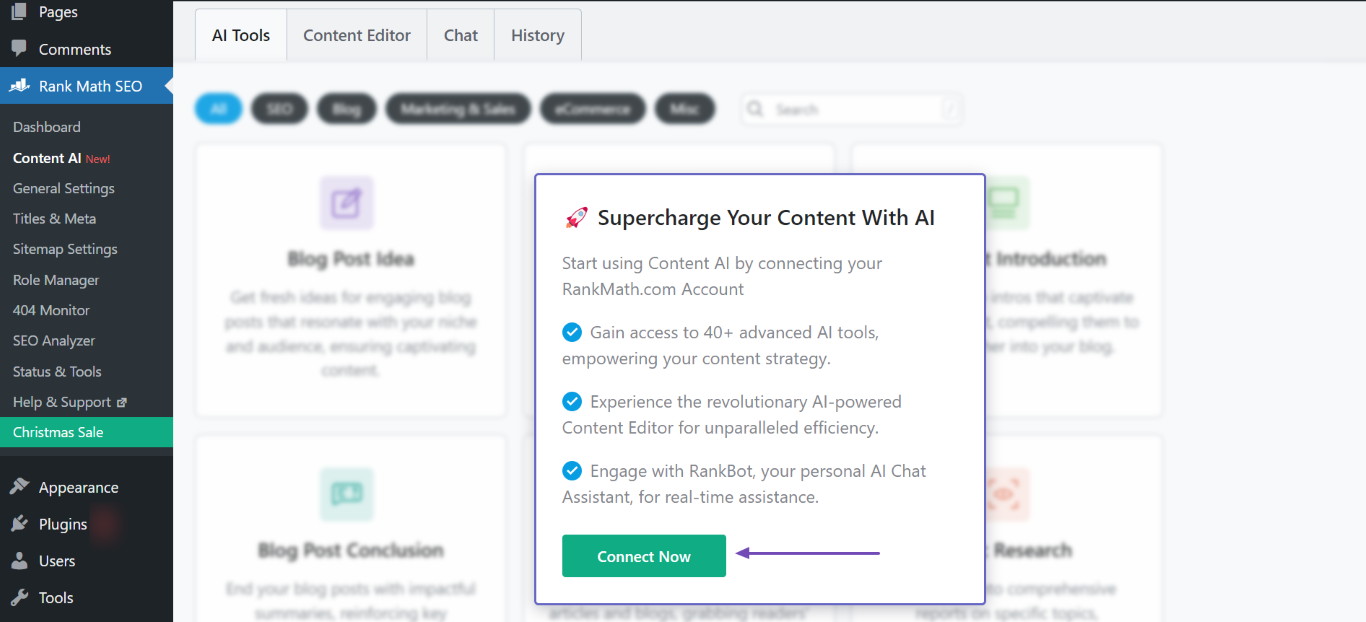
Connect Your Rank Math Account: If you are prompted to connect your Rank Math account, click on the "Connect Now" button as shown in the screenshot below:
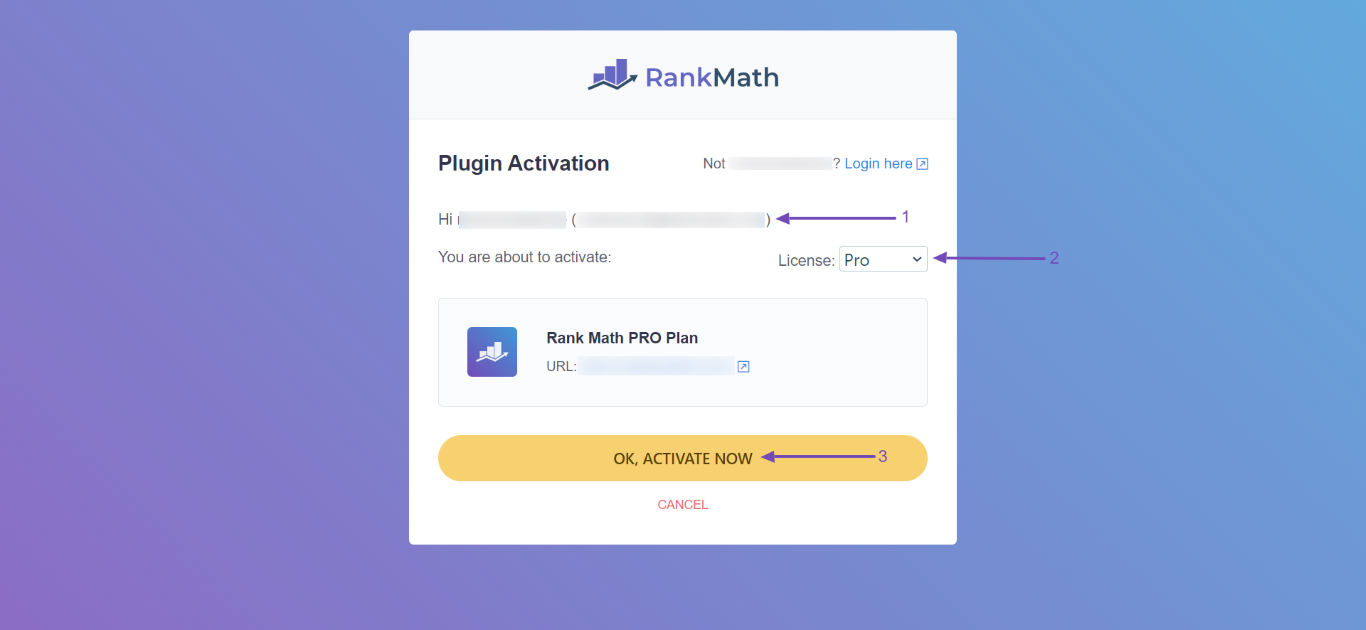
- Activate Rank Math: After connecting your Rank Math account, you may need to activate Rank Math. You will be redirected to the Rank Math activation page where you can select the appropriate license and click on "OK, Activate Now" as shown below:
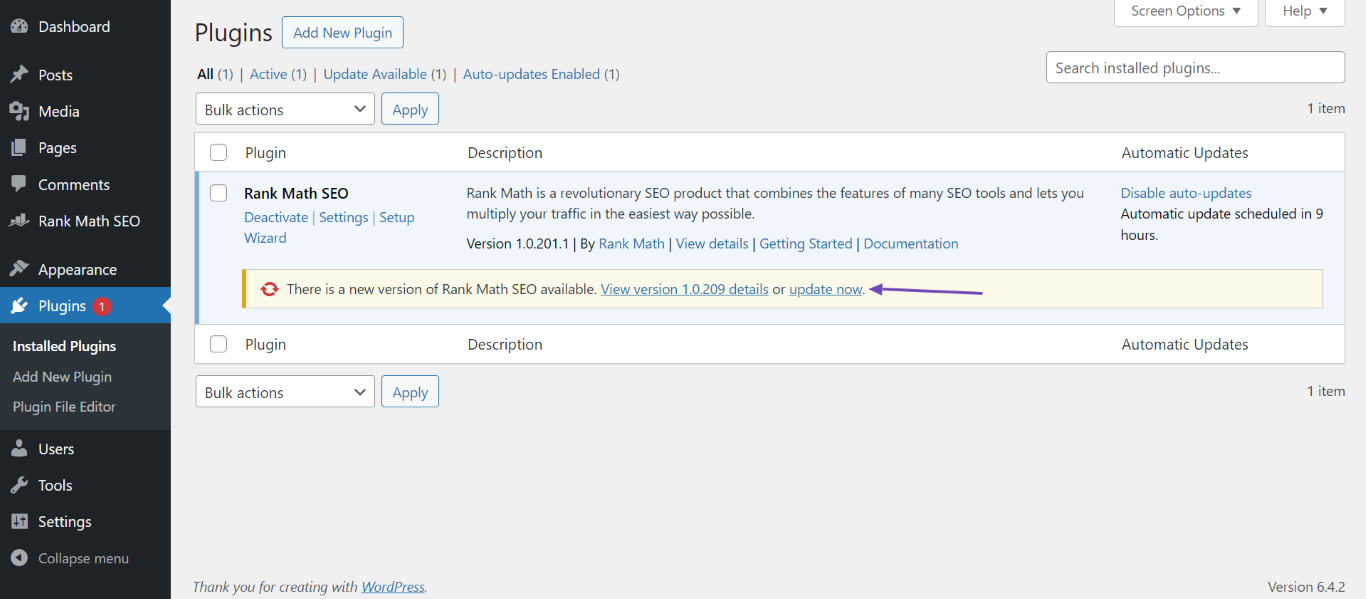
- Update Rank Math Plugin: Ensure that your Rank Math plugin is updated to the latest version. If you see a message asking you to update the plugin, follow these steps:
- Go to your WordPress Dashboard → Plugins.
- Click on "Update Now" as shown in the screenshot below:
By following these steps, you should be able to activate and start using the Content AI feature within Rank Math on your website. If you encounter any further issues or need additional assistance, please feel free to reply here.
Thank you for reaching out and giving us the opportunity to assist you with this matter.
Sources:
Resolving Content AI Related Issues » Rank Math
Content AI – Your Personal AI Assistant by Rank Math
How to Use Rank Math’s Content AI for SEO » Rank MathHello,
Thank you for contacting Rank Math support, and we are sorry for any inconvenience that might have been caused due to that.
Can you please confirm to us if you see the correct number of credits when you log in to your rankmath.com/my-account/websites?

If you’re seeing the correct number of credits here like in the image above, then this is an issue with syncing information between rankmath.com and your website. Disconnecting and then reconnecting your account should mostly resolve this
1 . Please verify that you’re running the latest versions of the Rank Math plugins according to the Rank Math changelog: https://rankmath.com/changelog
2. After that, you may try disconnecting and re-connecting Rank Math to see if that works for you. Please head over to your WordPress Dashboard > Rank Math > Dashboard > Help, and from there disconnect and reconnect your Rank Math account.

Once you’ve disconnected your Rank Math account, you can connect it again in the same settings. To connect your correct account, click on Connect Now.

3. Once done, please try to refresh the credits from WordPress Dashboard > Rank Math > General Settings > Content AI and see if that works for you. Here’s a screenshot for reference:
You should be seeing your correct Content AI credit and you can continue using the Content AI. If not, please let us know and we’ll be happy to investigate it further.
Hope this helps, and please do not hesitate to let us know if you need our assistance with anything else.
Thank you for choosing Rank Math.
Thank you for this info. I am very excited to use RankMath. The person helping me build my site signed in with their pro account, I believe. So to use my content ai subscription I would also need to purchase a pro subscription? If not I would still lose all the awesome stuff I havent had a chance to use with the RankMath Pro.
Would it be possible to get a refund to apply towards getting my own pro subscription of rank math?
NEVERMIND. I have logged out and logged back in. I am using the same email and password I used to make the purchase. My account shows 0/7500 content ai credits. I am using the latest version of rankmath. I refreshed the credits in the general setting and i am still showing zero credits.
Hello,
We are sorry for the troubles you are facing with using the Content AI.
Please share the information about the error that is shown when you refresh the Content AI credits.
Also, share the URL of the website where you are facing this issue.
We look forward to hearing from you.
Thank you.
Hello,
Since we did not hear back from you for 15 days, we are assuming that you found the solution. We are closing this support ticket.
If you still need assistance or any other help, please feel free to open a new support ticket, and we will be more than happy to assist.
Thank you.
-


The ticket ‘Content AI not activating’ is closed to new replies.