
-
I signed up for content ai, but it is not active on my account

-
Hello,
We apologize for the issue you are facing with activating Content AI. It seems that there could be a couple of reasons for this:
-
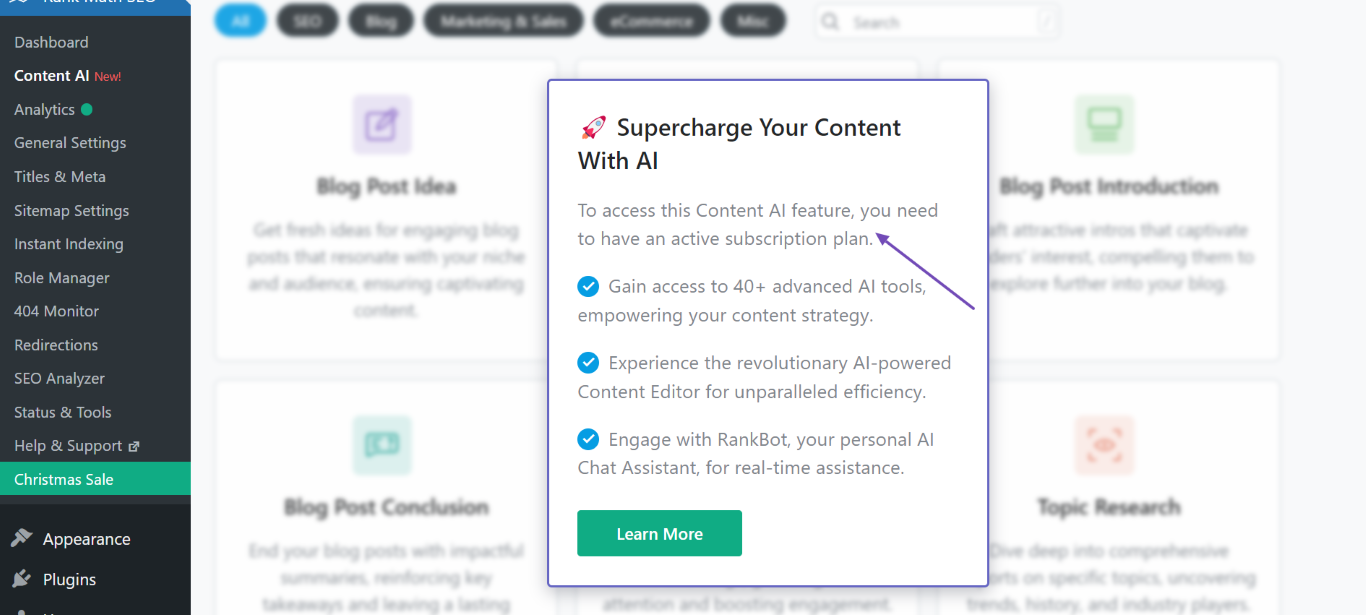
Content AI Subscription is Not Active: If you see a message stating, "To access this Content AI feature, you need to have an active subscription plan," it indicates that your subscription may not be active. You can check and select a Content AI plan here.
-
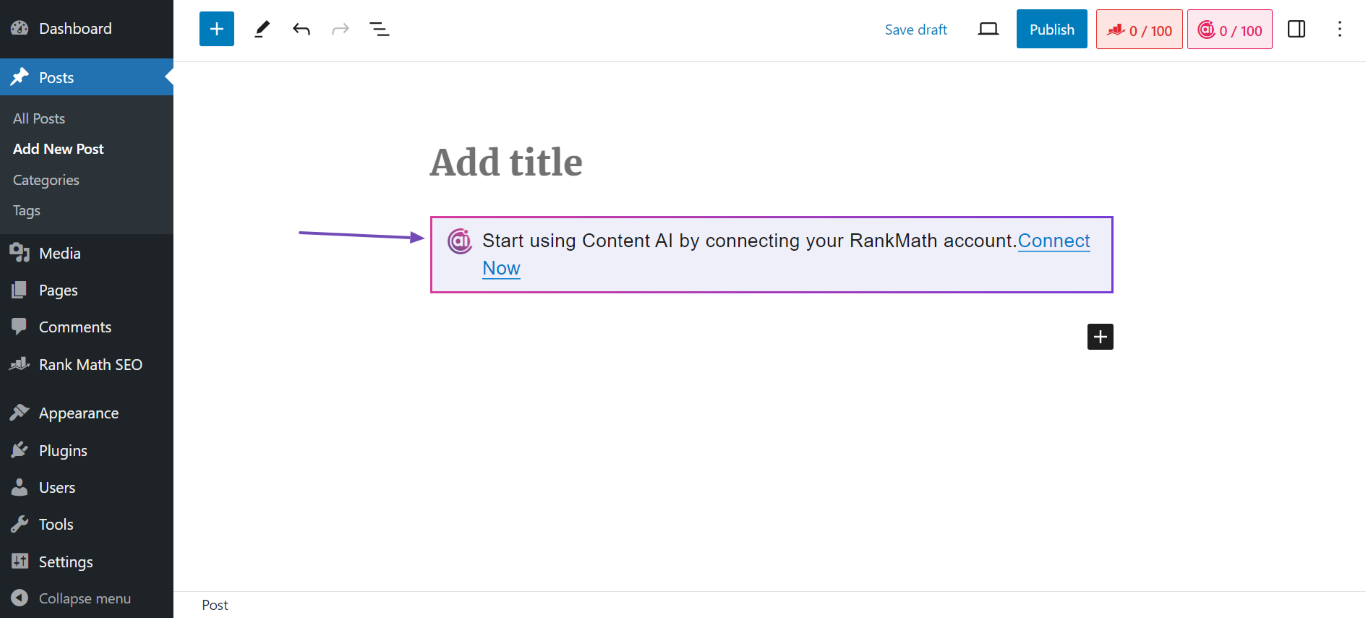
Website is Not Connected to Rank Math: If you encounter a message saying, "Start using Content AI by connecting your RankMath.com Account," it means your website is not connected to your Rank Math account. To connect, click the Connect Now button in your WordPress dashboard under Rank Math settings.
If you’ve checked both of these and are still having issues, please reply to this ticket, and a human agent from the Rank Math Support team will assist you further. Thank you for raising this concern!
Sources:
Resolving Content AI Related Issues » Rank Math
How to Connect/Disconnect Your Website From Content AIi do have a subscription and it says connected
Hello,
We’ve checked your account, and the Content AI credits are already applied.
Please ensure that your Rank Math plugin is already updated to the latest version:
https://rankmath.com/changelog/freeIf the issue persists, please follow these steps:
1 . Please clear the transients at Rank Math > Status & Tools > Database Tools > Remove transients
2 . After that, you may try disconnecting and re-connecting Rank Math to see if that works for you.
You can disconnect your account by navigating to WordPress Dashboard > Rank Math > Dashboard > Help and then simply disconnect the account by clicking on Disconnect Account.

3 . Once you’ve disconnected your Rank Math account, you can connect it again in the same settings. To connect your correct account, click on Connect Now.

4 . Once you click on Connect Now, please ensure that you’ve selected the correct account and then click on OK, Activate Now.

5 . Once all the above steps are done you might need to refresh the credits again this time to start using Content AI.
Please head over to WordPress Dashboard → Rank Math → General Settings → Content AI and refresh the credits. Here’s a screenshot for reference:
Let us know how this goes.
it says 0 credits left for this month
### rank-math ### version: 1.0.224 database_version: 1 plugin_plan: Free 0: undefined 1: undefined 2: undefined active_modules: link-counter, analytics, seo-analysis, sitemap, rich-snippet, instant-indexing, amp, content-ai refresh_token: Token exists permissions: Search Console: Given rank_math_404_logs: Not found rank_math_redirections: Not found rank_math_redirections_cache: Not found rank_math_internal_links: 32 KB rank_math_internal_meta: 16 KB rank_math_analytics_gsc: Not found rank_math_analytics_objects: Not found rank_math_analytics_inspections: Not found ### wp-core ### version: 6.6.1 site_language: en_US user_language: en_US timezone: +00:00 permalink: /%postname%/ https_status: true multisite: false user_registration: 0 blog_public: 1 default_comment_status: open environment_type: production user_count: 1 dotorg_communication: true ### wp-dropins (1) ### advanced-cache.php: true ### wp-active-theme ### name: Kadence (kadence) version: 1.2.7 author: Kadence WP author_website: https://www.kadencewp.com/ parent_theme: none theme_features: core-block-patterns, widgets-block-editor, automatic-feed-links, title-tag, html5, custom-units, custom-line-height, customize-selective-refresh-widgets, responsive-embeds, post-thumbnails, editor-styles, align-wide, custom-spacing, block-templates, editor-style, amp, menus, custom-logo, editor-color-palette, widgets theme_path: /home/gscottsc/public_html/wp-content/themes/kadence auto_update: Disabled ### wp-plugins-active (4) ### Kadence AI Starter Templates: version: 2.1.3, author: Kadence WP, Auto-updates enabled Kadence Blocks – Gutenberg Blocks for Page Builder Features: version: 3.2.49, author: Kadence WP, Auto-updates enabled Rank Math SEO: version: 1.0.224, author: Rank Math, Auto-updates enabled W3 Total Cache: version: 2.7.4, author: BoldGrid, Auto-updates enabled ### wp-server ### server_architecture: Linux 4.18.0-372.9.1.el8.x86_64 x86_64 httpd_software: LiteSpeed php_version: 8.0.30 64bit php_sapi: litespeed max_input_variables: 10000 time_limit: 120 memory_limit: 384M max_input_time: 60 upload_max_filesize: 128M php_post_max_size: 128M curl_version: 7.61.1 OpenSSL/1.1.1k suhosin: false imagick_availability: false pretty_permalinks: true htaccess_extra_rules: true current: 2024-07-25T16:02:16+00:00 utc-time: Thursday, 25-Jul-24 16:02:16 UTC server-time: 2024-07-25T16:02:16+00:00 ### wp-database ### extension: mysqli server_version: 10.5.24-MariaDB client_version: mysqlnd 8.0.30 max_allowed_packet: 134217728 max_connections: 450 ### wp-constants ### WP_HOME: undefined WP_SITEURL: undefined WP_CONTENT_DIR: /home/gscottsc/public_html/wp-content WP_PLUGIN_DIR: /home/gscottsc/public_html/wp-content/plugins WP_MEMORY_LIMIT: 40M WP_MAX_MEMORY_LIMIT: 384M WP_DEBUG: false WP_DEBUG_DISPLAY: true WP_DEBUG_LOG: false SCRIPT_DEBUG: false WP_CACHE: true CONCATENATE_SCRIPTS: undefined COMPRESS_SCRIPTS: undefined COMPRESS_CSS: undefined WP_ENVIRONMENT_TYPE: Undefined WP_DEVELOPMENT_MODE: undefined DB_CHARSET: utf8 DB_COLLATE: undefined ### wp-filesystem ### wordpress: writable wp-content: writable uploads: writable plugins: writable themes: writable fonts: not writableHello,
To investigate this issue further, we might need to take a closer look at your website and settings. Please follow these steps:
- Edit the first post on this ticket and include your WordPress and FTP logins in the Sensitive Data section. This is a secure section that only our support staff can access.
- Make sure you take a complete backup of your website before sharing the information with us.
- If you prefer, you can use this plugin to generate a temporary login URL to your website and share that with us instead: https://wordpress.org/plugins/temporary-login-without-password/
- You can also use this plugin to monitor what changes our staff might make on your website (if any): https://wordpress.org/plugins/wp-security-audit-log/
We appreciate your cooperation and patience.
Thank you for choosing Rank Math.
Hello,
I have updated the sensitive data as requested. Can you please check further?
Thank you.
please log in to my account or remote in
you can call me 785.608.7664did you fix it?
Hello,
We have replied to your other ticket about the same issue. We are closing this one in favor of that.
Looking forward to helping you.
Hello,
Since we did not hear back from you for 15 days, we are assuming that you found the solution. We are closing this support ticket.
If you still need assistance or any other help, please feel free to open a new support ticket, and we will be more than happy to assist.
Thank you.
-



The ticket ‘can’t activate content ai’ is closed to new replies.