
-
This is a great plugin, but I have a problem after modifying the plugin, pagespeed insights shows avoid multiple page redirects, I don’t know how to fix it, can you help me? https://artisticpeak.com/

-
Hello,
I’m sorry to hear about the issue you are facing with multiple page redirects after modifying the Rank Math plugin. To address the "Avoid multiple page redirects" warning in PageSpeed Insights, you may need to review the redirections set up in Rank Math.
To fix this issue, you should check the redirections configured in Rank Math and ensure that there are no unnecessary or excessive redirects that could be causing the problem. You can access the redirection settings in Rank Math by following these steps:
- Log in to your WordPress dashboard.
- Navigate to Rank Math > Redirections.
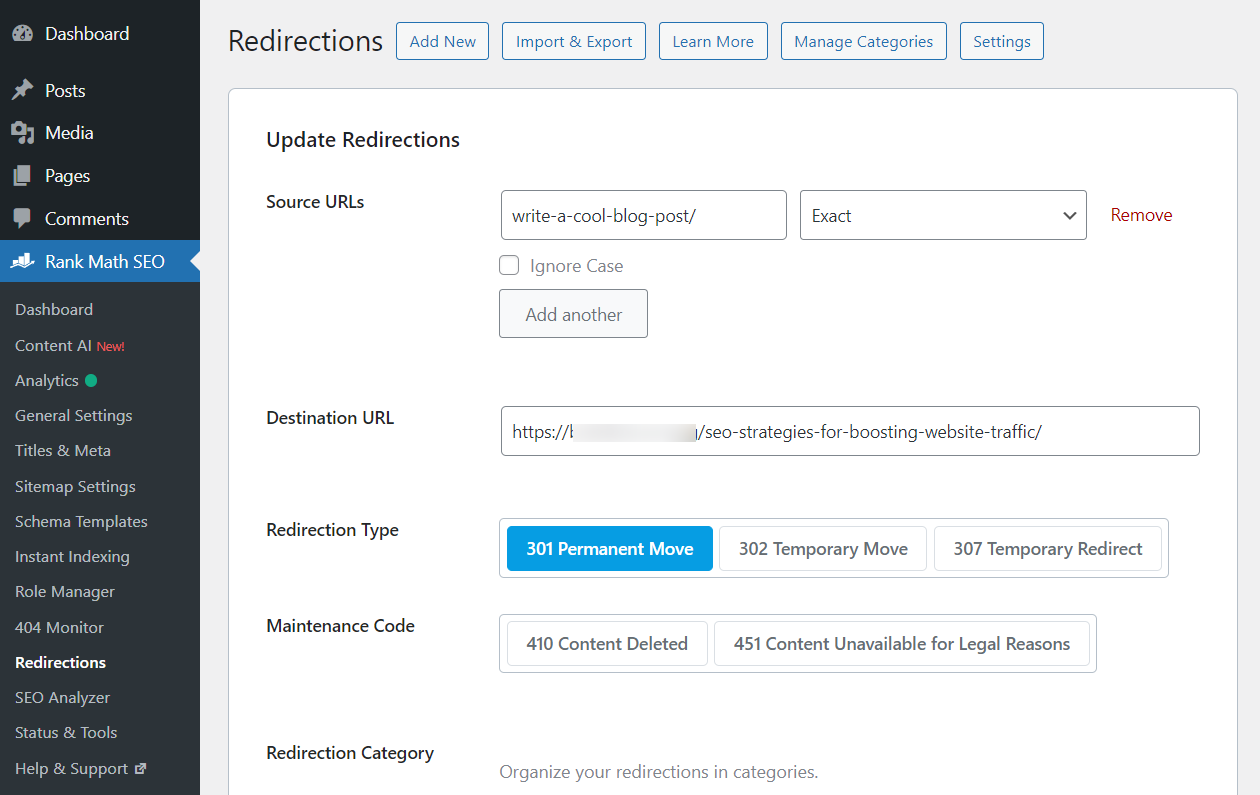
- Review the existing redirection rules and make sure there are no redundant or conflicting redirects that could lead to multiple redirects for a single URL.
If you find any unnecessary redirects, you can delete them to streamline the redirection process and potentially resolve the "Avoid multiple page redirects" warning.
If you need further assistance or encounter any difficulties while checking and adjusting the redirections, please feel free to reach out by replying to this ticket. Our support team will be happy to assist you further.
Thank you for bringing this concern to our attention. We appreciate your feedback and are here to help you resolve this issue.
Best regards.
Sources:
Solving Redirection Issues Using Rank Math SEO Plugin » Rank Math
Random URLs Redirecting Even When No Redirect Was Created » Rank Math
How to Trace Your Website’s URL Redirects » Rank MathMy panel is different from yours.
Hello,
Thank you for your query and we are so sorry about the trouble this must have caused.
We don’t see any multiple redirections from the URL you mentioned.
If the issue is happening on a specific URL, can you please share that URL here so we can check?
Looking forward to helping you.
Hello,
We checked these URLs too and we can see they are also returning a 200 status code without any redirections:
If you’re still facing the issue, please try to clear your website cache including any server-level cache and check again.
Let us know how it goes. Looking forward to helping you.
Thank you.
My server support told me First of all regarding the Object cache, I can see that errors related to Rank Meth plugins are appearing and due to that table do not exist you are seeing those misses in object cache plugin, here you may please check this error.
The error message indicates that WordPress is encountering a problem related to the Rank Math SEO plugin, specifically with the database table wp_rank_math_analytics_objects. The error suggests that this table does not exist in your database, which is causing issues when Rank Math tries to perform operations on it.
Do you know how to fix this?
Hello,
There are likely some missing database tables.
For your initial troubleshooting, please head over to your WordPress Dashboard > Rank Math > Status & Tools > Database tools and click on the button “Re-create Tables”.

You may also refer to this guide as well: https://rankmath.com/kb/recreate-missing-database-tables/
Then check under Rank Math SEO > Status & Tools > System Status > Rank Math and confirm that you see the Rank Math Analytics tables have been created as shown in the image below:

If it has not been created, you can use the following SQL queries to create the table manually:
Analytics Objects: https://pastebin.com/HaL1hgkh
If you can’t do this yourself, please share the link with your host so they can create the SQL tables manually for you.
Once done, please disconnect and reconnect Rank Math Analytics to Google and grant all permissions.
Let us know how that goes.
Thank you.
how to add rank math table of contents on elementor?
Hello,
Please note that the Rank Math Table of Content block is currently only compatible with the WordPress block editor. If you are using the classic editor or page builders like Elementor, you will need to use a third-party Table of Content plugin. You can find the full list of Table of Content plugins supported by Rank Math here.
Feel free to reach out if you need further assistance.
Hello,
Since we did not hear back from you for 15 days, we are assuming that you found the solution. We are closing this support ticket.
If you still need assistance or any other help, please feel free to open a new support ticket, and we will be more than happy to assist.
Thank you.



The ticket ‘Avoid multiple page redirects’ is closed to new replies.