
-
Hi
The author name that is shown below the article title is linking to homepage only and not to author page.

-
Hello,
I’m sorry to hear that you are facing an issue with the author link not working correctly on your website.
To resolve this problem, you can check and ensure that the Author Schema Entity is correctly set up in Rank Math. The Author Schema Entity helps search engines connect the author with high-quality authority signals and ensures that the author link directs to the correct page.
You can customize the Author Schema Entity in Rank Math by navigating to WordPress Dashboard → Rank Math SEO → Titles & Meta → Local SEO. Here, you can control the data displayed inside the Author Schema entity, including the organization the author works for.
If after checking and adjusting the Author Schema Entity settings, the issue persists, please feel free to reply to this ticket. A human agent from the Rank Math Support team will assist you further.
Thank you for bringing this concern to our attention.
Closing spiel.
Sources:
How Does the Author Schema Entity Work? » Rank Math
Open Graph/Social Preview Image Is Not Displayed » Rank Math
Rank Math’s Advanced Mode – Available Module, Options & MoreHello,
Could you please share the affected URL so we can check as well?
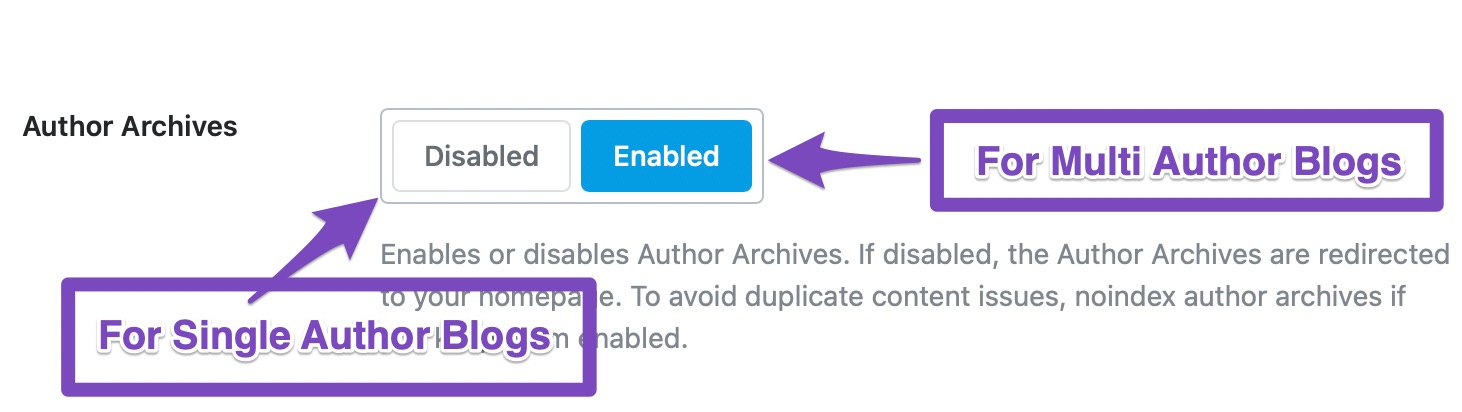
Meanwhile, ensure that the Author archives option is enabled on your WordPress dashboard > Rank Math > Titles & Meta > Author
Looking forward to helping you.
Hello,
I have updated the sensitive data as requested. Added some reference links.
The issue is in every article I publish.
And yes, the author option is enabled:)
Thank you.
Hello,
We checked the Author’s information at the bottom of the page and links to the author’s page.
Assuming you are using the latest version of all the plugins and the themes (please update if not yet), it would seem like a conflict with one of the plugins or the theme you are using.
To determine that, please follow this troubleshooting guide:
https://rankmath.com/kb/check-plugin-conflicts/Here is a video you can follow as well:
Only the site admin would know and your users won’t be affected by this troubleshooting.
If the issue persists, then we might need to take a closer look to the settings. Please edit the first post on this ticket and include your WordPress & FTP logins in the designated Sensitive Data section.
Please do take a complete backup of your website before sharing the information with us.
It is completely secure and only our support staff has access to that section. If you want, you can use the below plugin to generate a temporary login URL to your website and share that with us instead:
https://wordpress.org/plugins/temporary-login-without-password/
You can use the above plugin in conjunction with the WP Security Audit Log to monitor what changes our staff might make on your website (if any):
https://wordpress.org/plugins/wp-security-audit-log/
Please do take a complete backup of your website before sharing the information with us.
Looking forward to helping you.
Thank you.
Hi
The issue I am having is with the author link which is visible under the post title “by niharika verma”. Would you be able to confirm if the author link is working there as well? 🙂
Hello,
Yes, we can confirm the Author’s link below the title goes to the homepage.
However, we discovered that the author’s link in the Author box at the bottom of the page works fine and goes to the Author’s page.
There is a discrepancy here and the Author’s link below the title is possibly being added by the theme or a plugin you are currently using.
Please follow the guide we shared earlier to discover the conflicting theme or plugin.
We look forward to hearing from you.
Thank you.
Noted. I will see if it helps and if not, I will update it here soon. Thank you.
Hi
The issue is resolved. I removed the website link from the “website” tab under users and now it leads to the author page only.
Hello,
We are super happy that this resolved your issue. If you have any other questions in the future, know that we are here to help you.
If you don’t mind me asking, could you please leave us a review (if you haven’t already) on https://wordpress.org/support/plugin/seo-by-rank-math/reviews/#new-post about your overall experience with Rank Math? We appreciate your time and patience.
If you do have another question in the future, please feel free to create a new forum topic, and it will be our pleasure to assist you again.
Thank you.



The ticket ‘Author link not working’ is closed to new replies.