
-
Settings
—————
https://ibb.co/s93nNnY
https://ibb.co/qWg3zDYSitemap
—————-
https://findmyfarmhouse.com/sitemap_index.xml

-
Hello,
I’m sorry to hear about the issue you’re facing with the author not being visible in the sitemap despite having all settings correct. From the screenshots you provided, it seems that the author settings are configured correctly.
Since the author is not appearing in the sitemap, let’s ensure that the author pages are not excluded from the sitemap settings.
-
Please navigate to your Rank Math settings and check the Authors sitemap settings to ensure that authors are not excluded based on user IDs or user roles.
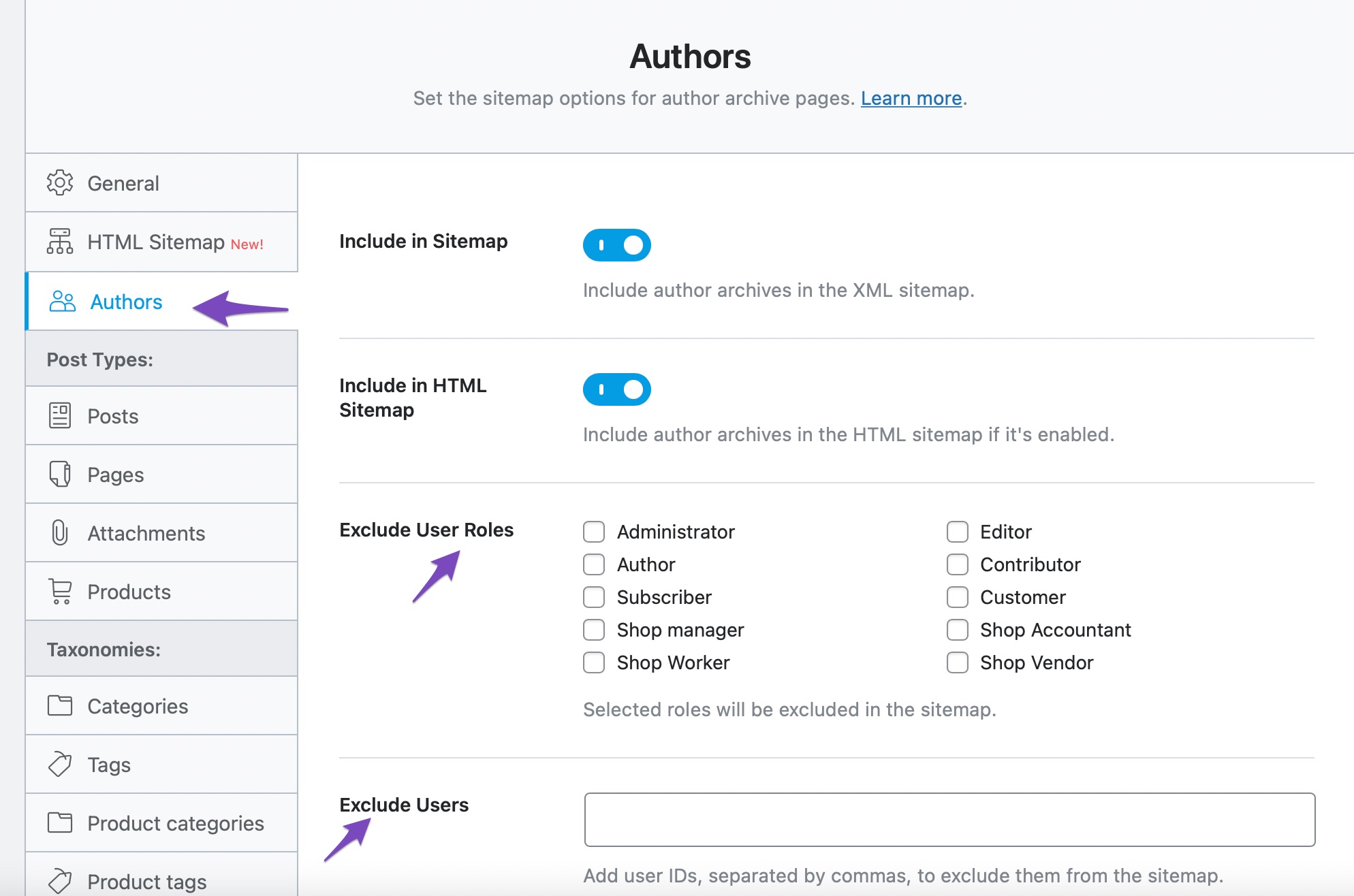
-
If the issue persists, you can also verify if the author page is set to noindex. To check this, go to the Advanced tab of the author page and ensure that the Robots Meta tag is set to Index.
If after checking these settings, the issue still persists, please feel free to reply here, and a human agent from our support team will assist you further.
Thank you for your understanding and patience.
Sources:
Why Isn’t My URL Included in the Sitemap? » Rank Math
Rank Math Sitemap Issues and Their Fixes » Rank Math
Troubleshooting the “Couldn’t Fetch” Error in Google Search Console » Rank MathHello,
Thank you for contacting us and sorry for any inconvenience that might have been caused due to that.
We tried to check your sitemap but it is showing ERR_HTTP2_PROTOCOL_ERROR:
Please get in touch with your hosting provider to fix this issue first so that we can check the sitemap further for you.
Looking forward to helping you.
Thank you.
Works fine !
Hello,
We can see your author sitemap can be accessed from https://findmyfarmhouse.com/author-sitemap.xml but it is not showing on the main
/sitemap_index.xml:In this case, please try to follow the steps below and see if that works for you:
1. Flush the Sitemap cache by following this video screencast:
https://i.rankmath.com/pipRDp2. Exclude the Sitemap files of the Rank Math plugin in your caching plugin. The cache could be via a plugin or from the server. For plugins or Cloudflare, please follow this article:
https://rankmath.com/kb/exclude-sitemaps-from-caching/3. If the above steps don’t seem to work, kindly apply the following filter to your site.
add_filter( 'rank_math/sitemap/enable_caching', '__return_false');Here’s how you can add filter/hook to your WordPress site:
https://rankmath.com/kb/wordpress-hooks-actions-filters/Let us know how it goes. Looking forward to helping you.
Thank you.
I have put code and above instruction but still not visible to main sitemap.xml
Hello,
This was a bug in the previous version of our plugin where the author sitemap was not being included in the main sitemap when you excluded user roles from the author sitemap. Please update the plugin to the latest version on your site to fix the issue: https://rankmath.com/changelog/
Let us know how that goes. Looking forward to helping you.
Hello,
The 1.0.221 version is still in beta and it is currently not available in the WP repository.
The current stable version is 1.0.220 so if you wish to use the beta to fix the issue, you may follow this guide: https://rankmath.com/kb/version-control/#beta-updates
If you don’t prefer the beta version, you can wait for the stable release.
Looking forward to helping you.
I have updated the plugin but still same issue . 🙁
https://findmyfarmhouse.com/sitemap_index.xml
Please fix this bug ASAP !
Hello,
In this case, we might need to take a closer look at the settings. Please edit the first post on this ticket and include your WordPress & FTP logins in the designated Sensitive Data section.
Please do take a complete backup of your website before sharing the information with us.
It is completely secure and only our support staff has access to that section. If you want, you can use the below plugin to generate a temporary login URL to your website and share that with us instead:
https://wordpress.org/plugins/temporary-login-without-password/
You can use the above plugin in conjunction with the WP Security Audit Log to monitor what changes our staff might make on your website (if any):
https://wordpress.org/plugins/wp-security-audit-log/
We really look forward to helping you.
Hello,
I have updated the sensitive data as requested. Can you please check further?
Thank you.
Any update ?
Hello,
Apologies for the delay as this ticket seems to have been stuck in our drafts section for some reason.
Could you please share the FTP details in the sensitive data section so we can investigate it further?
Meanwhile, you may also try fixing this by adding this code:
$exclude_roles = is_array($exclude_roles) ? array_values($exclude_roles) : $exclude_roles;at this Rank Math file after line 274:
wp-content/plugins/seo-by-rank-math/includes/modules/sitemap/providers/class-author.phpPlease do take a complete backup of your website before updating the file
If you’re not confident with the process, we may continue fixing it by access your website files via FTP.
Let us know how this goes.
Hello
After Debugging the plugin i notice the bug here to fix the author is not adding to sitemap !here : (
function get_index_users())
\wp-content\plugins\seo-by-rank-math\includes\modules\sitemap\providers\class-author.php( 285 ) umt.meta_key =’wp_capabilities’
( 299 ) u.ID = umt.user_id AND umt.meta_key = ‘wp_capabilities’But see wp_ is the default prefix ..
but for mine website i have setup different prefix farm_
https://ibb.co/5krjLmkso in this case meta key become farm_capabilities
https://ibb.co/5Ycs76JSo on next update kindly plz use the dynamic Prefix while using query…
After this change seems working things are Good
Have a grate day !
thank you !function get_index_users()
wp-content/plugins/seo-by-rank-math/includes/modules/sitemap/providers/class-author.phpKindly please use dynamic prefix won sql
i don’t have meta key wp_capabilitiesbut i have diffrent prefix so now i have meta_key = farm_capabilities
so due to this mismatch i never got any user so sitemap dosen’t include any user 🙁
i hope you can fix it by next update !
Thank you !Hello,
That code is not looking at the database table with that prefix. That code is looking at the option called
wp_capabilitieswhich is always called that in WordPress.If you look inside your options folder you’ll see this option there.
Don’t hesitate to get in touch if you have any other questions.
-



The ticket ‘Author is not visible to sitemap even all settings are Correct !’ is closed to new replies.