Hello,
We apologize for the issue you are facing with the thumbnail image not showing when sharing your post on WhatsApp. This can be frustrating, and we appreciate you bringing this to our attention.
There are a few reasons why the Open Graph/Social Preview Image might not be appearing:
-
Check if the Image is Set: Ensure that you have added a Facebook/Twitter sharing image through the Rank Math Meta Box. You can do this by navigating to the post editor and checking the Social tab in Rank Math.
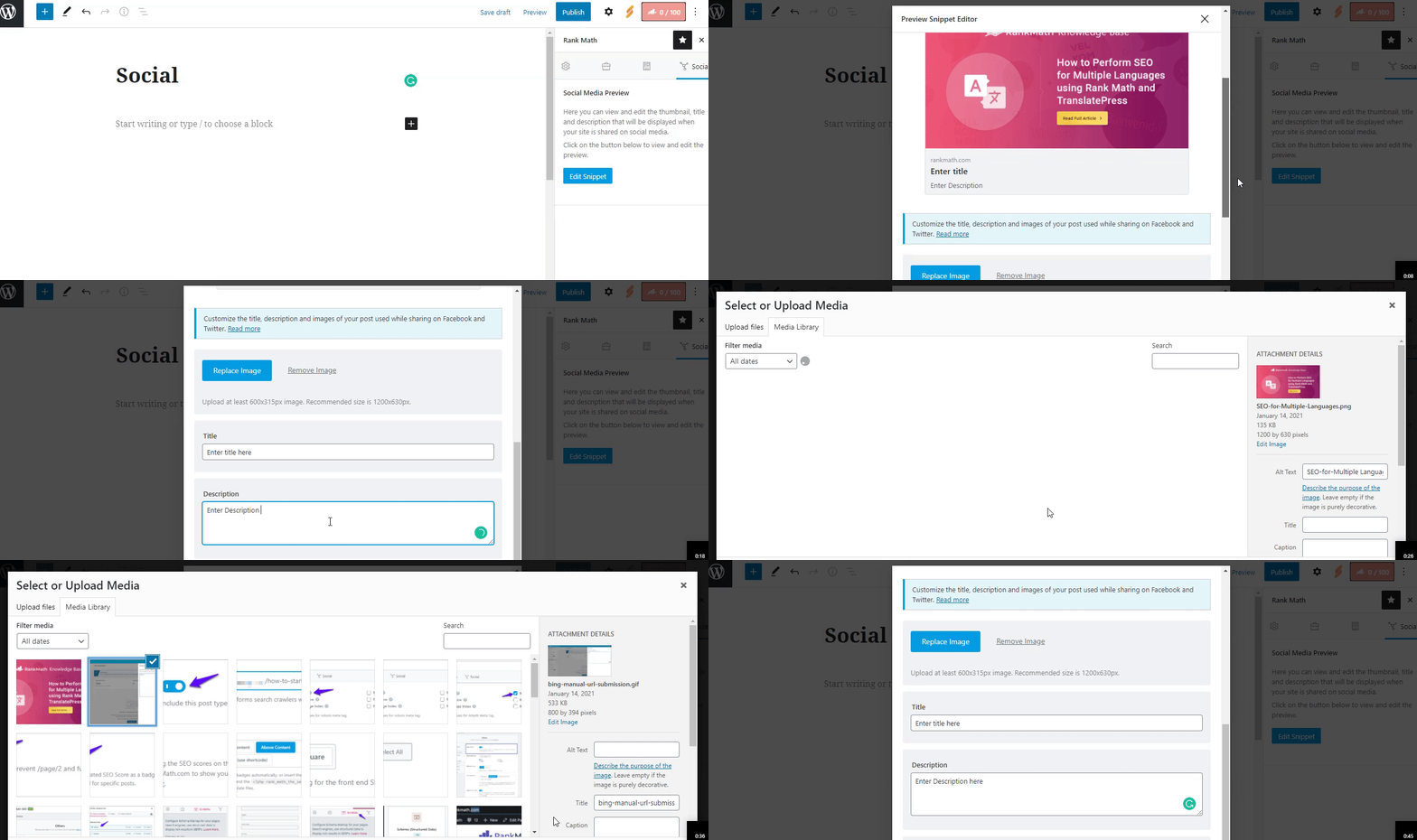
-
Image Dimensions & Format: WhatsApp supports specific image formats (jpeg, png, gif) and dimensions. The recommended size is 1200px X 630px. If your image does not meet these criteria, it may not display correctly. You can refer to the Facebook documentation for more details on supported formats.
-
Caching Issues: Sometimes, caching can cause issues with how images are displayed. You might want to clear your website’s cache and try sharing again.
-
Testing with Debugger Tools: You can use Facebook’s Sharing Debugger tool to see how your post is being interpreted by social media platforms. This can help identify any issues with the Open Graph tags. You can access it here.
If you’ve checked all of these and the issue persists, please reply to this ticket, and a human agent from the Rank Math Support team will assist you further.
Thank you for your understanding, and we hope to resolve this issue for you soon!
Sources:
Open Graph/Social Preview Image Is Not Displayed » Rank Math
Hello,
Thank you for contacting us and sorry for any inconvenience that might have been caused due to that.
We checked your page with the Facebook Sharing debugger tool and we can see the OG image is showing there properly.

In this case, please try to clear your website cache including any server-level cache, and check again. Also, please clear your WhatsApp cache by following this guide: https://www.businessinsider.com/guides/tech/clear-whatsapp-cache?international=true&r=US&IR=T
However, it looks like you’re currently using the Rank Math PRO plugin on your website, but the account you have used to open this ticket is the Rank Math free version.
Please search and forward a receipt from FastSpring.com so we can locate your account and verify it.
Let us know how it goes. Looking forward to helping you.
Thank you.
Hello,
Since we did not hear back from you for 15 days, we are assuming that you found the solution. We are closing this support ticket.
If you still need assistance or any other help, please feel free to open a new support ticket, and we will be more than happy to assist.
Thank you.



