Hello,
We apologize for the issue you are facing with your website being hacked and the unwanted redirects. It sounds like you’ve taken some important steps already, but let’s try to address the remaining issues.
-
Check for Other Redirection Plugins: Ensure that there are no other redirection plugins installed that might be causing these redirects. If you find any, please remove them and check if the problem persists.
-
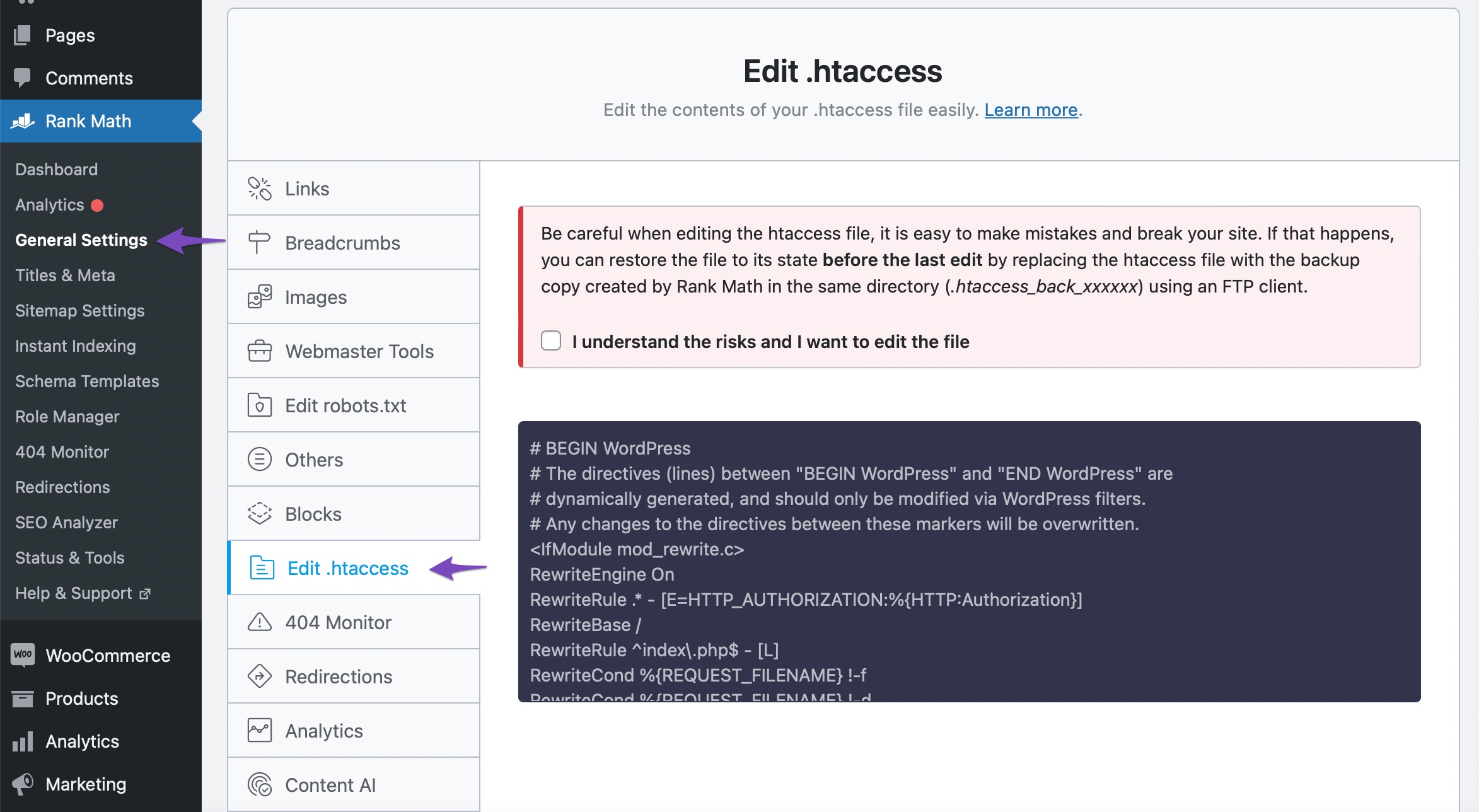
Review .htaccess File: Since you mentioned that the issue occurs only when the Rank Math plugin is active, it’s essential to check your .htaccess file for any unwanted redirection rules. You can do this by navigating to WordPress Dashboard → Rank Math SEO → General Settings → Edit .htaccess. If you see any additional redirection rules, delete them and save the changes. Here’s a visual guide:
-
Check Rank Math Settings: Go through the Rank Math settings to ensure that there are no configurations set up that could be causing these redirects. You can also check the Redirection Manager in Rank Math to see if there are any active redirects that need to be removed.
-
Clear Cache: If you are using any caching plugins, clear the cache after making changes to ensure that old redirects are not being served.
-
Scan for Malware: It might also be beneficial to run a security scan on your website to ensure there are no remaining malicious files or scripts that could be causing these issues.
If after following these steps the problem still persists, please reply to this ticket, and a human agent from the Rank Math Support team will assist you further.
Thank you for raising this concern, and we hope to help you resolve it soon!
Sources:
Random URLs Redirecting Even When No Redirect Was Created » Rank Math
Solving Redirection Issues Using Rank Math SEO Plugin » Rank Math
Clear cache is done.
Scan for malware is done.
No other redirection plugins installed.
I’ve been looking at het htaccess file in rankmath, but don’t know what I should look for or what could be wrong.
Hello,
Thank you for contacting us. We apologize for any inconvenience this issue may have caused.
Concerning the redirection to your homepage, perhaps the Fallback Behavior was configured to Redirect to Homepage at WordPress Dashboard > Rank Math SEO > General Settings > Redirections. You can change it to Default 404.
Please check the URL below and follow the troubleshooting steps to take immediate action concerning the Japanese keyword hack:
https://web.dev/fixing-the-japanese-keyword-hack/
If this is happening very recently and you take action now, you could still stop the results from going to SERPs.
We would recommend starting by performing a security audit of the website and fixing any issues you find.
Looking forward to helping you.
htaccess looks the same as in the image above – I did already remove all the htaccess files and replace the ones needed. They were added everywhere.
Wordpress core files are replaced with new ones.
Every scan says that all is clear now.
Only de redirect remain and the bad links in the sitemap
There are already lots of links in the SERPS, hosting provider did not want to help, so it took me some time to find solutions and solve all the infected problems.
I’ve been adding URL’s in Search Console to remove (for 180 days)
I did follow the instructions in the link you give earlier today.
Concerning the redirection to your homepage, perhaps the Fallback Behavior was configured to Redirect to Homepage at WordPress Dashboard > Rank Math SEO > General Settings > Redirections. You can change it to Default 404.
That was indeed the case – I changed it now to go to 404
I just found this in the support topics – https://i.rankmath.com/pipRDp – and did it as showed.
Hopefully this can resolve the sitemap problem and remove all the bad links from it.
Or should I do something else? They are all (950 or so) in the category sitemap
Woh… all the bad links from the hacker are now showing up in the 404 log from RankMath 🙂 happy to see this
Thank you for the quick help
Hello,
We are super happy that this resolved your issue. If you have any other questions in the future, know that we are here to help you.
If you don’t mind me asking, could you please leave us a review (if you haven’t already) on https://wordpress.org/support/plugin/seo-by-rank-math/reviews/#new-post about your overall experience with Rank Math? We appreciate your time and patience.
If you do have another question in the future, please feel free to create a new forum topic, and it will be our pleasure to assist you again.
Thank you.



