We followed documentation and completed the setting, still we have failed tests

#851272
  • Resolved Jegadeeshwaran
    Rank Math free

    1). Keywords in Title & Description: No common keywords found in the page title and the description.
    We already have the title and description in the page

    2).  Focus Keywords: There are 11 ElementsKit items with no focus keyword set.
    we have added focus keywords to all the post, pages and list but still it is showing

    3). Image Headers: How to fixYour server is not using expires header for your images.
    we followed both the .htaccess and plugins method from you documentation. But still it not fixed

    4). Minify Javascript: How to fixSome Javascript files don’t seem to be minified.
    Converted all the js files to minify, but no luck

Viewing 1 replies (of 1 total)

  • Hello,

    We apologize for the issues you are facing with the tests in Rank Math. Thank you for raising these concerns. Let’s address each of your points:

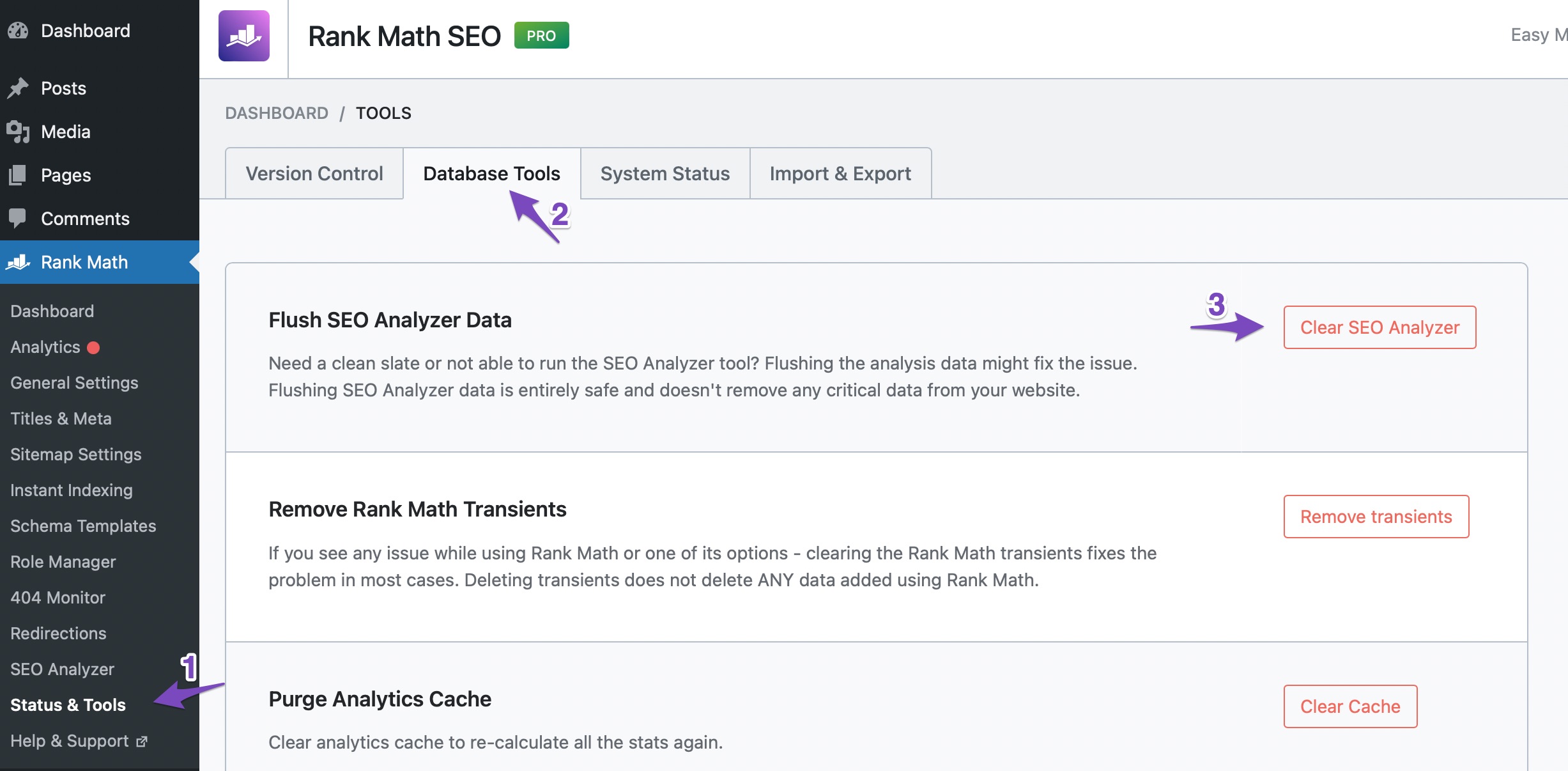
    1. Keywords in Title & Description: If you have already set the title and description but are still seeing the error "No common keywords found in the page title and description," it may be due to cached results. You can try flushing the SEO analysis cache by going to WordPress Dashboard > Rank Math > Status and Tools > Database Tools and clicking on Clear SEO Analysis. After that, run a fresh analysis by going to Rank Math > SEO Analysis and clicking on Start Site-Wide Analysis.

      Flush SEO Analysis data

    2. Focus Keywords: If you have added focus keywords to all posts and pages but still see the message about ElementsKit items, please ensure that the focus keywords are correctly set in the Rank Math metabox for each item. If everything seems correct, it might be worth checking for any plugin conflicts or JavaScript errors that could be affecting the functionality.

    3. Image Headers: If your server is not using expires headers for images despite following the .htaccess and plugin methods, it could be a server configuration issue. We recommend checking with your hosting provider to ensure that the server settings allow for expires headers to be set correctly.

    4. Minify Javascript: If some JavaScript files are not being minified even after conversion, it could be due to caching plugins or server-side caching. Make sure to clear all caches after making changes. Additionally, check if there are any specific settings in your minification plugin that need to be adjusted.

    If you continue to experience these issues after trying the above steps, please reply to this ticket, and a human agent from the Rank Math Support team will assist you further. We’re here to help!

    Sources:
    How to Fix the "No Keywords Found in the Page Title" Test in Rank Math » Rank Math

    This is an automated reply from Rank Math Support Bot. If you need further assistance, please reply to this topic and a human support agent will reply to you shortly.

    Hello,

    Since we did not hear back from you for 15 days, we are assuming that you found the solution. We are closing this support ticket.

    If you still need assistance or any other help, please feel free to open a new support ticket, and we will be more than happy to assist.

    Thank you.

Viewing 1 replies (of 1 total)

The ticket ‘We followed documentation and completed the setting, still we have failed tests’ is closed to new replies.