Hello,
We apologize for the issue you are facing with removing the default schema from your homepage. To remove the Organization Schema from the homepage using Rank Math, you can add the following code snippet to your theme’s rank-math.php file:
add_filter( 'rank_math/json_ld', function( $data, $jsonld ) {
    if ( ! is_front_page() || ! isset( $data['publisher'] ) ) {
        return $data;
    }
    unset( $data['publisher'] );
    unset( $data['place'] );
    return $data;
}, 99, 2);
Steps to Add the Code:
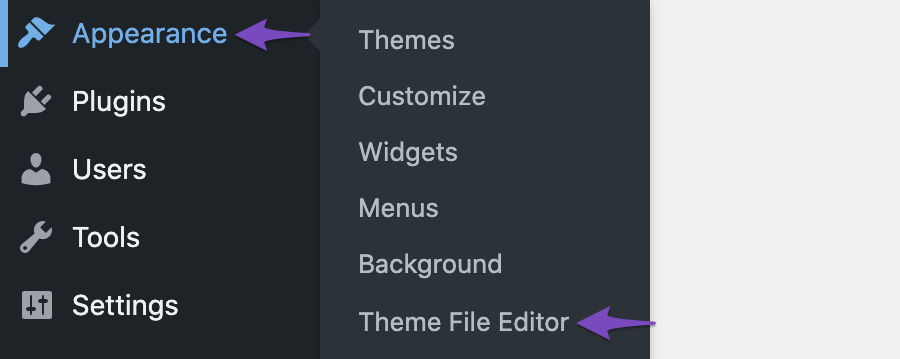
- Navigate to WordPress Dashboard → Appearance → Theme File Editor (for Classic Theme) or WordPress Dashboard → Tools → Theme File Editor (for Block Theme).
- Find the
rank-math.php file that you have created previously.
- Add the above code snippet to this file.
- Click the Update File button to save the changes.
For your reference, here’s a screenshot of how to navigate to the Theme File Editor:
Please ensure that you have a backup of your site before making any changes to the code. If you need further assistance, feel free to reply to this ticket, and a human agent from the Rank Math Support team will assist you further.
Thank you for raising this concern!
Sources:
Remove Organization Schema from Your Website » Rank Math
Hello,
Thank you for contacting us and sorry for any inconvenience that might have been caused due to that.
Can you please confirm if you want to remove all kinds of Rank Math schema from your homepage? If so, you can add the following filter on your website:
add_filter( 'rank_math/json_ld', function( $data, $jsonld ) {
    if ( is_front_page() || is_home() ) {
        return false;
    }
}, 99, 2);
Here’s how you can add filter/hook to your WordPress site: https://rankmath.com/kb/wordpress-hooks-actions-filters/
Hope that helps and please don’t hesitate to let us know if you have any other questions.
Thank you.
Hello,
Since we did not hear back from you for 15 days, we are assuming that you found the solution. We are closing this support ticket.
If you still need assistance or any other help, please feel free to open a new support ticket, and we will be more than happy to assist.
Thank you.



