Hello,
We apologize for the issue you are facing with your video not being recognized as the main content on the page. This problem often arises when Google cannot determine which video is the most relevant to the content of the page.
To resolve this issue, you can follow these steps:
-
Ensure Your Video is Above the Fold: Place your most prominent video above the fold, which means it should be visible without scrolling down. This helps Google understand its relevance to the rest of the content on the page. If you have multiple videos, make sure the most important one is positioned at the top.
-
Resize Your Video: Make sure your video meets Google’s size requirements. If your video is too tall or too small, it may not be indexed properly. You can refer to our guide on fixing these errors:
- Video Too Tall: Reduce the height to 1080px or below.
- Video Too Small: Increase both height and width to at least 140px each, ensuring the width is at least one-third of the webpage’s width.
-
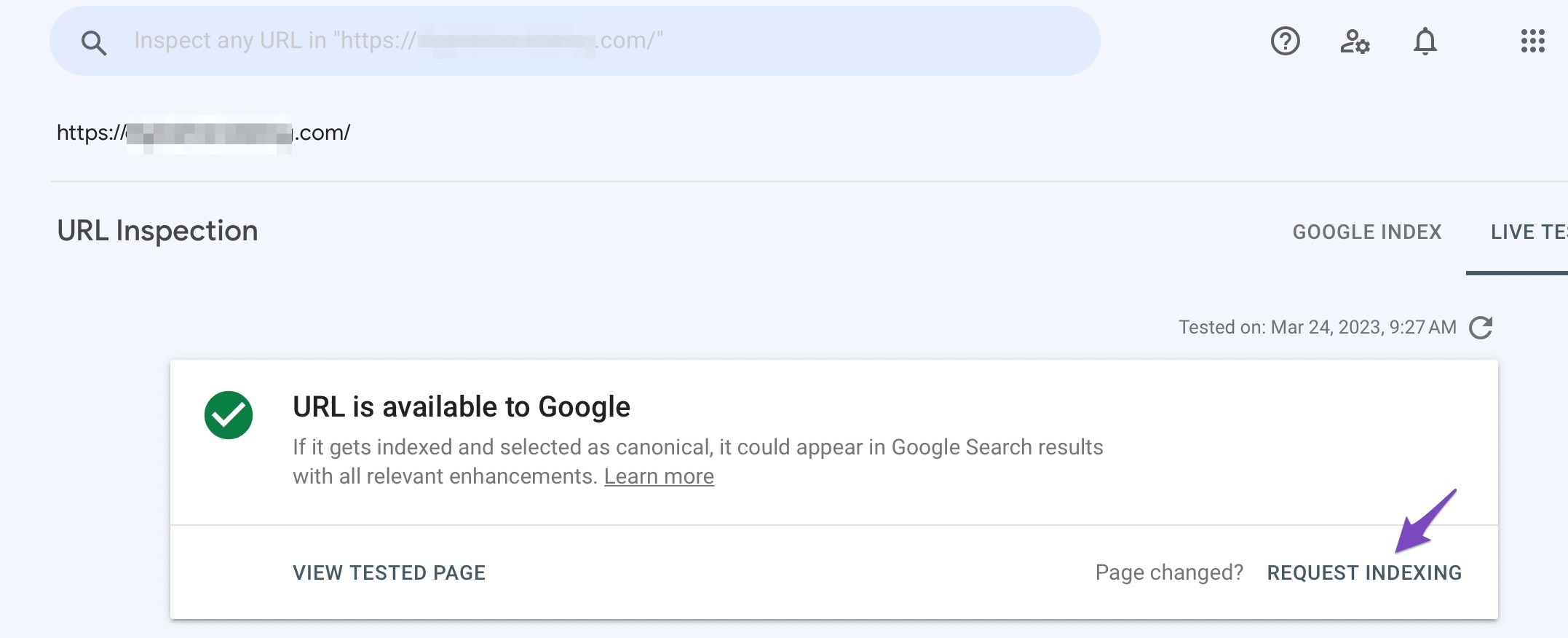
Request Google to Reindex the URL: After making changes, you should request Google to reindex your webpage. You can do this through Google Search Console by using the URL Inspection tool and clicking on REQUEST INDEXING.
By following these steps, you should be able to help Google recognize your video as the main content on your page. If you have further questions or need assistance, please reply to this ticket, and a human agent from our support team will assist you.
Sources:
How to Fix ‘Google Could Not Determine the Prominent Video on the Page’ Error » Rank Math
Thank you very much for the quick response. 🙂
Hello,
We are glad that helped.
Please feel free to reach out to us again in case you need any other assistance.
We are here to help.
Thank you.



