Hello,
Thank you for contacting the support and sorry for any inconvenience that might have been caused due to that.
I am not sure if I understand well; If you want to change the permalink structure of your posts/pages or you want to remove the category base from the URL.
If you want to change the permalink structure, Please head over to WP Dashboard > Settings > Permalinks.
If you want to change the category base from your WooCommerce product link, head over to Rank Math > General Settings > WooCommerce
You can use this or Google drive to upload the pictures and share the link with us.
I hope that helps. Thank you, and looking forward to your update.
okay i checked both of those and it wasn’t the answer to my problem.
]I am writing blog articles, and for each blog article you are suppose to be able to change the permalink manually while you are writing the post along with the keywords etc. but your plugin is not allowing me to change the permalink.
i reached out to site ground support and they told me to reach out to you guys.
Hello,
Thank you for your reply.
In the Classic Editor, you will find the permalink just below your post. Click on Edit and then change the end of the URL.

In Gutenberg you will find the URL slug in the Article > Permalink section.
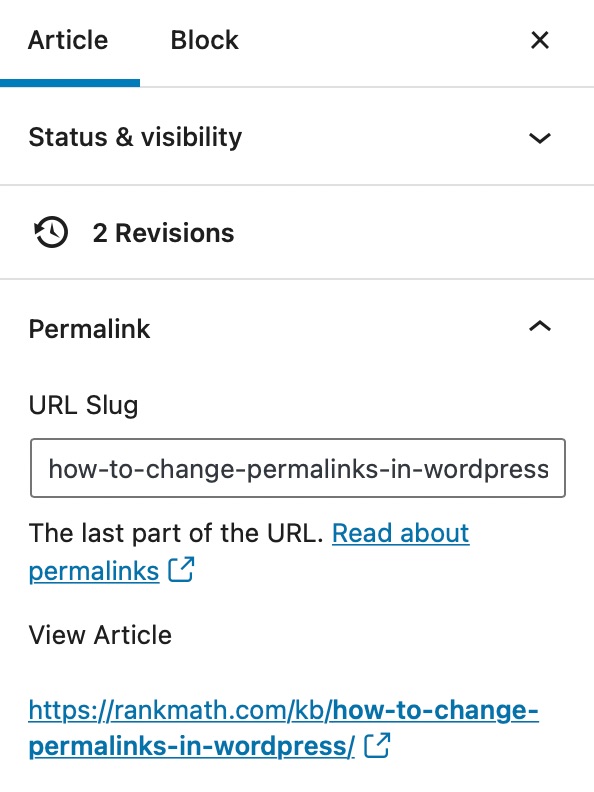
If you have tried the above methods and still not able to change the permalinks,
We might need to take a closer look at the settings. Please edit the first post on this ticket and include your WordPress & FTP logins in the designated Sensitive Data section.
Please do take a complete backup of your website before sharing the information with us.

It is completely secure and only our support staff has access to that section. If you want, you can use the below plugin to generate a temporary login URL to your website and share that with us instead:
https://wordpress.org/plugins/temporary-login-without-password/
You can use the above plugin in conjunction with the WP Security Audit Log to monitor what changes our staff might make on your website (if any):
https://wordpress.org/plugins/wp-security-audit-log/
We really look forward to helping you.
Hello,
Glad that helped.
Please feel free to reach out to us again in case you need any other assistance.
We are here to help.
Thank you.


