
-
I really appreciate your support last time. Thank you so much!
This time, I have a new issue with the URLs. Last week, URLs without a trailing slash would redirect to the ones with a trailing slash, but now they don’t. My SEO team needs to fix this.
Here is an example of the URLs:I am following the guide in this blog, but it’s not working. Is there anything I might have missed?
https://rankmath.com/kb/how-to-redirect-to-urls-with-trailing-slash/Thank you.

-
Hello,
We apologize for the issue you are facing with the trailing slashes in your URLs. Thank you for raising this concern and for your appreciation of our previous support.
It seems like you are already following the guide on how to redirect to URLs with trailing slashes, but if the redirection is not working as expected, there are a few things you might want to check:
-
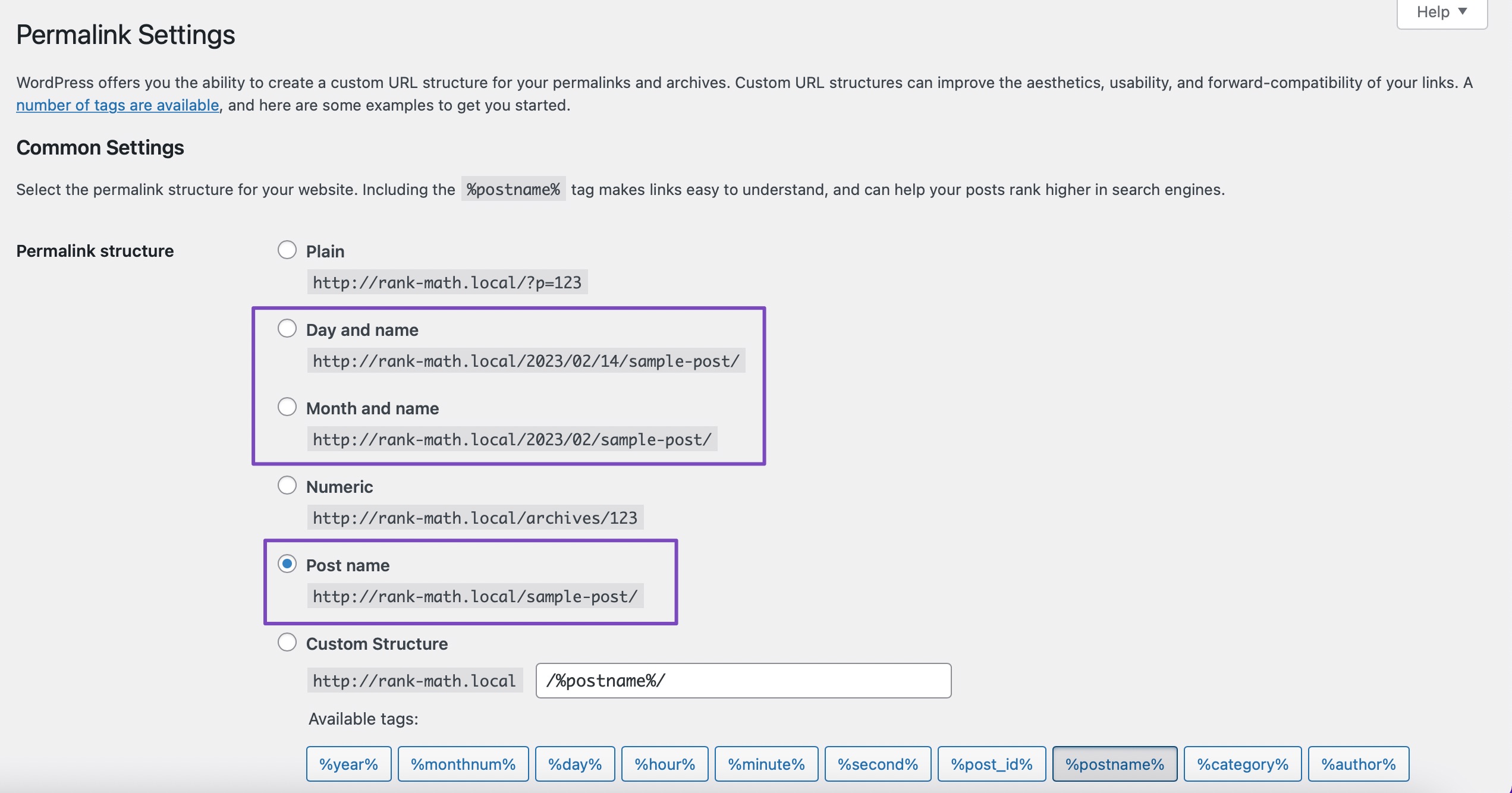
Permalink Settings: Ensure that your permalink settings in WordPress are configured correctly. Most URL structures should have trailing slashes by default. You can check this in your WordPress dashboard under Settings > Permalinks.
-
.htaccess File: If the default WordPress redirect is not functioning, you may need to add custom rules to your
.htaccessfile. Here’s a sample code snippet that you can use to force trailing slashes:RewriteCond %{REQUEST_URI} /+[^.]+$ RewriteCond %{REQUEST_URI} !^/wp-json RewriteRule ^(.+[^/])$ %{REQUEST_URI}/ [R=301,L]Make sure to back up your
.htaccessfile before making any changes, as errors can cause issues with your website. -
Caching Issues: Sometimes, caching plugins or server-side caching can interfere with redirection rules. Clear any caches and check if the issue persists.
-
Conflict with Other Plugins: Ensure that there are no other plugins that might be conflicting with Rank Math’s redirection functionality.
If you’ve checked all these points and the issue still exists, please reply to this ticket, and a human agent from the Rank Math Support team will assist you further.
Thank you for your understanding, and we hope to resolve this issue for you soon!
I think there is a plugin or some code causing a conflict. Besides this issue, I also have a related problem where the URL redirects twice. This is weakening my backlinks.
https://decornow.vn/danh-muc/tranh-truc-chi/tranh-truc-chi-tron/ -> https://decornow.vn/tranh-truc-chi/tranh-truc-chi-tron -> https://decornow.vn/tranh-truc-chi-tron/
If you need temporary login access, please let me know, and I will create a link with the appropriate role.
Let me explain more about the double redirect issue.
Currently, I’ve created a new 301 rule for https://decornow.vn/tranh-truc-chi/tranh-truc-chi-tron → https://decornow.vn/tranh-truc-chi-tron/. It works when users access https://decornow.vn/danh-muc/tranh-truc-chi/tranh-truc-chi-tron/, and it redirects to https://decornow.vn/tranh-truc-chi/tranh-truc-chi-tron, then to https://decornow.vn/tranh-truc-chi-tron/.However, if I create a 301 rule for https://decornow.vn/danh-muc/tranh-truc-chi/tranh-truc-chi-tron/ → https://decornow.vn/tranh-truc-chi-tron/, it redirects to a 404 error (this 301 rule was created in July).
A lot of my older backlinks have been affected by this issue.
Hello,
The URL is redirecting properly without 404.
Please clear your website and server’s cache if it is still showing the 404 error on your end.
Looking forward to helping you.
Certainly, the URL can redirect now because I created a new 301: (1) https://decornow.vn/tranh-truc-chi/tranh-truc-chi-tron/ → https://decornow.vn/tranh-truc-chi-tron/.
However, my aim is to restore the old 301: https://decornow.vn/danh-muc/tranh-truc-chi/tranh-truc-chi-tron/ → https://decornow.vn/tranh-truc-chi-tron/. If I create this 301 now and do not activate (1), it will redirect to a 404 error. Ideally, it should go to the target URL: https://decornow.vn/tranh-truc-chi-tron/.
Hello,
The redirection is not happening since you have disabled WordPress’ redirect to find the similar slug on your site from your last ticket here:
https://support.rankmath.com/ticket/problem-with-301/?view=all#post-879034If it’s not enabled, then it will show 404 instead.
Looking forward to helping you.
Hello,
We might need to take a closer look at the settings. Please edit the first post on this ticket and include your WordPress & FTP logins in the designated Sensitive Data section.
Please do take a complete backup of your website before sharing the information with us.
It is completely secure and only our support staff has access to that section. If you want, you can use the below plugin to generate a temporary login URL to your website and share that with us instead:
https://wordpress.org/plugins/temporary-login-without-password/
You can use the above plugin in conjunction with the WP Security Audit Log to monitor what changes our staff might make on your website (if any):
https://wordpress.org/plugins/wp-security-audit-log/
Looking forward to helping you.
Thank you.
Hello,
I have updated the sensitive data as requested. Can you please check further?
Thank you.
Hi, due to company policy, I cannot grant you access to the website. Thank you for your help!
Hello,
You have created all these redirects in Rank Math. Please check the redirection again to confirm this.
The URL
https://decornow.vn/danh-muc/tranh-truc-chi/tranh-truc-chi-tron/first redirects tohttps://decornow.vn/tranh-truc-chi/tranh-truc-chi-tron/before finally redirecting tohttps://decornow.vn/tranh-truc-chi-tron/Can you create a staging site where we can replicate this issue and fully debug it?
Please create one, and share the login access here, this will allow us to investigate the issue and resolve it without worrying about touching the live website.
You can follow this article to create the staging website: https://rankmath.com/blog/how-to-create-staging-site/
We look forward to hearing back from you.
Thank you.
-



You must be logged in to reply to this ticket.