Hello,
We apologize for the issue you are facing with the title attribute for images not saving and the 403 Forbidden error. Since you’ve already tried deactivating all plugins and using the Health Check & Troubleshooting plugin without success, here are a few additional steps you can take:
1. Check for Firewall or Security Settings
Even if you do not have any security plugins active, your hosting provider may have firewall settings that could be blocking access. Please check with your hosting provider to ensure that there are no restrictions on your IP address or any other settings that might be causing the 403 error.
2. Whitelisting Googlebot IP Address
If the 403 error is related to a blocked IP address, you may need to whitelist the IP address of Googlebot. You can find the list of Googlebot IP addresses here. If you don’t have a security plugin installed, contacting your hosting provider for assistance would be advisable.
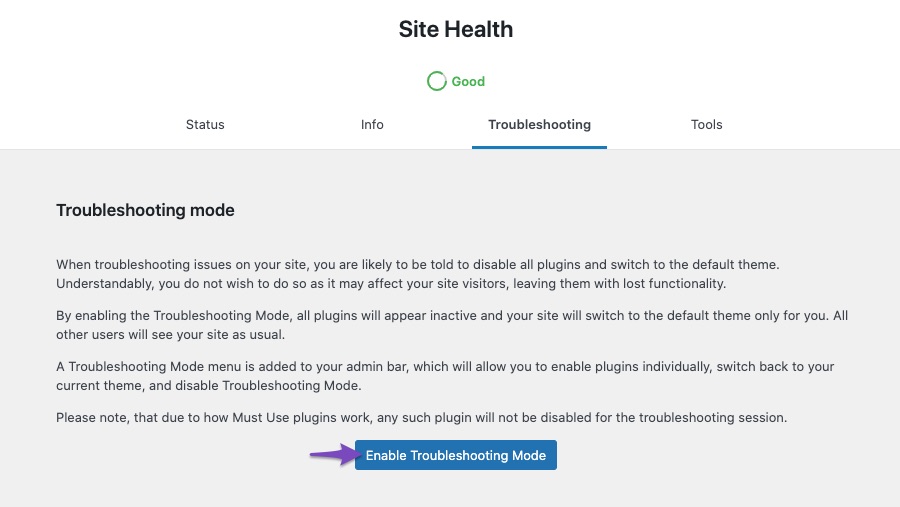
3. Enable Troubleshooting Mode
Since you mentioned using the Health Check & Troubleshooting plugin, ensure that you enable the Troubleshooting Mode and then enable Rank Math while keeping all other plugins disabled. This will help isolate if Rank Math is causing the issue or if it’s something else.
4. Check Server Logs
If possible, check your server logs for any specific errors that might give more insight into why the 403 error is occurring. This can often provide clues that are not visible in the console.
If after trying these steps you are still encountering issues, please reply to this ticket, and a human agent from the Rank Math Support team will take over and assist you further. Thank you for raising this concern!
also, my search console google is not connected to rank math. I have an account in the search console and my email is correct. but I do not know what is the problem
Hello,
Thank you for your query and we are so sorry about the trouble this must have caused.
Please follow this guide to help you resolve the saving issues: https://rankmath.com/kb/meta-data-not-saving/
As for your GSC connection, to make sure that everything works correctly please go through this article to set up the Analytics module: https://rankmath.com/kb/install-google-analytics/
If however, you are having challenges with this, then follow the steps below to fix it.
1. Check to make sure that you have verified Google Search Console, if not, follow this guide: https://rankmath.com/kb/google-site-verification/
2. Please make sure that you are not connecting to Google Search Console via a domain property but rather a URL prefix and that you have verified the correct version of your website on the Google Search Console (HTTP or HTTPS, www or non-www).
3. Then remove Rank Math’s access from Google Please remove RankMath’s app from your Google apps permissions: https://myaccount.google.com/permissions
4. Reconnect the Google account again to regenerate the auth token from Google, by going to WordPress Dashboard > Rank Math > General Settings > Analytics and configure the Search Console and Analytics settings again
Kindly check all necessary checkboxes to allow Rank Math to access some of the Google Services.
We hope this resolves the issue for you.
If you still face any problems or have any questions, please let us know. We’re always here to help.
Hello,
Since we did not hear back from you for 15 days, we are assuming that you found the solution. We are closing this support ticket.
If you still need assistance or any other help, please feel free to open a new support ticket, and we will be more than happy to assist.
Thank you.



