Hello,
Thank you for contacting Rank Math, and sorry for any inconvenience caused.
Assuming you are referring to the Homepage title, head over to WordPress settings > General >
Site Title and ensure that the site name is added there.
Then, head over to Rank Math > Titles & Meta > Homepage and make sure the %sitename% variable is added in the title:

Hope this helps.
Thank you.
thanks for you answer
Before activating the plugin, when I search for a product for example ”microsoft office”” in the search bar, it is displayed in the browser tab: Search results for “microsoft office”- websitetitle .
in my case: Search results for “microsoft office”- eesoftwares
how can I have the same title by enabling the RankMath plugin?
Hello,
Yes, you can set the search results title on your site in Rank Math > Titles & Meta > Misc Pages.

Here’s a link for more information:
https://rankmath.com/kb/titles-and-meta/#search-results-title
I hope that helps.
Thank you.
thank you so much.
I did not find an option in Rank Math to display the reviews and the price in google search as it did this site in screenshot,
please is there an option that does this?
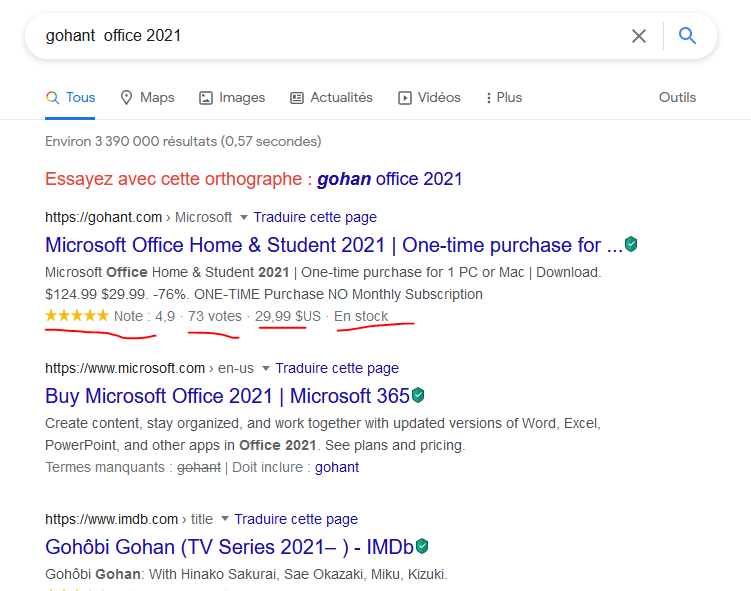
Hello,
The snippet you have shared in the screenshot can be achieved using the Product Schema.
You can check these helpful guides to apply those to your site:
https://rankmath.com/kb/earning-star-ratings-in-serps/
https://rankmath.com/kb/product-schema/
I hope that helps.
Thank you.
Hello,
Since we did not hear back from you for 15 days, we are assuming that you found the solution. We are closing this support ticket.
If you still need assistance or any other help, please feel free to open a new support ticket, and we will be more than happy to assist.
Thank you.



