-
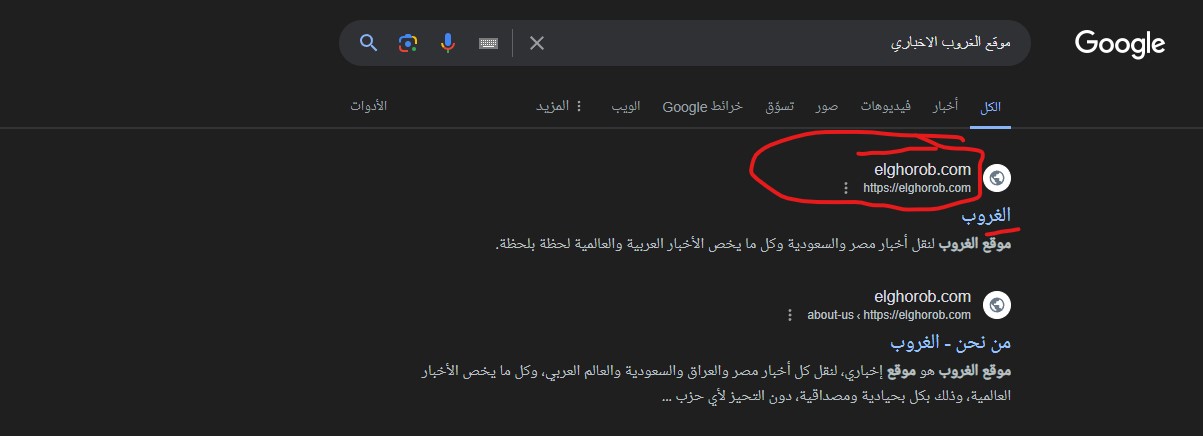
The title of the article does not appear in its entirety in the Google search engine, as the secondary title that is added within the article appears in the Google search engine as the primary title. What is the reason for this, even though I am sure that everything is fine in the articles section regarding adding your math rank? I do not use anything else in SEO. Also, when I search for the name of my site in the Google search engine, the name of the site does not appear, but rather the link to the site or the domain for the site appears. I want the site name to appear at the top and then the domain below it, but what happens is The domain appears only at the top and bottom
Please help me, this is very important in SEO, thank you.
-
Hello,
I understand the concern you have regarding the title of your article not appearing correctly in Google search results and the site name not displaying as expected.
When Google displays a different title or the domain instead of the site name, it could be due to various reasons related to how Google determines the site name and titles for search results. To ensure that Google displays the correct information, you need to make sure that your site name is correctly set up in different locations that Google checks for it.
Here are some steps you can take to address these issues:
- Add a Site Name to Your Homepage Meta Title: Ensure that your homepage meta title contains the site name. You can refer to this guide on setting a homepage meta title and description using Rank Math.
- Add a Site Name to Your Open Graph Metadata: Check if your Open Graph metadata includes the site name. This metadata is automatically added to your homepage if you have Rank Math.
- Add a Site Name to Your Website Structured Data: Enable the Schema module in Rank Math SEO and fill in the required fields under Rank Math SEO → Titles & Meta → Local SEO to specify the website name, person or organization name, logo, and URL. This will help Google prioritize the site name in your WebSite structured data.
By ensuring that your site name is correctly set up in these locations, you can improve the chances of Google displaying the correct information in search results.
If you have already followed these steps and are still facing issues, please provide more details or screenshots so that we can assist you further.
Thank you for reaching out, and we are here to help you with your SEO concerns.
Sources:
Why Google Displays URL Instead of Site Name in SERP? » Rank Math
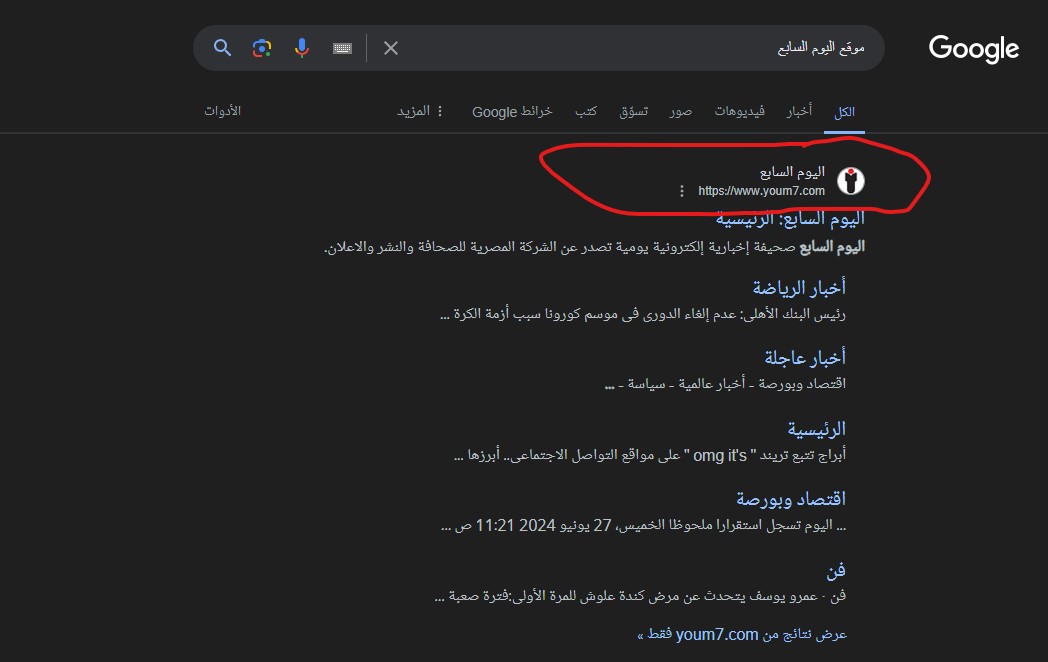
Google Shows A Different Meta Title/Description For My Site » Rank MathLook, here the site name appears normally, but look at the top, you will see the site’s domain is what appears, and you know that in that place the site name appears, and at the bottom the entire domain appears.
There is an example shown in the picture, and this example is from another famous site in Egypt. I want my site to appear like this, and I also want the sections of the site to appear below it. Can I get that in the free version, and I am very sorry for the inconvenience.
There is also another point that you did not respond to me about, which is the issue of the article’s full title not appearing in the search engine, but rather one of the subtitles that is added within the article appears, and I assure you that I did everything correctly in your Rank Math tool, so that I I saw the illustrative examples below that are correct, but they do not appear in the Google search engine as well, so what is the solution?
Hello,
Thank you for contacting Rank Math support.
You seemed to have marked this ticket as resolved.
Do you still need our assistance with anything else or we can go ahead to close the ticket?
We really look forward to helping you.
both
Please do not close it. Read the words written in that message. I do not know what I did until I closed the conversation. I am sorry for that mistake.
Read what was written in the previous message, and I ask you to help me, thank youHello,
I understand that you are facing an issue where Google Search Results display your domain as the site name instead of the actual site name.
There are various sources that Google uses to define your site name on SERPs:
1 . og:site_name
2 . WebSite structured data (Schema)
3 . Content in title elements
4 . Heading elements (H1, H2, etc)Rank Math automatically incorporates the og:site_name meta tag and the WebSite Schema on your page.
This aids Google in understanding and displaying your desired site name.
To address this and encourage Google to display the sitename instead of domain please follow these steps:
1 . Ensure that your website’s<title>tag on the homepage reflects sitename accurately.2 . Update the
og:site_namemeta tag to add sitename within Rank Math settings.3 . Double-check that your logo
alt textand other significant areas on your site mention the sitename.4 . Make sure
internal linkswithin your site use sitename rather than the domain.5 . After making these adjustments, utilize the
URL Inspection Toolin Google Search Console to request indexing for your homepage.6 . Ensure sitename is consistently represented across all
online profiles, directories, and other platforms.7 . If you’ve rebranded or changed the name in the past, verify there’s no
legacy content, old sitemaps, or outdated pages sending conflicting signals to Google.8 . Remember, you’ll need patience as Google
re-crawlsandre-indexesyour site. It might take some time before these updates reflect in the SERPs.While these steps can guide Google, the final site name display in SERPs is determined by Google’s algorithm, based on what it deems relevant and user-friendly.
You can further understand this by reviewing Google’s documentation on site-name: Google Site Names Documentation: https://developers.google.com/search/docs/appearance/site-names
Also note that it is common for Google to do this nowadays. Even when everything is fine, Google may choose to display a different meta title for your search query result. Google may sometimes ignore the custom metadata you have set and instead display something from the page’s content that better matches the search intent.
Since the pages are already indexed, it is up to Google to show your content for the desired search keyword. Google sometimes tries to adjust the title according to the search intent.
You can follow this URL for details on this issue: https://rankmath.com/kb/different-meta-title-and-description/
Here’s an article you can also check for reference:
https://www.searchenginejournal.com/google-changes-more-than-61-percent-of-title-tags/435618/We hope that helps, and please don’t hesitate to get in touch if you have any other questions.
Thank you.

Thank you
Hello,
Glad that helped.
Please feel free to reach out to us again in case you need any other assistance.
We are here to help.
Thank you.
You must be logged in to reply to this ticket.