
-
I keep getting the error message “Add Heading blocks to this page to generate the Table of Contents,” even after adding the appropriate headings and this prevents me from creating table of contents for my articles. Can you please help me resolve it.

-
Hello,
We apologize for the issue you are facing with the Table of Contents block. The error message "Add Heading blocks to this page to generate the Table of Contents" typically appears when there are no headings detected in your article. Here are a few steps you can take to resolve this:
-
Check Your Headings: Ensure that you have added one or more heading blocks (H1, H2, H3, etc.) in your content. The Table of Contents block requires these headings to generate properly.
-
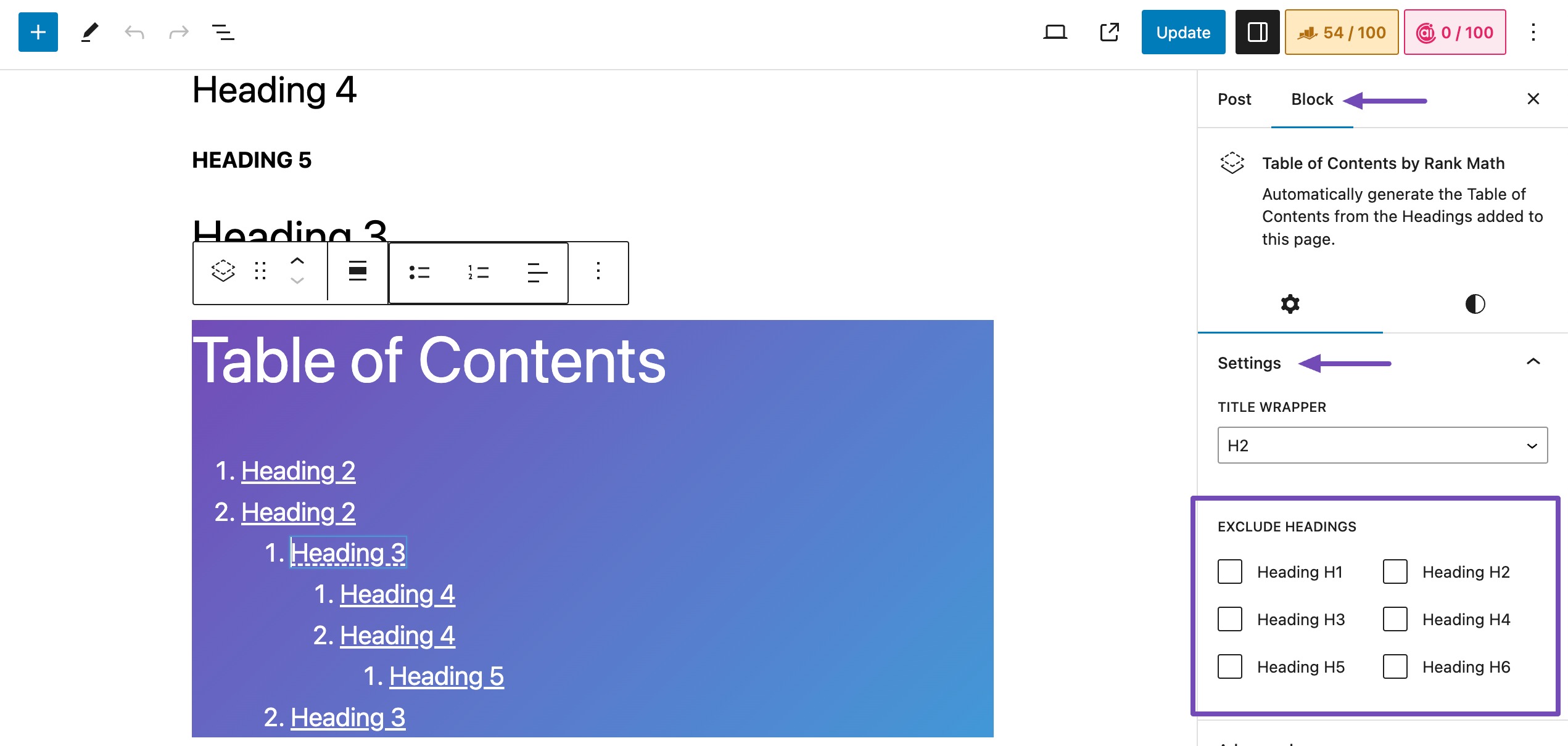
Settings Check: Click on the Table of Contents block and navigate to Settings. Then go to Block → Settings → EXCLUDE HEADINGS and confirm that you have not excluded any headings from appearing in the table.
-
Bug Awareness: Please note that our team has identified a bug that may cause higher-level headings to disappear if a lower-level heading is added before it. We are working on resolving this issue in a future update. You can monitor our changelog here for updates.
If you continue to experience issues after checking these points, please reply to this ticket, and a human agent from the Rank Math Support team will assist you further. Thank you for raising this concern!
Sources:
How to Add Rank Math’s Table of Contents Block » Rank MathI still need help. I have tried all that
Hello,
Thank you for contacting support.
Are you adding default Gutenberg heading blocks to the page? Our plugin can only detect the default heading blocks and not ones from custom plugins or themes.
Looking forward to hearing back from you.
No. I am not adding extra plugins
Hello,
To help you investigate this issue, we might need to take a closer look at your website and settings. Please follow these steps:
- Edit the first post on this ticket and include your WordPress logins in the Sensitive Data section. This is a secure section that only our support staff can access.
- Make sure you take a complete backup of your website before sharing the information with us.
- If you prefer, you can use this plugin to generate a temporary login URL to your website and share that with us instead: https://wordpress.org/plugins/temporary-login-without-password/
- You can also use this plugin to monitor what changes our staff might make on your website (if any): https://wordpress.org/plugins/wp-security-audit-log/
We appreciate your cooperation and patience. Thank you for choosing Rank Math.
Hello,
I have updated the sensitive data as requested. Can you please check further?
Thank you.
I have added the login link to the sensitive data session
Hello,
You are using Classic Editor to create the post content, not the block editor. Even if you edit the post in the block editor and use TOC block, it won’t be able to detect the headings added using the classic editor. Our TOC block only detects the headings of the Heading block.
Hope that helps and please do not hesitate to let us know if you need our assistance with anything else.
Yes, thank you. So how do I add the headings with the block editor? Should I delete the headings or what?
Hello,
When editing the post using the Block Editor, you will need to convert the content of the post to the ‘Block Type’ to be able to edit the headings.

Let us know how it goes. We look forward to hearing from you.
Thank you.
Yes, I created a new post with Block editor and the Table of contents worked! Thank you.
I just have two more questions:
– How can I rectify the error in old posts, do I have to delete them and start again?– I am unable to find the toggle for follow and no follow links, can you help me turn that on? I want to be able to edit individual links in my posts and decide if it should be nofollow or follow.
Thanks in advance.
Hello,
1.
Please edit the old posts using the Block Editor and convert the content of the post to the ‘Block Type’. To do this, over you mouse above the first paragraph of the post and click on ‘Convert to blocks’ as we have shown below:2.
Please follow this guide to edit the individual links on your posts: https://rankmath.com/kb/should-you-nofollow-external-links/#adding-nofollowWe hope that helps and please don’t hesitate to let us know if you have any other questions.
Thank you.
-



You must be logged in to reply to this ticket.