Hello,
We apologize for the issue you are facing with Rank Math SEO and synchronized compositions in the Gutenberg editor. It sounds like a frustrating experience, and we appreciate you bringing this to our attention.
From your description, it seems that there might be a JavaScript conflict when using Rank Math with your current setup, especially since you mentioned that disabling Rank Math resolves the freezing issue. Here are a few steps you can take to troubleshoot further:
-
Check for JavaScript Errors: Since you have already captured the JavaScript console, please review any errors that may be displayed there. If you find any specific errors related to Rank Math, it would be helpful to share those details.
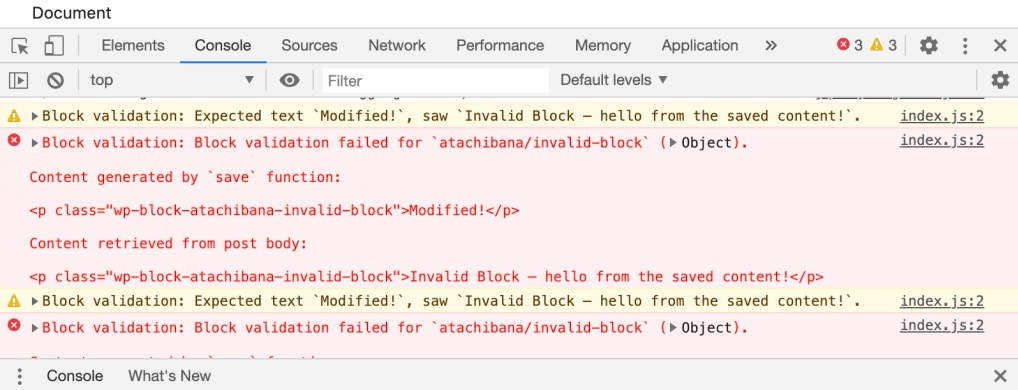
-
Theme Conflict: Sometimes, the active theme can cause conflicts. You might want to switch to a default WordPress theme (like Twenty Twenty-One) temporarily to see if the issue persists.
-
Gutenberg Compatibility: Ensure that your version of Gutenberg is up to date, as compatibility issues can arise with older versions.
-
Contact Support: If the problem continues, please reply to this ticket with any specific error messages from the console, and a human agent from the Rank Math Support team will take over and assist you further.
Thank you for your patience, and we hope to resolve this issue for you soon!
Sources:
Why Your SEO Title, Description & Focus Keyword Aren’t Being Saved » Rank Math
I also carried out a switchover test on a default Twnety Twenty-four WordPress theme and leaving only RANKMATH SEO active is still the problem. After a long wait I have access to the page again, but it is not possible to stay like this for my client. This gives the impression that there is an infinite loop.
Hello,
Thank you for contacting us and sorry for any inconvenience that might have been caused due to that.
To investigate this issue further, we might need to take a closer look at your website and settings. Please follow these steps:
- Edit the first post on this ticket and include your WordPress and FTP logins in the Sensitive Data section. This is a secure section that only our support staff can access.

- Make sure you take a complete backup of your website before sharing the information with us.
- If you prefer, you can use this plugin to generate a temporary login URL to your website and share that with us instead: https://wordpress.org/plugins/temporary-login-without-password/
- You can also use this plugin to monitor what changes our staff might make on your website (if any): https://wordpress.org/plugins/wp-security-audit-log/
We appreciate your cooperation and patience.
Thank you for choosing Rank Math.
Hello,
I have updated the sensitive data as requested. Can you please check further?
Thank you.
You can check the home page for the problem.
Thank you.
Hello,
Please increase your site’s PHP values and see if that fixes the issue:
PHP Memory Limit: 1024M
Max input time: 150
PHP time limit: 120
PHP max input variables: 1000
You can ask your host to increase the values.
Let us know how that goes. Looking forward to helping you.
Hello,
Thanks for your feedback, but this doesn’t fix the problem.
Hello,
We checked your website and we can still see the memory limit is way below the recommended value. Can you please increase it to at least 1024M?
Looking forward to helping you.
Hello,
I can’t change the memory limit because my host limits me to 256MB in staging version.
Thanks
Hello,
Since your hosting environment limits the PHP memory to 256MB in staging, this might be causing the editor freeze issue with the synchronized composition and Rank Math. We recommend checking with your host to see if they can temporarily lift the memory restriction, or try replicating the issue in a production environment where higher memory limits can be applied.
Additionally, please ensure that all other plugins, including WooCommerce and ACF Blocks, are up to date, as sometimes conflicts arise from outdated versions.
We hope this helps.
Thanks.
Hello,
Since we did not hear back from you for 15 days, we are assuming that you found the solution. We are closing this support ticket.
If you still need assistance or any other help, please feel free to open a new support ticket, and we will be more than happy to assist.
Thank you.





