
-
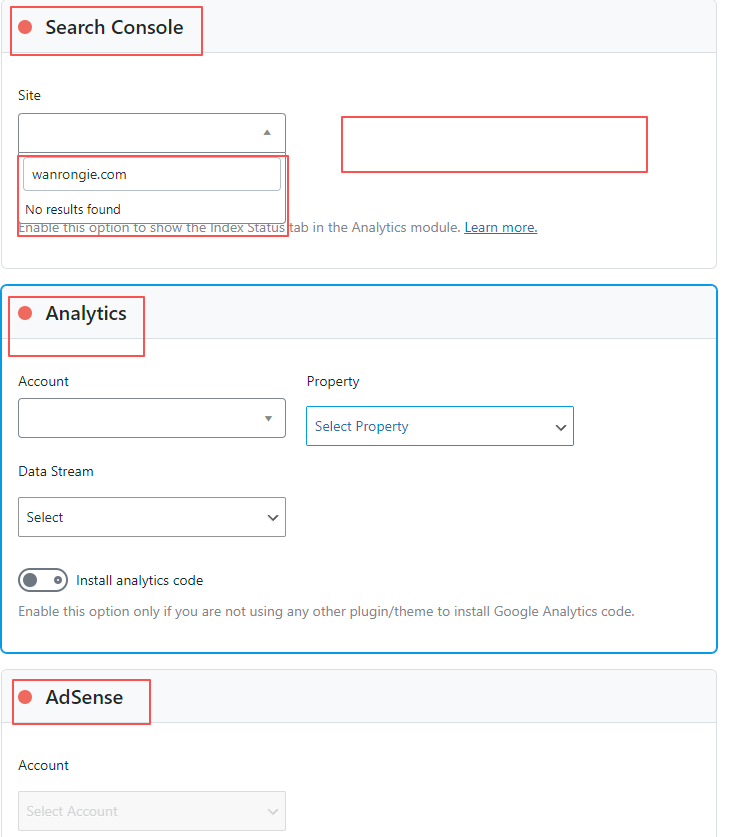
Hi I reconnected the Google & Rank Math, but the Analytics still showing this:

-
Hi I reconnected the Google & Rank Math, but the Analytics still showing this:
https://ibb.co/nvrnwBgHello @clarkhan,
The screenshot URL you’ve shared is returning a 404 error. Could you please share the screenshot again with us so that we can check the issue further for you?
Looking forward to helping you.
Thank you.
Hi, thanks for for your contact, please try to open screenshot as below:
https://i.hd-r.cn/3546fa0b-1563-4124-ab82-1f03e53e4979.pngHello,
We have split the previous ticket to help you further with this.
Please make sure that you are not connecting to Google Search Console via a domain property but rather a URL prefix and that you have verified the correct version of your website on the Google Search Console (HTTP or HTTPS, www or non-www).
Then, reconnect your Google account in our plugin with full permission.
If the issue perisists, we need to fully investigate and resolve the issue on your website. We need temporary access to your WordPress/FTP account.
For security reasons, please share these credentials securely using our credential vault: https://vault.rankmath.com/
You can also use the plugin below to generate a temporary login URL to your website and share that with us instead:
https://wordpress.org/plugins/temporary-login-without-password/You can use the above plugin in conjunction with the WP Security Audit Log to monitor what changes our staff might make on your website (if any):
https://wordpress.org/plugins/wp-security-audit-log/Please do take a complete backup of your website before sharing the information with us.
Looking forward to helping you with this one.
Hello,
Sorry for the delay in response.
We might need to take a closer look at the settings. Please edit the first post on this ticket and include your WordPress login in the designated Sensitive Data section.
Please do take a complete backup of your website before sharing the information with us.
It is completely secure and only our support staff has access to that section. If you want, you can use the below plugin to generate a temporary login URL to your website and share that with us instead:
https://wordpress.org/plugins/temporary-login-without-password/
You can use the above plugin in conjunction with the WP Security Audit Log to monitor what changes our staff might make on your website (if any):
https://wordpress.org/plugins/wp-security-audit-log/
We really look forward to helping you.
Hi Jeremy:
Secret link already created, please check and help us for setting, thanks a lot
Hi,
My website already been verified by Google Search Console
Hi Jeremy:
Secret link already created, please check and help us to set, thanks a lot
Hello,
We deeply apologize for the unexpected delay in response.
If you’ve generated a temporary login URL, please share that in the sensitive data section of this ticket so that we can check the issue further for you.
Looking forward to helping you.
Thank you.
HiRakibuzzaman Siam,
Secret link as below:
[moved to the sensitive data section]
Hello,
We would like to check the issue further with your Google account. Please add me as your temporary GA and GSC user:
j*******@r***********Here’s a guide you can follow:
https://rankmath.com/kb/add-user-to-google-analytics/
https://rankmath.com/kb/add-user-to-google-search-console/Looking forward to helping you with this one.
Hi Jeremy,
Thanks for your information, please confirm if we need to add you to both anylytics & Google Console, thanks again.
Hi Jeremy,
I have added you as the full user of our Google Console.
Hello,
Yes, please allow access in both your Google Search Console and Google Analytics so that we can check the issue further for you.
Looking forward to helping you.
Thank you.
Hi,
We have no Google Analytics, the issue just happened on Google Search Console & Rank Math ConnectionThanks


You must be logged in to reply to this ticket.