Sitemap Submitted but Links not Accepted by Search Console

#877903
  • Resolved Ankit
    Rank Math free

    I have submitted my sitemap to Google Search Console, generated by Rank Math, at https://rkcl.online/sitemap_index.xml. While I can view the sitemap, Google Search Console is not indexing any new links or pages from my site, including https://rkcl.online/itgk-full-form/.

    I’ve tried using another plugin like Yoast SEO, and in that case, the sitemap works, and pages are indexed. However, I prefer to use Rank Math and want to resolve this issue while keeping Rank Math as my SEO plugin.

    I’ve confirmed that my robots.txt file is configured correctly, and there are no “noindex” tags or crawling restrictions on my site. Could you help me identify why the pages are not being indexed with Rank Math’s sitemap and how I can fix this?

    Thank you.

Viewing 2 replies - 1 through 2 (of 2 total)
  • Hello,

    We apologize for the issue you are facing with your sitemap and the indexing of your pages in Google Search Console. Thank you for raising this concern.

    Here are a few steps you can take to troubleshoot and potentially resolve the issue:

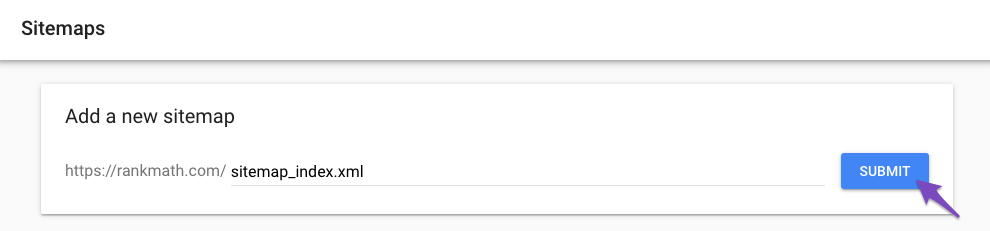
    1. Check Sitemap Submission: Ensure that you have submitted the correct sitemap URL in Google Search Console. The correct URL should be `https://img.youtube.com/vi/IicxbPtcCyI/maxresdefault.jpg.

    2. Validate Your Sitemap: You can validate your sitemap by visiting it directly in your browser. Make sure it displays correctly and includes all the expected URLs.

    3. Check for Errors in Google Search Console: Look for any errors or warnings related to your sitemap in Google Search Console. If there are issues, they will be listed there.

    4. Resubmit Your Sitemap: If everything seems fine, try removing the existing sitemap from Google Search Console and resubmit it. This can sometimes help refresh the indexing process. You can follow the steps outlined in this tutorial on submitting a sitemap to Google.
      Submit sitemap to Google Search Console

    5. Check for Plugin Conflicts: Sometimes, other plugins can conflict with Rank Math. You can use the Health Check plugin to identify any potential conflicts.

    6. Custom Canonicals: If you have set custom canonical URLs for your posts, ensure that they are not causing issues with how Rank Math generates the sitemap. If necessary, remove custom canonicals to allow Rank Math to generate them automatically.

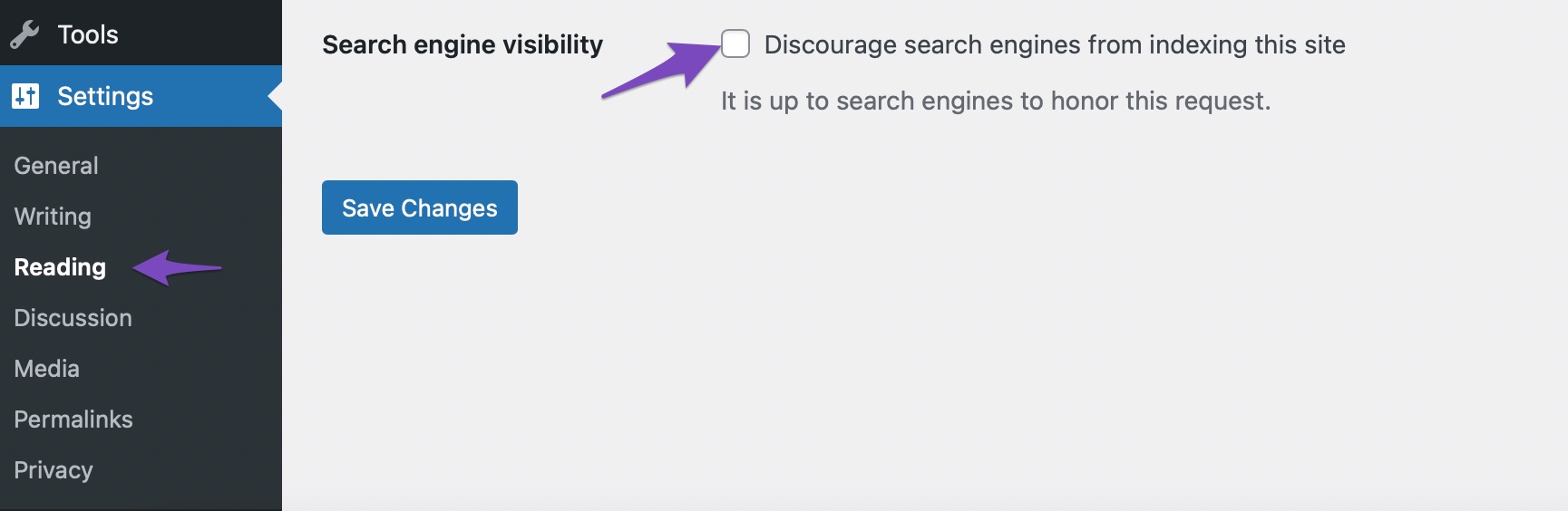
    7. Search Engine Visibility: Double-check that the Search engine visibility option is unchecked in your WordPress settings. Navigate to Settings → Reading and ensure that the box is not checked.
      Search engine visibility test from settings

    8. Wait for Indexing: After making these changes, it may take some time for Google to crawl and index your pages again. You can monitor the progress in Google Search Console.

    If you continue to experience issues after trying these steps, please reply to this ticket, and a human agent from our support team will assist you further.

    We hope this helps you resolve the issue!

    Sources:
    Rank Math Sitemap Issues and Their Fixes » Rank Math
    How to Submit a Sitemap to Google » Rank Math
    How to Fix Submitted URL Marked ‘NoIndex’ Error » Rank Math

    Hello,

    Thank you for contacting us and sorry for any inconvenience that might have been caused due to that.

    We checked the page you’ve shared but couldn’t find any issues that may prevent this from being indexed on Google:

    Also, please note that it is completely normal for newly published posts/pages to take time before they get crawled or indexed by Google. It depends on a lot of factors. Your posting frequency + the domain authority are just two of the many factors Google considers when indexing some new URLs.

    Google assigns a crawl budget to your website depending on these factors (especially these two) and that has a direct effect on how soon or how late your content can get indexed.

    Here’s a link for more information:
    https://rankmath.com/kb/google-index/

    However, we have another Instant Indexing for Google plugin that you can use to get your website’s pages and content crawled immediately: https://rankmath.com/blog/google-indexing-api/

    Let us know how it goes. Looking forward to helping you.

    Thank you.

    Hello,

    Since we did not hear back from you for 15 days, we are assuming that you found the solution. We are closing this support ticket.

    If you still need assistance or any other help, please feel free to open a new support ticket, and we will be more than happy to assist.

    Thank you.

Viewing 2 replies - 1 through 2 (of 2 total)

The ticket ‘Sitemap Submitted but Links not Accepted by Search Console’ is closed to new replies.