
-
I am trying everything but my rankmap sitemap not updating. I lost my all traffic from 14 July to today. I can’t find any of my article on Google Search except home page. I can find my article on Google using site:%url%. Thare are only errors I find was:
1. Discovery
Sitemaps
No referring sitemaps detected
Referring page
https://ehnews4u.com/jamalpur-colleges-list/Note: Referring page was other post url or some day ago everything is ok.

-
Hello,
We apologize for the issue you are facing with your sitemap not updating and the errors in Google Search Console. It sounds frustrating, especially with the loss of traffic since July 14.
Here are some steps you can take to troubleshoot the sitemap issue:
-
Flush the Cache: If your sitemap appears outdated, try flushing the sitemap cache. Go to Rank Math SEO → Sitemap Settings, increase the value of Links Per Sitemap by one, and then save your settings. After that, navigate to Settings → Permalinks and click Save Changes to ensure the current settings are applied.
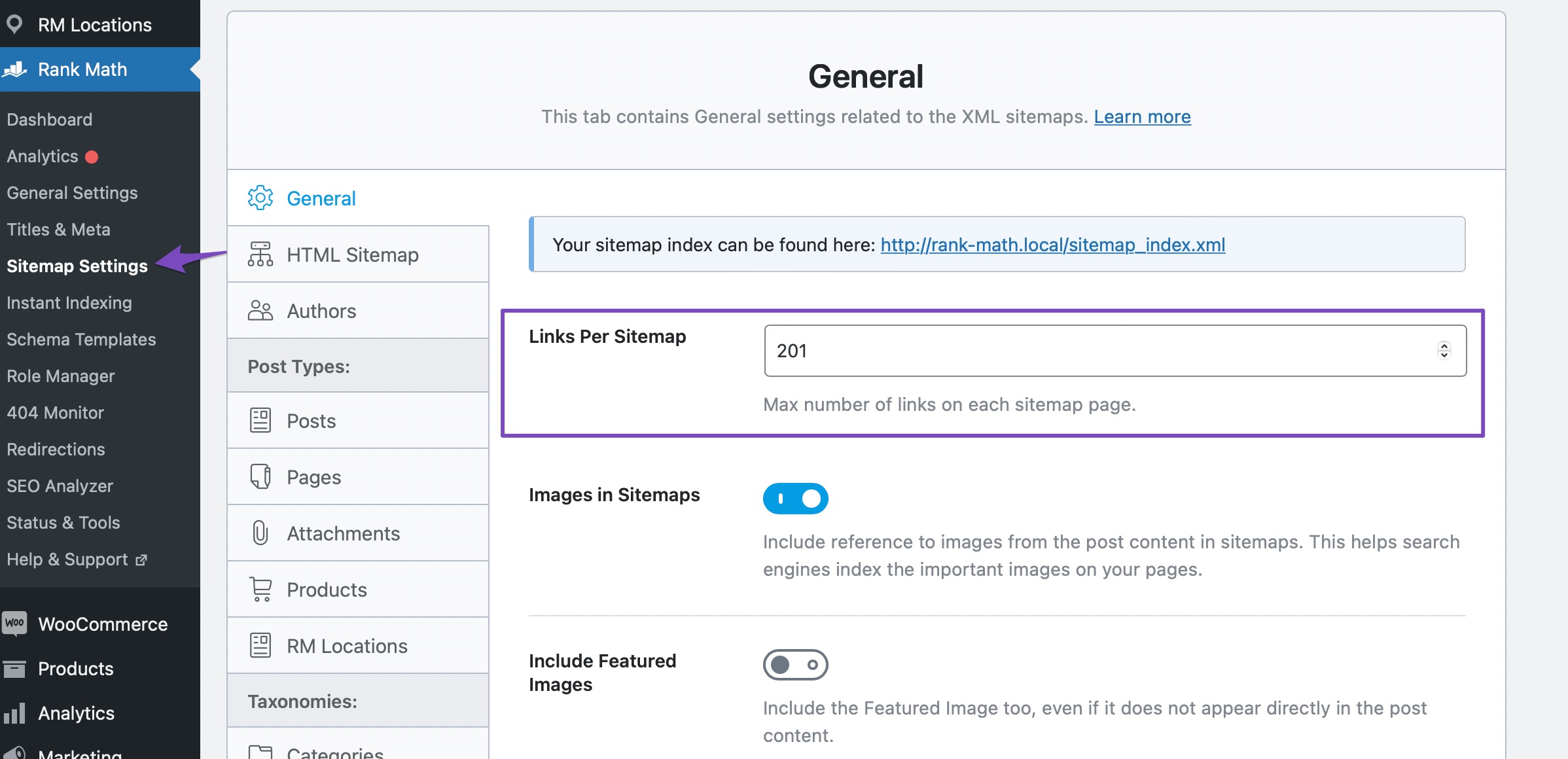

-
Check Sitemap Location: Ensure your sitemap is located in the root folder of your WordPress installation. The correct URL should look like this:
https://yourdomainname.com/sitemap_index.xml. -
Validate Your Sitemap: Use a tool like Validate XML Sitemap to confirm that your sitemap is correctly configured. If there are issues, the tool will provide feedback.

-
Ensure Posts Are Set to Index: Check that your posts are set to index. Go to Rank Math SEO → Titles & Meta, and in the Robots Meta settings, ensure the Index checkbox is enabled for your posts.

-
Submit Your Sitemap Again: After making these changes, resubmit your sitemap URL to Google Search Console.
If you continue to experience issues after trying these steps, please reply to this ticket, and a human agent from the Rank Math Support team will assist you further.
Thank you for raising this concern, and we hope to help you resolve it soon!
Sources:
Troubleshooting the “Couldn’t Fetch” Error in Google Search Console » Rank MathI do everything I can like exclude in litespeed, resubmit in search console etc. There a errors when iam following give instructions from rankmath:
Check if Your Sitemap is Accessible:
Use the httpstatus.io tool to check the status of your sitemap URL. This will help identify any issues preventing Googlebot from accessing your sitemap.
And I just don’t add apply filter code to my site.
Here my sitemap: https://ehnews4u.com/sitemap_index.xml
Hello,
Thank you for contacting us and sorry for any inconvenience that might have been caused due to that.
The “No referring sitemaps detected” message does not indicate an error and is nothing to worry about. Google displays the “No referring sitemaps detected” message when it discovers your URL through means other than the sitemap. For example, Google can find your URL through backlinks.
Please note that a sitemap is only one of many ways Google discovers the URLs of your site. If Google discovers the URL through other means, it may not cross-reference your sitemap to check if the URL is there. Hence the “No referring sitemaps” message.
You can refer to this guide for reference: https://rankmath.com/kb/no-referring-sitemaps-detected/
Hope that helps and please don’t hesitate to let us know if you have any other questions.
Thank you.
I am trying everything but my rankmap sitemap not updating. I have total 155 approx url including post, category and page but sitemap_index.xml showing 151 url for last week.
If I click on sitemap in search console
Below sitemap_index.xml should show more site-map
Like post sitemap
Category sitemap
Page sitemap but they are not showing now.If I submit post sitemap it updating correctly but sitemap_index.xml not updating.
Hello,
We checked your sitemap and it seems to be opening fine.
Please flush the Sitemap cache by following this video screencast: https://i.rankmath.com/pipRDp
Once done, remove all sitemaps in the Search Console and resubmit only the
/sitemap_index.xmlin the Search Console.Let us know how this goes.
I ensure I have follow given video when iam resubmit sitemap search console still showing Discovered pages 151 but I have more. When I resubmit on bing there showing 134 url. When i scan site and sitemap using bing it stay in queue for a day.
Please help me solve this problem fast.
In bing sitemap_index.xml showing 133 url. In Search console it showing 153. I think main problem was when i cilik on sitemap_index.xml in Search console I don’t find
Post sitemap
Page sitemap
Category sitemapIt not just in Google also I’m bing.
Hello,
Please note that when you submit your sitemap on GSC, it takes some time to crawl and process it fully. During this time, you may see your sub-sitemaps blank.
Regarding the ‘Discovered Pages’ on the Google Search Console, it only shows the number of pages that were discovered using the sitemap, and since the sitemap is not the only tool Google uses to discover pages, the number of ‘Discovered Pages’ might differ from your number of pages on your sitemap.
In fact, it could be a good sign, as it means that you have good internal linking that Google does not need a sitemap to find some of your pages.
If your pages are getting indexed, you don’t have to worry about this.
Hope that helps and please don’t hesitate to let us know if you have any other questions.
Thank you.
I will wait then mark as resolved in this ticket if problem solved. Thanks.
Hello,
That is fine.
Please update us when the process is completed.
We look forward to hearing from you.
Thank you.
Hi I know you are going to that “No referring sitemaps detected” is not a problem but my all 160 article showing same think. But it’s was not like before.
It’s been so long my sitemap not updating it still showing 151 article after doing many things. I have more than 160 Article.
Now bing showing I have 3 url on sitemap. I think before recent update in rankmath I don’t have this problem.
Hello,
As mentioned before and documented throughout the Google expert forums, the number of discovered URLs in the sitemaps only shows the ones that were found using the sitemap submitted.
As long as the pages are indexed, it doesn’t matter if they are indexed via the sitemap or any other method such as internal links.
It’s important to note that Google doesn’t work through sitemaps as fast as possible – instead, it works through at its own pace.
If the sitemaps are being read and the website is being indexed, via the sitemap or not, nothing is wrong as each website is crawled and indexed differently.
Don’t hesitate to get in touch if you have any other questions.
Hello,
Since we did not hear back from you for 15 days, we are assuming that you found the solution. We are closing this support ticket.
If you still need assistance or any other help, please feel free to open a new support ticket, and we will be more than happy to assist.
Thank you.
-



The ticket ‘Sitemap not updating and all article saying No referring sitemaps detected’ is closed to new replies.