
-
please find all details in the sensitive data tab…

-
Hello,
We apologize for the issue you are facing with your sitemap. To assist you better, we recommend checking the server configurations to ensure they meet the necessary requirements. You can navigate to Tools → Site Health → Info in your WordPress dashboard and check the server settings. Here are the values you should compare:
PHP max input variables: 1000
PHP time limit: 120
PHP memory limit: 512M
Max input time: 150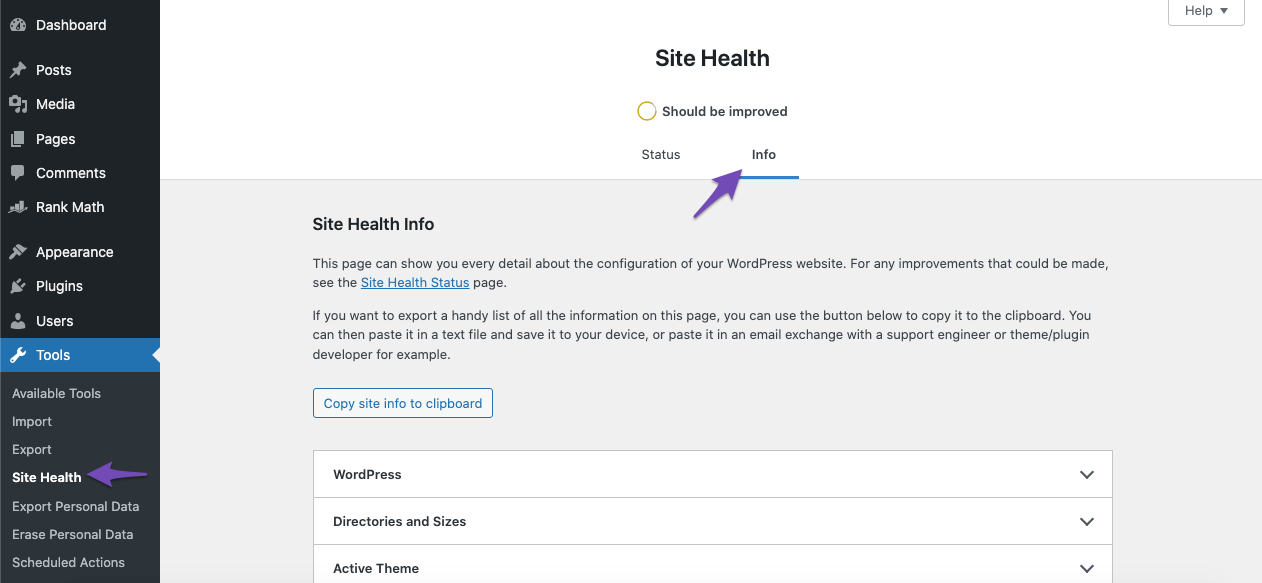
If your values are lower than these, please contact your web host to increase them or consider upgrading your hosting plan.
If you still encounter issues with the sitemaps, please reply to this ticket, and a human agent from the Rank Math Support team will take over and assist you further.
Thank you for raising this concern!
Sources:
Rank Math Sitemap Issues and Their Fixes » Rank MathHello,
It seems that your sitemaps must have been heavily cached if the issue was fixed at that step.
Please follow these steps to permanently clear the cache
1. Exclude the Sitemap files of the Rank Math plugin in your caching plugin. The cache could be via a plugin or from the server. For plugins or Cloudflare, please follow this article: https://rankmath.com/kb/exclude-sitemaps-from-caching/
2. Disable the transient cache for the sitemap by applying this filter. This will make sure that your XML sitemap always reflects the latest changes on your site:
/**
 * Filter if XML sitemap transient cache is enabled.
 *
 * @param boolean $unsigned Enable cache or not, defaults to true
 */
add_filter( 'rank_math/sitemap/enable_caching', '__return_false');
If you’re not sure how to add this code, you can follow this guide:
https://rankmath.com/kb/wordpress-hooks-actions-filters/Looking forward to helping you.
I have already disabled cache for Cloudflare, htaccess and transient but still problem is not fixed yet.
what should i do next?
Hello,
In this case, we might need to take a closer look at the settings. Please edit the first post on this ticket and include your WordPress & FTP logins in the designated Sensitive Data section.
Please do take a complete backup of your website before sharing the information with us.
It is completely secure and only our support staff has access to that section. If you want, you can use the below plugin to generate a temporary login URL to your website and share that with us instead:
https://wordpress.org/plugins/temporary-login-without-password/
You can use the above plugin in conjunction with the WP Security Audit Log to monitor what changes our staff might make on your website (if any):
https://wordpress.org/plugins/wp-security-audit-log/
We really look forward to helping you.
Hello,
I have updated the sensitive data as requested. Can you please check further?
Thank you.
Hello,
Those images are added to the content as background image:
div class="lf-avatar" style="background-image: urlPlease note that Rank Math detects only the images inserted inside the
post_content, so images that were inserted on a page as gallery, background, and slider will not be detected and included in the sitemap.Looking forward to helping you.
Hey, I managed to fix that issue, but I’m still facing a problem. The correct numbers only appear in the sitemap when I’m logged in as a WordPress admin. When I’m logged out, it still shows the old numbers. I’ve cleared the Cloudflare cache multiple times, along with my local cache and the object cache, but the wrong numbers are still displayed when I’m not logged in as an admin. what should i do?
Hello,
That situation happens only in cases where the sitemap is still being cached from your users because the caching on the server is completely removed when a user is logged-in.
We would recommend checking if you have any other caching systems such as Object Cache on your server and clearing that completely.
Thank you.
Hello,
Since we did not hear back from you for 15 days, we are assuming that you found the solution. We are closing this support ticket.
If you still need assistance or any other help, please feel free to open a new support ticket, and we will be more than happy to assist.
Thank you.



The ticket ‘sitemap issue’ is closed to new replies.