Hello,
We apologize for the issue you are facing with your sitemap not loading after the WordPress update. A 404 error for the sitemap_index.xml file can occur for several reasons, and we appreciate you bringing this to our attention.
Steps to Fix the Sitemap Issue:
-
Flush Permalinks: Sometimes, after a WordPress update, permalinks need to be refreshed. To do this, go to your WordPress admin area and navigate to Settings → Permalinks. Simply click the Save Changes button without making any changes. This action can often resolve 404 errors related to sitemaps.

-
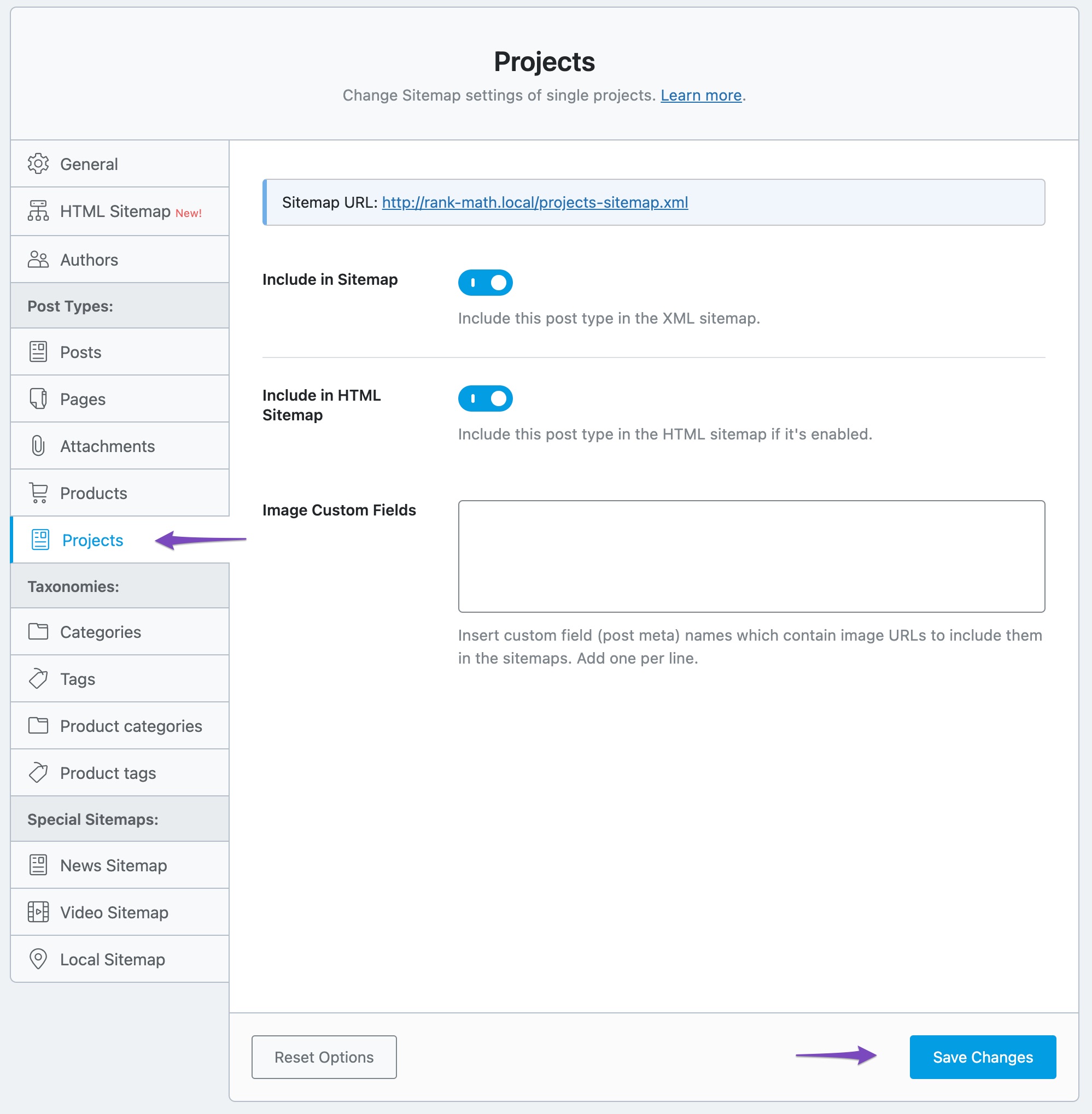
Check Sitemap Settings: Since you received a notification about a new post type (e-floating-buttons), you should check the settings for this post type in Rank Math. Go to Rank Math SEO → Sitemap Settings and ensure that this new post type is included in your sitemap if it should be indexed.
-
Validate Your Sitemap: You can also validate your sitemap using an online tool to ensure it is correctly configured. Enter your sitemap URL into the Validate XML Sitemap tool and check for any issues.

-
Check for Plugin Conflicts: If the issue persists, there might be a plugin conflict. You can use the Health Check plugin to identify any conflicts that may be affecting the sitemap functionality.
Breadcrumbs Issue:
For the breadcrumbs appearing weirdly, it could also be related to the new post type or a theme/plugin conflict. Ensure that your theme is compatible with the latest version of WordPress and Rank Math. You may want to check your theme settings or consult the theme documentation for any updates needed.
If these steps do not resolve your issues, please reply to this ticket, and a human agent from the Rank Math Support team will assist you further. Thank you for your patience!
Sources:
Rank Math Sitemap Issues and Their Fixes » Rank Math
We Detected New Post Type(s) » Rank Math
The sitemap_index.xml is working after flushing the permalinks. But the e-floating-button sitemap is not working. Also, the “Rank Math has detected a new post type: e-floating-buttons. You may want to check the settings of the Titles & Meta page and the Sitemap” messege is still appearing.
Hello,
Could you please confirm if there are important posts under the e-button post type?
As we mentioned, the notice is only a reminder to configure the settings. If you’ve configured the essential settings, you may simply dismiss the notice by clicking the close button on the right side of the notification.
In case, even after clicking the close button and changing the page, if the notice fails to dismiss, then try clearing the browser cache. Next, navigate to Rank Math SEO → Status & Tools → Database Tools inside your WordPress dashboard and then click Remove Transients.
Looking forward to helping you.
I don’t even know what e-button is. I’m running a small woocommerce store. This “https://www.wellshot.in/e-floating-buttons-sitemap.xml” shows 404 error. Check the screenshot below.
https://prnt.sc/NnyVzSNA1-mj
Also, as I mentioned earlier, the breadcrumb section is appearing weirdly, breaking my website CSS.
I’m facing the issue right after updating wordpress yesternight (around 24 hrs ago from now).
I tried to follow your knowledgebase, but you have a poor documentation, it’s not very definitive. E.g. It asks to put a php script in theme template file at ‘appropriate location’, but it doesn’t define what ‘appropriate location’ is. Your documentation shows the theme style.CSS file screenshot. In your documentation screenshot, it shows a template file. Check the screenshot: https://prnt.sc/AQRJLuEXnitF . But I can’t find any template file in my theme editor. Only style.css and functions.php are there, as for most popular themes.
Hello,
The post type can be registered by one of your plugins or active theme.
If you want to determine that, please follow this troubleshooting guide:
https://rankmath.com/kb/check-plugin-conflicts/
Here is a video you can follow as well: https://www.youtube.com/watch?v=FcIWRhcUP2c
Only the site admin would know and your users won’t be affected by this troubleshooting.
Regarding the breadcrumbs, the file to insert the breadcrumbs code are either header.php or single.php file:
https://rankmath.com/kb/breadcrumbs/#theme-template-files
If those files are not showing in your theme, we recommend contacting your theme developer and forwarding the breadcrumbs code as they are in a better position to assist you with their files.
Looking forward to helping you.
Hello,
Since we did not hear back from you for 15 days, we are assuming that you found the solution. We are closing this support ticket.
If you still need assistance or any other help, please feel free to open a new support ticket, and we will be more than happy to assist.
Thank you.



