Sitemap Indexing Issue

#892600
  • Resolved Isaac Jonathan
    Rank Math free

    Hello Rank Math Team !
    Greeting from me !
    “Sir, I have been trying to index my sitemap for 2 weeks, but my sitemap is not being indexed. I have tried all the methods and checked everything, but the sitemap is still not being indexed. I am using your plugin, Rank Math Pro, and I generated the sitemap through it. However, for 2 weeks, it has not been indexed, and my site is not appearing in Google search results. Although the sitemap appears to be generated, Google Search Console is showing ‘could not fetch.’ I have tried many times, but the option for ‘successfully’ is not appearing. Please help me.”
    (Thank You)

Viewing 11 replies - 1 through 11 (of 11 total)
  • Hello,

    We apologize for the issue you are facing with indexing your sitemap. It can be frustrating when your sitemap is not being indexed despite your efforts. Here are some steps you can take to troubleshoot the "Couldn’t fetch" error in Google Search Console:

    1. Validate Your Sitemap

    Make sure your sitemap is correctly configured. You can validate it using the Validate XML Sitemap tool. If there are no issues detected, you should see a success message.

    An example displaying how to validate a sitemap

    2. Ensure the Sitemap is Located in the Root Folder

    Check that your sitemap is located in the root folder of your WordPress installation. The URL should look like this:
    https://yourdomainname.com/sitemap_index.xml

    3. Check Your Posts Are Set to Index

    Ensure that your posts are set to index. Go to Rank Math SEO → Titles & Meta and enable the Index checkbox in the Robots Meta settings.

    Index Titles and Meta settings

    4. Add the Sitemap to Google Search Console

    Make sure you have added the correct sitemap URL in Google Search Console under Indexing → Sitemaps. If you haven’t done so, paste the sitemap URL and click SUBMIT. Ensure there are no spaces in the URL.
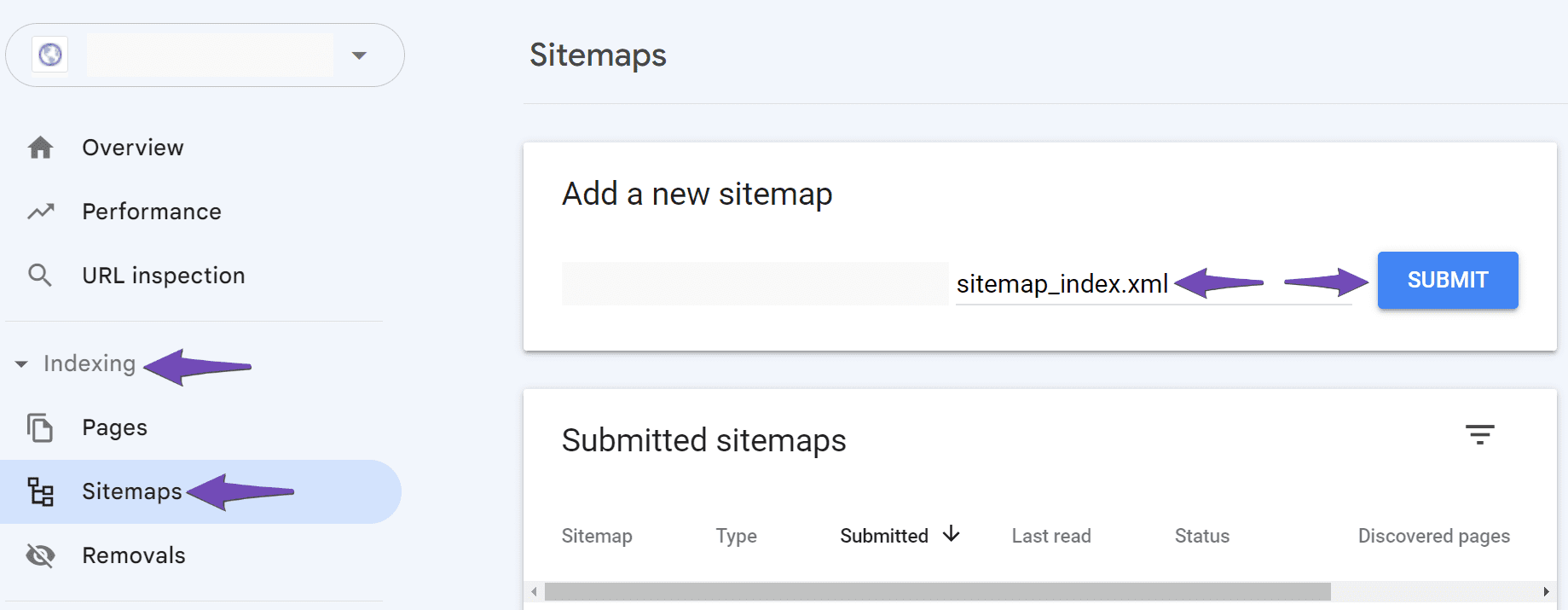
    Add the sitemap to Google Search Console

    If you still encounter the "Couldn’t fetch" error, try adding a forward slash before the sitemap URL and submit it again.

    5. Check Server Configuration

    If your sitemap still does not work, it may be due to server configuration issues. If you are using an Apache or Nginx server, you may need to add specific rewrite rules to your .htaccess or Nginx config file respectively. You can find more details on how to do this in our articles:

    6. Wait for Google to Fetch Your Sitemap

    Sometimes, it may take time for Google to fetch your sitemap. If everything seems correct, you might just need to wait a bit longer.

    If you’ve tried all these steps and are still having issues, please reply to this ticket, and a human agent from our support team will assist you further.

    Thank you for raising this concern, and we hope this helps resolve your issue!

    Sources:
    Troubleshooting the “Couldn’t Fetch” Error in Google Search Console » Rank Math
    Rank Math Sitemap Issues and Their Fixes » Rank Math

    Hello Rank Math Team !

    I have tried all these steps and are still having issues, please Help Me

    Hello,

    Thank you for contacting support.

    Please share the website where this issue is happening so we can check the sitemap and make sure that everything is correctly being reported to search engines.

    Looking forward to hearing back from you.

    businessmoney.fun

    Sitemap in Search Console Could not Fetch Image

    Hello,

    You mentioned you’re using Rank Math PRO but your account here is showing Rank Math Free .You might have used a different email address when you bought the plugin. If so, please send us a copy of your receipt from FastSpring.com. You can search your inbox for an email from them – please share the email with us so we can verify your purchase and update your account. You can share images with us by uploading them to an image hosting site like Imgur, and then sharing the generated URL with us here.

    That said, we can see that your Rank Math sitemap is loading and working fine, and we can see that Google has already indexed some of your pages.

    If you’re having issues getting Google to index a specific page, you can use your the URL Inspection Tool to manually submit the URL to be indexed.

    We appreciate your cooperation and we hope to hear from you soon.

    Site not At Google Search

    Hello !
    Dear You Can Check it This Above Image my site is not at google search. Please Help Me and i give you a 1 more picture you need to check it .

    Rank Math Pro Screeshot

    Please Help Me

    Hello,

    It seems that you already marked this ticket as “Resolved”. Do you still need our assistance regarding this issue?

    Looking forward to helping you.

    Thank you.

    My Dear !
    My issue is not solved Please Help Me he ticked by mistake my issue is in pending please help me

    Hello,

    Unfortunately, the screenshot URLs you’ve shared are not valid. Please use any image-sharing tool like https://imgur.com/upload to share the screenshots with us.

    Looking forward to helping you.

    Thank you.

    Hello !
    My Dear imgur is not existing in our country . Please Help me . Try to Understand my Issue/case Please

    Hello,

    Please use any other platform for sharing images that is available in your country to share the images with us to illustrate the issue you are referring to.

    Thank you.

    Hello,

    Since we did not hear back from you for 15 days, we are assuming that you found the solution. We are closing this support ticket.

    If you still need assistance or any other help, please feel free to open a new support ticket, and we will be more than happy to assist.

    Thank you.

Viewing 11 replies - 1 through 11 (of 11 total)

The ticket ‘Sitemap Indexing Issue’ is closed to new replies.
