Hello,
We apologize for the issue you are facing with the sitemap and the out of memory error. It seems that even after increasing the memory limit, the problem persists, which can be frustrating.
Here are a few suggestions to optimize your sitemap generation:
-
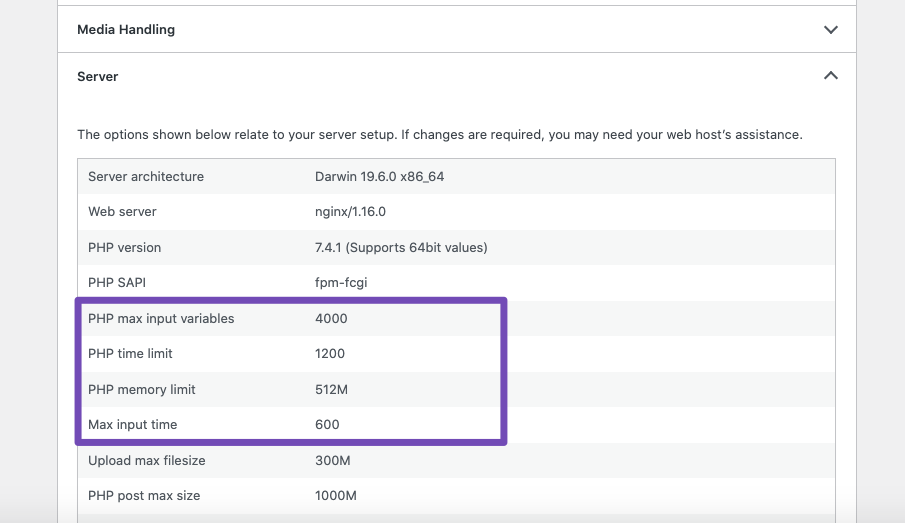
Check Server Resources: Ensure that your server meets the necessary requirements for running a large database. You can check your server configurations by navigating to Tools → Site Health → Info in your WordPress dashboard. Make sure the following values are adequate:
- PHP max input variables: 1000
- PHP time limit: 120
- PHP memory limit: 512M
- Max input time: 150
-
Optimize Database: If you have a large number of products, consider optimizing your database. You can use plugins that help clean up and optimize your database tables.
-
Disable Unused Plugins: Sometimes, other plugins can conflict or consume resources. Try disabling any unnecessary plugins temporarily to see if it helps.
-
Use a Staging Site: Create a staging site where you only activate Rank Math and see if the issue persists. This can help identify if another plugin or theme is causing the problem.
-
Contact Hosting Provider: If the issue continues, it may be worth reaching out to your hosting provider to see if they can assist in optimizing server settings or resources further.
If you continue to experience issues after trying these steps, please reply to this ticket, and a human agent from the Rank Math Support team will be happy to assist you further.
Sources:
Rank Math Sitemap Issues and Their Fixes » Rank Math
WordPress Database Error Commands Out of Sync; You Can’t Run This Command Now » Rank Math
Hello,
Thank you for contacting us and sorry for any inconvenience that might have been caused due to that.
Please try to set the links per sitemap to 500-1000 from WP Dashboard > Rank Math > Sitemap Settings > General and see if that works for you. Here’s a screenshot for your reference:

Let us know how it goes. Looking forward to helping you.
Thank you.
Hello,
Since we did not hear back from you for 15 days, we are assuming that you found the solution. We are closing this support ticket.
If you still need assistance or any other help, please feel free to open a new support ticket, and we will be more than happy to assist.
Thank you.



