Hello,
I apologize for the issue you are facing with your sitemap. It sounds like you’ve already tried flushing the cache, which is a good first step. Here are a few additional steps you can take to resolve the 404 error for your sitemap:
-
Flush Permalinks: Go to your WordPress admin area and navigate to Settings → Permalinks. Click on the Save Changes button, even if you didn’t make any changes. This can often resolve sitemap issues.

-
Check Server Configuration: If you are using an Nginx server, ensure that the necessary rewrite rules are added. You can refer to this guide for more details: Why the Sitemap_Index.xml is Throwing a 404 Error.
-
Check .htaccess File: If you are on an Apache server, make sure the rewrite rules are correctly set in your .htaccess file. You can find the required code in the same guide linked above.
-
Disable Caching for Sitemap: Ensure that your caching plugin is not caching the sitemap. You may need to exclude the sitemap files from being cached. More information can be found here: Exclude Sitemaps from Caching.
-
Check Indexing Settings: Make sure that your posts/pages are set to index in the robots meta tag. You can check this by navigating to Rank Math SEO → Advanced tab in the post editing screen.
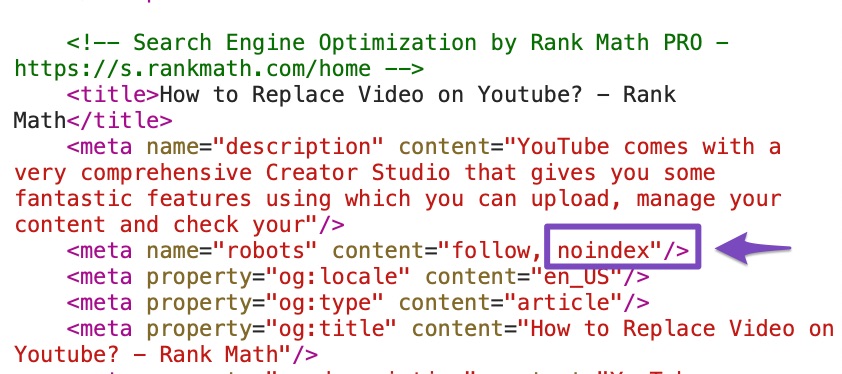
If you’ve tried all these steps and are still experiencing issues, please reply to this ticket with your site URL so we can assist you further. A human agent from our support team will take over and help resolve the issue.
Thank you for raising this concern!
Sources:
Why the Sitemap_Index.xml is Throwing a 404 Error » Rank Math
Rank Math Sitemap Issues and Their Fixes » Rank Math
Tried above, please help human agent
Hello,
Thank you for contacting Rank Math support and sharing your concerns with us.
We checked the index sitemap and sub-sitemaps, and they are opening and validating correctly.


If the issue persists, please clear your browser cache and check again.
Let us know how it goes. We look forward to hearing from you.
Thank you.
Hello,
Thank you for contacting Rank Math support and sharing your concerns with us.
We checked the index sitemap and sub-sitemaps, and they are opening and validating correctly.
If the issue persists, please clear your browser cache and check again.
Let us know how it goes. We look forward to hearing from you.
Thank you.
Hello, THanks for your support. I have the same issue again. There seems to be an issue because the Sitemap shows 404 error.
Hello,
Your sitemaps are working fine at the moment.
If the issue was fixed upon flushing the permalinks, then your sitemap must still be cached.
Please exclude the Sitemap files of the Rank Math plugin from your caching plugin. The cache could be via a plugin or from the server. For plugins or Cloudflare, please follow this article:
https://rankmath.com/kb/exclude-sitemaps-from-caching/
Once done, disable the transient cache for the sitemap by applying this filter. This will make sure that your XML sitemap always reflects the latest changes on your site:
/**
 * Filter if XML sitemap transient cache is enabled.
 *
 * @param boolean $unsigned Enable cache or not, defaults to true
 */
add_filter( 'rank_math/sitemap/enable_caching', '__return_false');
If you’re not sure how to add this code, you can follow this guide:
https://rankmath.com/kb/wordpress-hooks-actions-filters/
Looking forward to helping you.
Hello,
Since we did not hear back from you for 15 days, we are assuming that you found the solution. We are closing this support ticket.
If you still need assistance or any other help, please feel free to open a new support ticket, and we will be more than happy to assist.
Thank you.




