Hello,
We apologize for the issue you are facing with your website not being indexed on Google. There are several reasons why your website might not be indexed yet:
-
Google Has Not Indexed Your Site Yet: If your website is new, it may take some time for Google to index it. It can take up to a few weeks for Google to index a new website. In the meantime, your website will not show up in search results.
-
Blocked by Robots.txt: If you accidentally block Google from crawling your site, it will not appear in search results. Check your robots.txt file to ensure that there are no directives blocking Googlebot from accessing your site. You can use the robots.txt testing tool to verify this.
-
Sitemap Submission: Make sure you have submitted your sitemap to Google. Rank Math automatically creates a Sitemap Index for your website, which is available at https://yourdomainname/sitemap_index.xml. Submitting this Sitemap Index can help Google find and crawl all the pages on your website more efficiently.
-
Crawl Budget: Google assigns a crawl budget to your website based on various factors, including the frequency of posting and domain authority. This can affect how quickly your content gets indexed.
If you have checked these factors and your site is still not indexed, we recommend using our Instant Indexing plugin for Google to submit your URLs directly to Google.
Thank you for raising this concern! If you have further questions or need assistance, please reply to this ticket, and a human agent from the Rank Math Support team will assist you further.
Sources:
Why Did My Website Disappear From Google Search? » Rank Math
Why Google Hasn’t Indexed Your Post, Page, and/or Website? » Rank Math
Hello,
Thank you for contacting support and we apologise for any inconvenience caused.
To address this issue, we recommend checking the WordPress settings directly to ensure that the “Discourage search engines from indexing this site” option is unchecked. You can access this setting by navigating to Settings → Reading in your WordPress dashboard and ensuring that the checkbox is unchecked, as shown in the image below:
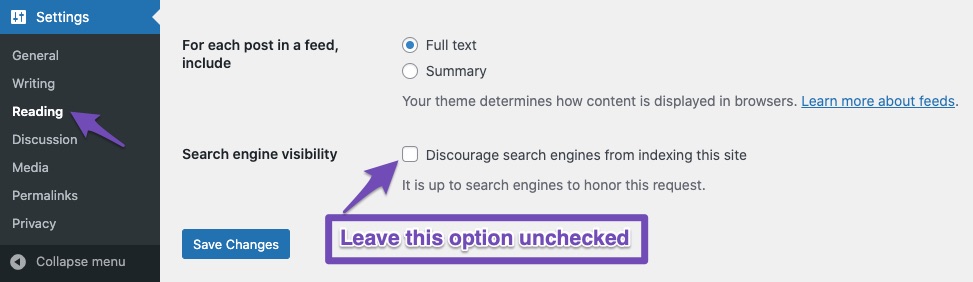
However, if the option is unchecked, and the notification is still showing, you can dismiss the notification by clicking the X button.
If the notice still keeps showing, please head over to Rank Math> Status & Tools > Database Tools and from there remove Rank Math transients.

Let us know how it goes. Looking forward to helping you.
Thank you.
Hello,
Since we did not hear back from you for 15 days, we are assuming that you found the solution. We are closing this support ticket.
If you still need assistance or any other help, please feel free to open a new support ticket, and we will be more than happy to assist.
Thank you.



