Hello,
We apologize for the issue you are facing with your sitemap when using the www version of your domain. It seems like there might be a configuration issue causing the sitemap to show a white screen when accessed with www.
To resolve this, you can set up a 301 redirect from the www version of your site to the non-www version. This way, whenever someone tries to access the sitemap with www, they will be redirected to the correct URL without www.
Here’s how you can do it:
-
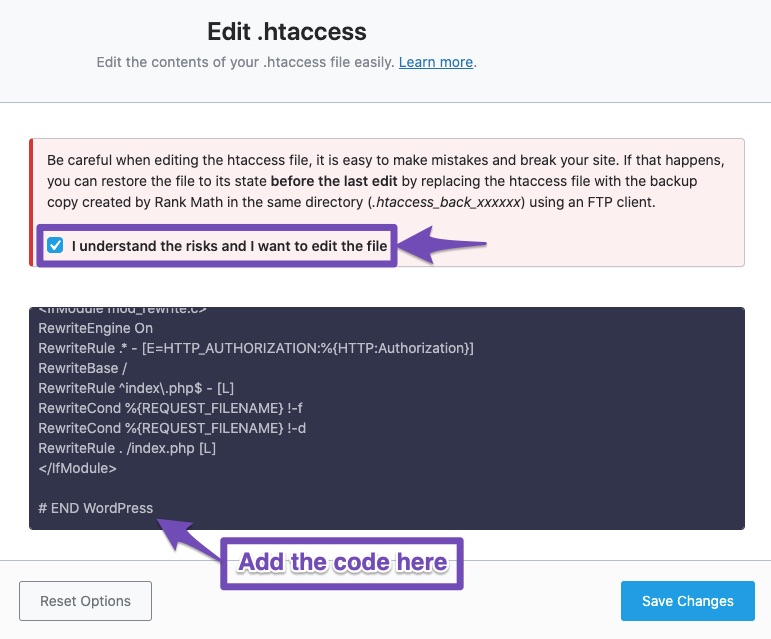
Edit your .htaccess file: You can add the following code snippet to your .htaccess file to redirect www to non-www:
RewriteEngine On
RewriteCond %{HTTP_HOST} www.oswalpublishers.com
RewriteRule (.*) http://www.example.com [R=301,L]
Make sure to place this code after #END WordPress in your .htaccess file.
-
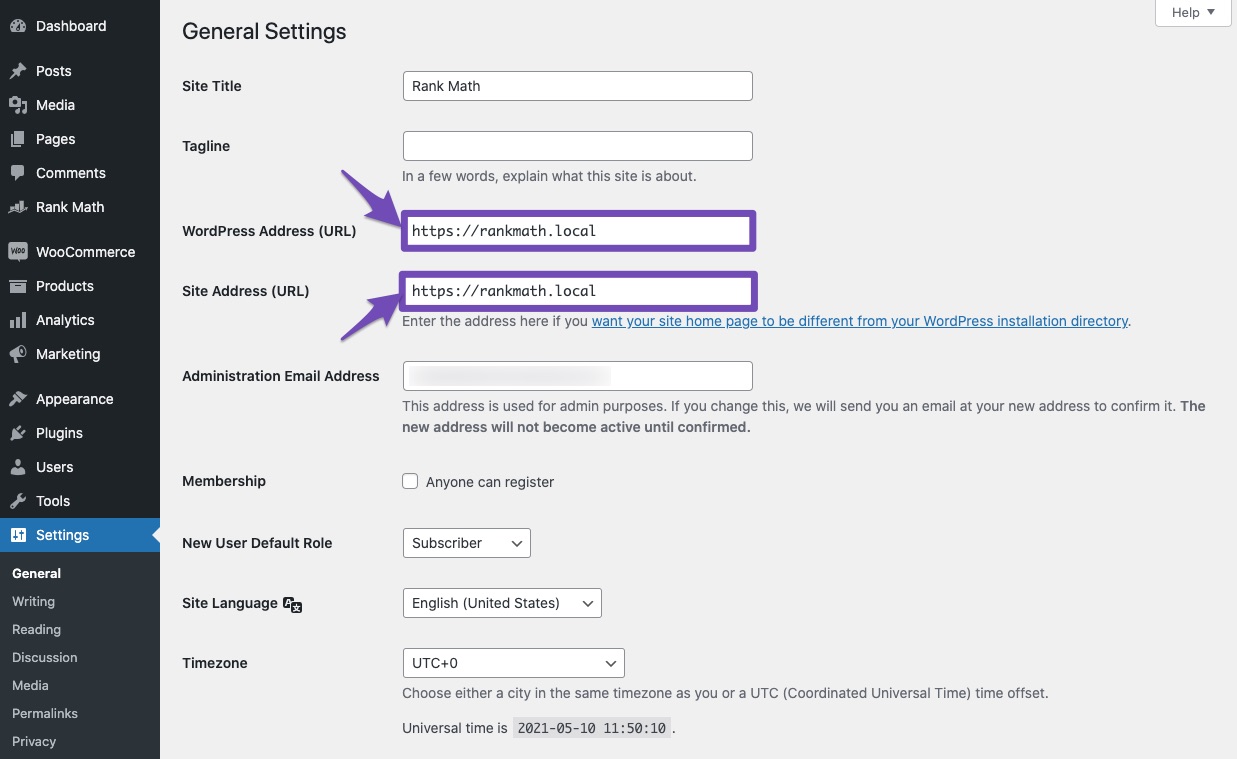
Check WordPress Settings: Ensure that both the WordPress Address and Site Address in your WordPress settings are set to the non-www version of your site. You can find these settings under Settings → General in your WordPress admin area.
If you continue to experience issues after making these changes, please reply to this ticket with your site URL so that a human agent from our support team can assist you further. Thank you for raising this concern!
Sources:
Why Are Posts Redirecting to www or Non-www Incorrectly?
Hello,
Thank you for your query and we are so sorry about the trouble this must have caused.
The www version of your sitemap seems to be loading just fine and redirects to the final version (non-www). Please see this video screencast: https://i.rankmath.com/v/hFbbUm
Please clear your website and browser caches and check again.
Let us know how that goes. Looking forward to helping you.
Hi Mr. Jeremy,
Thank you for your reply. I understand the root cause of the issue, and I have already fixed it.
I just wanted to inform your team that the problem was caused by dynamic URLs generated by the Rank Math plugin. The default URLs were working fine. However, the solution provided by your team was not suitable for this specific issue.
Reason 1: If we use the .htaccess file, the redirection is handled at the server level. However, in this case, the dynamic URLs are not yet created at that point, meaning they cannot be manipulated through .htaccess.
Solution: Since these dynamic URLs are generated by the Rank Math plugin, the relevant code runs only after the platform is fully loaded. Therefore, the best approach is to handle or manipulate these URLs in the functions.php file instead.
Thank you,
Vishal Verma
Sr. Php Developer
OSWAL PRINTERS AND PUBLISHERS PRIVATE LTD.
Hello,
Glad that everything has been sorted out.
Please feel free to reach out to us again in case you need any other assistance.
We are here to help.
Thank you.




