Hello,
We apologize for the issue you are facing with your sitemap submission. The "Couldn’t fetch" error in Google Search Console can be frustrating, especially when it indicates that the page cannot be indexed due to a ‘noindex’ tag.
Here are some steps you can take to troubleshoot and resolve this issue:
1. Check Rank Math Settings
Ensure that your posts are set to index. You can do this by navigating to Rank Math SEO → Titles & Meta. In the Robots Meta settings, make sure the Index checkbox is enabled for your posts.

2. Validate Your Sitemap
Use the Validate XML Sitemap tool to confirm that your sitemap is correctly configured. Enter your sitemap URL and click VALIDATE SITEMAP. If there are any issues, they will be highlighted.

3. Flush the Cache
If your sitemap appears outdated, you may need to flush the sitemap cache. Go to Rank Math SEO → Sitemap Settings, increase the value of Links Per Sitemap by one, and then save your settings. After that, navigate to Settings → Permalinks and click Save Changes to ensure the current settings are applied.

4. Check for NoIndex Tags
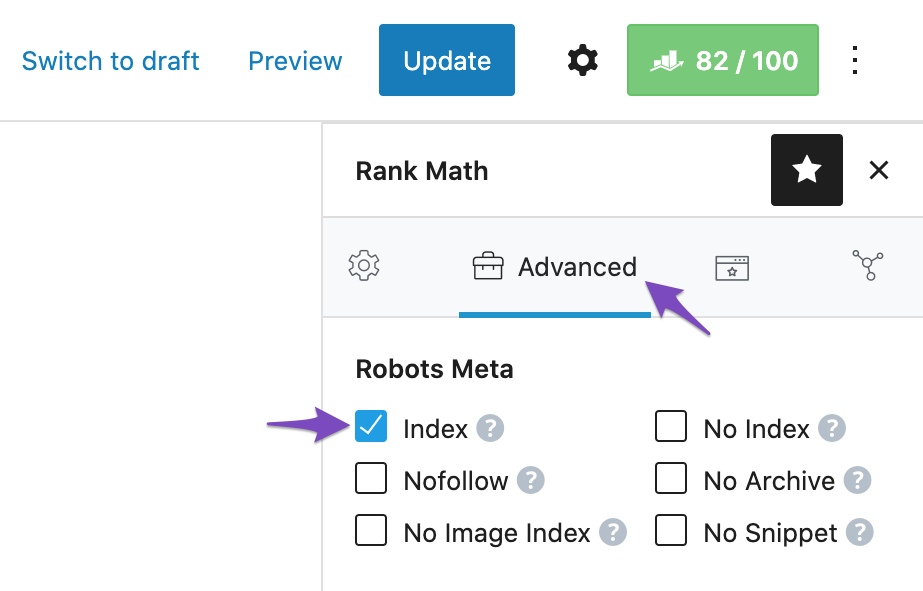
Make sure that the pages you want indexed do not have a noindex tag set. You can check this in the Rank Math Metabox when editing a post or page. Ensure that the Robots Meta is set to Index.
5. Resubmit Your Sitemap
After making these changes, remove your sitemap from Google Search Console and then submit it again.
If you continue to experience issues after following these steps, please reply to this ticket, and a human agent from the Rank Math Support team will assist you further. Thank you for your patience, and we hope this helps resolve your issue!
Sources:
Troubleshooting the “Couldn’t Fetch” Error in Google Search Console » Rank Math
This is an automated reply from Rank Math Support Bot. If you need further assistance, please reply to this topic and a human support agent will reply to you shortly.


