
-
Hi there, i am new in rank math. So i wanted to set it up for the first time and stuck while doing it.
You can see the pic. I am not getting my site in the box. So kindly help me out here.

-
Hello,
We apologize for the issue you are facing with setting up Rank Math. It seems like you’re having trouble getting your site to appear in the setup wizard.
To resolve this, please ensure that you have entered your website URL correctly in the setup wizard. If the problem persists, it might be helpful to check if there are any caching plugins active on your site that could be affecting the setup process.
If none of these steps resolve the issue, we recommend replying to this ticket, and a human agent from the Rank Math Support team will be able to provide more specific guidance based on your website’s configuration.
Thank you for raising this concern!
Hello,
Thank you for your query and we are so sorry about the trouble this must have caused.
We deeply apologize but the screenshot you shared can’t seem be opened from our end. We tried accessing the screenshot URL via VPN but we still can’t see it.
Can you please upload your screenshot using Imgur instead? You may also use any preferred cloud storage solutions.
Looking forward to helping you.
Hi there. Here is the pic.
Hello,
For troubleshooting, you can skip the Google connection process in the Setup Wizard.
Then, please verify using the URL prefix and ensure that you have verified the correct version of your website on the Google Search Console (HTTP or HTTPS, www or non-www).
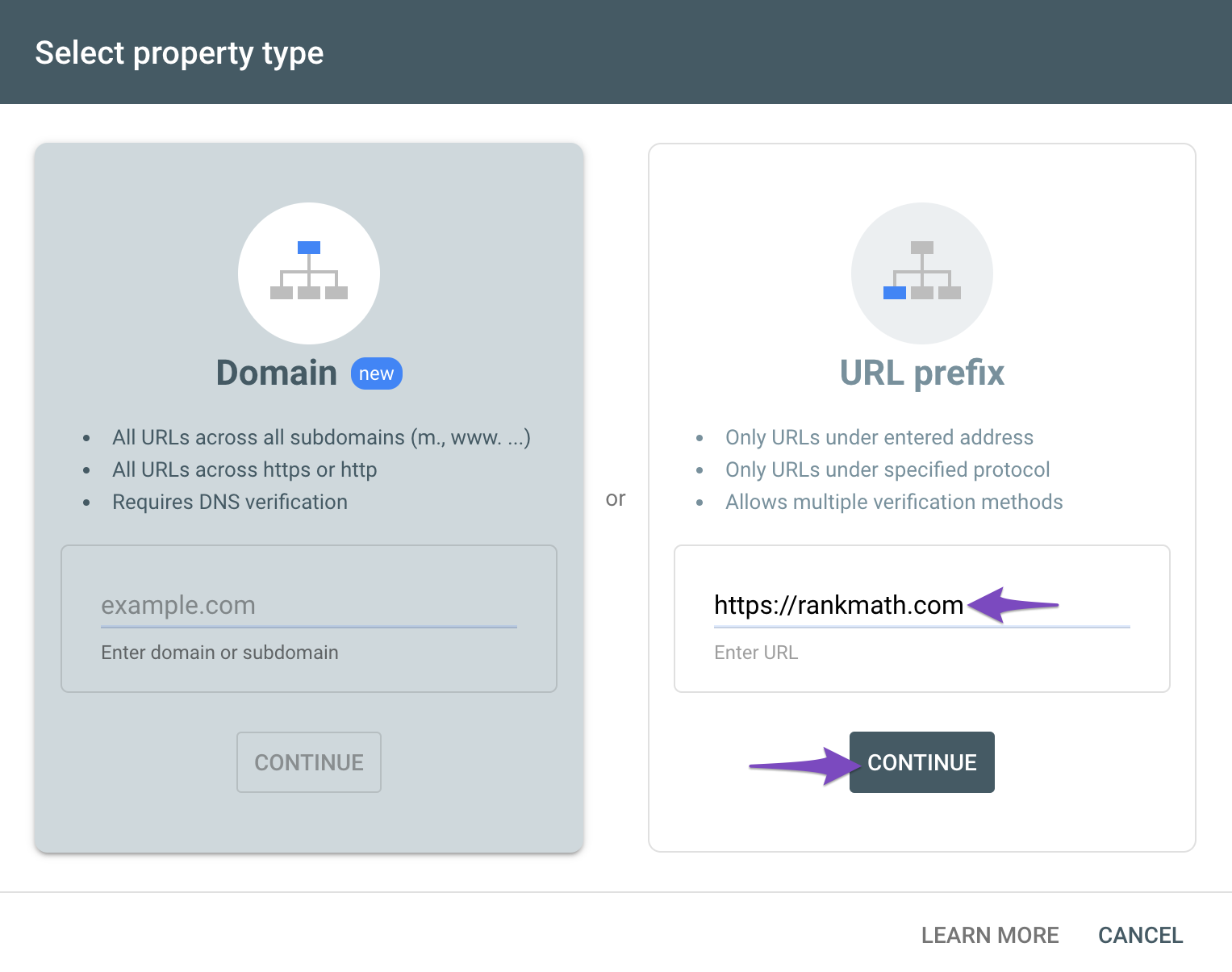
You can follow our guide here to create the URL Prefix property:
https://rankmath.com/kb/google-site-verification/#num-1-1-open-google-search-consoleThe URL-prefix property also helps keep your sitemap in sync with Google Search Console as we submit it automatically for you. In addition, the domain property won’t work correctly on some sections of the Analytics module such as the IndexStatus.
Regarding the Analytics drop-down, could you please confirm if you have already created a GA4 property for your website?
If not yet, please visit this page (https://analytics.google.com/analytics/web/) and sign up for a Google Analytics account and property, then reconnect your Google Account so the new Analytics account will reflect in that section.
Hope that helps.
Hey there again. I have set it up. Thanks to you guys. But i have one more problem. My impression was after installing it properly my dashboard will like like the first picture but now it is looking like the other two pictures. Blank and empty. Is it normal?
https://imgur.com/T56LMkX
https://imgur.com/6ymMeuf
https://imgur.com/TUlpoALHello,
Normally, that page will display the Analytics section within just a few seconds.
If the page is still shown just like in your screenshot for too long, then there may be a conflicting plugin or your active theme with Rank Math.
Assuming you are using the latest version of all the plugins and the themes (please update if not yet), to determine that, please follow this troubleshooting guide:
https://rankmath.com/kb/check-plugin-conflicts/Here is a video you can follow as well: https://www.youtube.com/watch?v=FcIWRhcUP2c
Only the site admin would know and your users won’t be affected by this troubleshooting.
Looking forward to helping you.
hey there again. I have tried both the solutions you prescribed and yet no result yet. Still analytics showing like before. Here are the plugins i am using.
For theme, i am using SOLEDAD.
Let me know what you think.
Hello,
We might need to take a closer look at the settings. Please edit the first post on this ticket and include your WordPress & FTP logins in the designated Sensitive Data section.
Please do take a complete backup of your website before sharing the information with us.
It is completely secure and only our support staff has access to that section. If you want, you can use the below plugin to generate a temporary login URL to your website and share that with us instead:
https://wordpress.org/plugins/temporary-login-without-password/
You can use the above plugin in conjunction with the WP Security Audit Log to monitor what changes our staff might make on your website (if any):
https://wordpress.org/plugins/wp-security-audit-log/
Looking forward to helping you.
Thank you.
Hello,
I have updated the sensitive data as requested. Can you please check further?
Thank you.
Hey there i have updated the info quite long ago. Can you plz look into it?
Hello,
The issue was caused by the fact that the database tables for the Analytics module were not created which we did but now the problem is with the WP-Cron on your website which is not running.
The cron jobs are running into the following issue: https://wp-crontrol.com/help/problems-spawning-wp-cron/#unexpected-http-response-code-401-or-403
You will need to talk with your hosting provider and ask them to help you fix this issue with the cron jobs so the data import can start into the website.
Don’t hesitate to get in touch if you have any other questions.
Thanks for your continuous support.
Hello,
You’re welcome.
Let us know if you need any assistance with Rank Math.
If you have any other concerns, please don’t hesitate to contact us anytime so we can assist you further.
Looking forward to helping you.
Hello,
Since we did not hear back from you for 15 days, we are assuming that you found the solution. We are closing this support ticket.
If you still need assistance or any other help, please feel free to open a new support ticket, and we will be more than happy to assist.
Thank you.



The ticket ‘setup problem’ is closed to new replies.