Hello,
We apologize for the issue you are facing with the SEO settings not changing. It sounds like there may be a few factors at play here.
-
Plugin Conflicts: Sometimes, other plugins can interfere with Rank Math’s functionality. We recommend checking for any plugin conflicts by following our guide on plugin conflict.
-
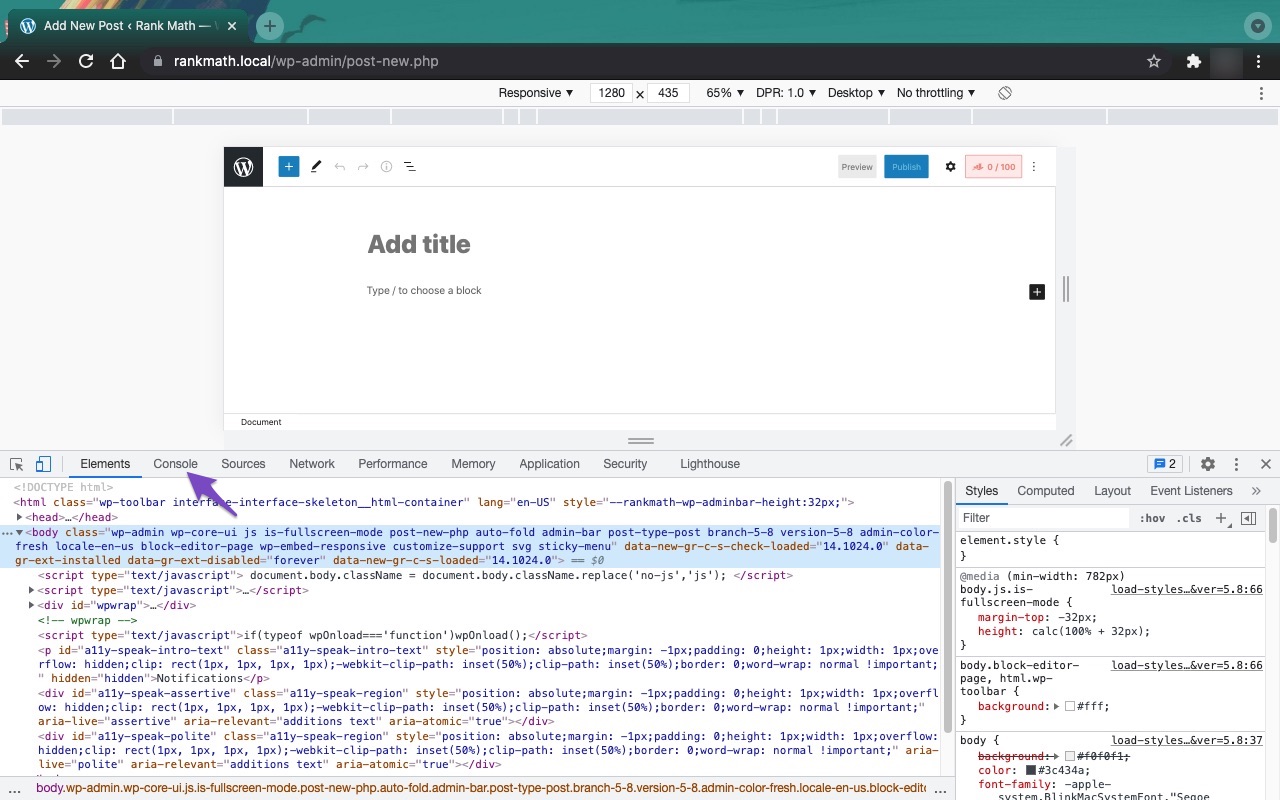
JavaScript Errors: If there are JavaScript-related errors on your site, they could prevent changes from being saved. You can diagnose these errors using the JavaScript Console in your browser. Here’s how to check for JavaScript errors in Chrome:
- Open Developer Tools by navigating to More Tools → Developer Tools from the Chrome menu or using the shortcut Ctrl + Shift + J (Windows) or Cmd + Option + J (Mac).
- Click on the Console tab to see if there are any errors that might be affecting the functionality.

-
Focus Keyword: The focus keyword is the main keyword you want your post or page to rank for in search engines. It’s important to choose a keyword that is relevant to your content. If you’re unsure what to use, consider what terms people might search for to find your content.
If you have already tried troubleshooting and the issue persists, we recommend replying to this ticket with more details, and a human agent from the Rank Math Support team will assist you further.
Thank you for your patience, and we hope to resolve this issue for you soon!
Sources:
Why Your SEO Title, Description & Focus Keyword Aren’t Being Saved » Rank Math
Hello,
Thank you for contacting Rank Math support, and sorry for any inconvenience that might have been caused due to that.
1) The issue is when I change the description, it just reverts back to the one automatically generated.
We logged in to your website and are unable to replicate this. The description gets saved when changed. If you don’t edit the description, the placeholder content will be used as your SEO Description. However, to modify the description, you need to manually edit it.
2) If I change keywords it keeps giving me a score in red and says my focus keyword doesn’t match something, but I have no idea what a focus keyword is or what I need to put in there.
The focus keyword is simply the search term you want your post or page to be ranked for in the search engines. So when the audience looks out for that specific phrase or keyword in the search engines, they should probably locate you.
You can learn more about the focus keyword here: https://rankmath.com/kb/what-is-a-focus-keyword/
Hope this helps, and please do not hesitate to let us know if you need our assistance with anything else.
Thank you.
Hi
Thanks for your response. However, I have changed the description at least 4 times manually, and each time I do this, it reveres to the automatic on. What am I not doing? can you talk me through the procedure please?
Thank you
Hello,
The meta data got saved when we checked: https://www.loom.com/share/7f6933edc798452788b0075d899ae247?sid=434795e7-c638-4869-a2d6-99427e2b4e47
Can you please share the page where this issue occurred and the steps we can take to replicate it?
You can also share a screen recording using https://www.loom.com/ so we can further understand the issue.
We look forward to hearing from you.
Hello,
Since we did not hear back from you for 15 days, we are assuming that you found the solution. We are closing this support ticket.
If you still need assistance or any other help, please feel free to open a new support ticket, and we will be more than happy to assist.
Thank you.



