
-
Rank Math adds an Open Graph tag to the source code of our site:
<html lang=”de-DE” prefix=”og: https://ogp.me/ns#”>
This results in a 404 Error, which leads to Google deactivating our Merchant Center account.
When deactivating Rank Math, the code is gone.
When adding the suggested code to rankmath.php, the code is still there.
We kindly ask for your assistance.
Best regards.
Andy

-
Hello,
We apologize for the issue you are facing with the Open Graph tag causing a 404 error on your site. It seems that the Open Graph tag added by Rank Math is leading to complications with your Merchant Center account.
To remove the Open Graph tags from your source code, you can follow these steps:
-
Disable Open Graph in Rank Math: Go to Rank Math → General Settings → Social Meta and disable the Open Graph option. This should prevent Rank Math from adding the Open Graph tags to your site.
-
Check for Caching: If you are using any caching plugins, make sure to clear your cache after making changes. Sometimes, cached versions of your site may still display the old code.
-
Custom Code: If you have added custom code to
rankmath.phpand it’s still not working, please ensure that the code is correctly implemented and that there are no syntax errors. You might also want to check if there are any other plugins or themes that might be adding their own Open Graph tags. -
Testing: After making these changes, you can test your site using the Facebook Sharing Debugger to see if the Open Graph tags are still present.
If these steps do not resolve the issue, please reply to this ticket, and a human agent from the Rank Math Support team will take over and assist you further.
Thank you for raising this concern, and we hope to help you resolve it soon!
We don’t have a Social Meta section under Rank Math → General Settings, but we have one under SEO Title & Meta. But there are no Open Graph options.
Hello,
Thank you for your patience.
In this case, you may use this filter on your site to remove the prefix:
add_filter( 'language_attributes', function( $input ) {
	$input = str_replace( ' prefix="og: https://ogp.me/ns#"', '', $input );

	return $input;
}, 16 );
Here is a guide you can follow to add the filter:
https://rankmath.com/kb/wordpress-hooks-actions-filters/Looking forward to helping you.
Thank you very much, this filter works like a charm.
But there is another piece of code added by Rank Math, that results in a 404 error.
Although we deactivated Analytics functions in Rank Math’ settings, it adds some code for Google Tag Manager with an ID that is either outdated or wrong.
How can we get rid of that code?
Best regards.
AndyHello,
Please share a screenshot of the tag using a tool like https://imgur.com/ so we can check and help you remove it from the site.
Looking forward to helping you.
Hi Jaideep,
I uploaded a screenshot to our webspace:
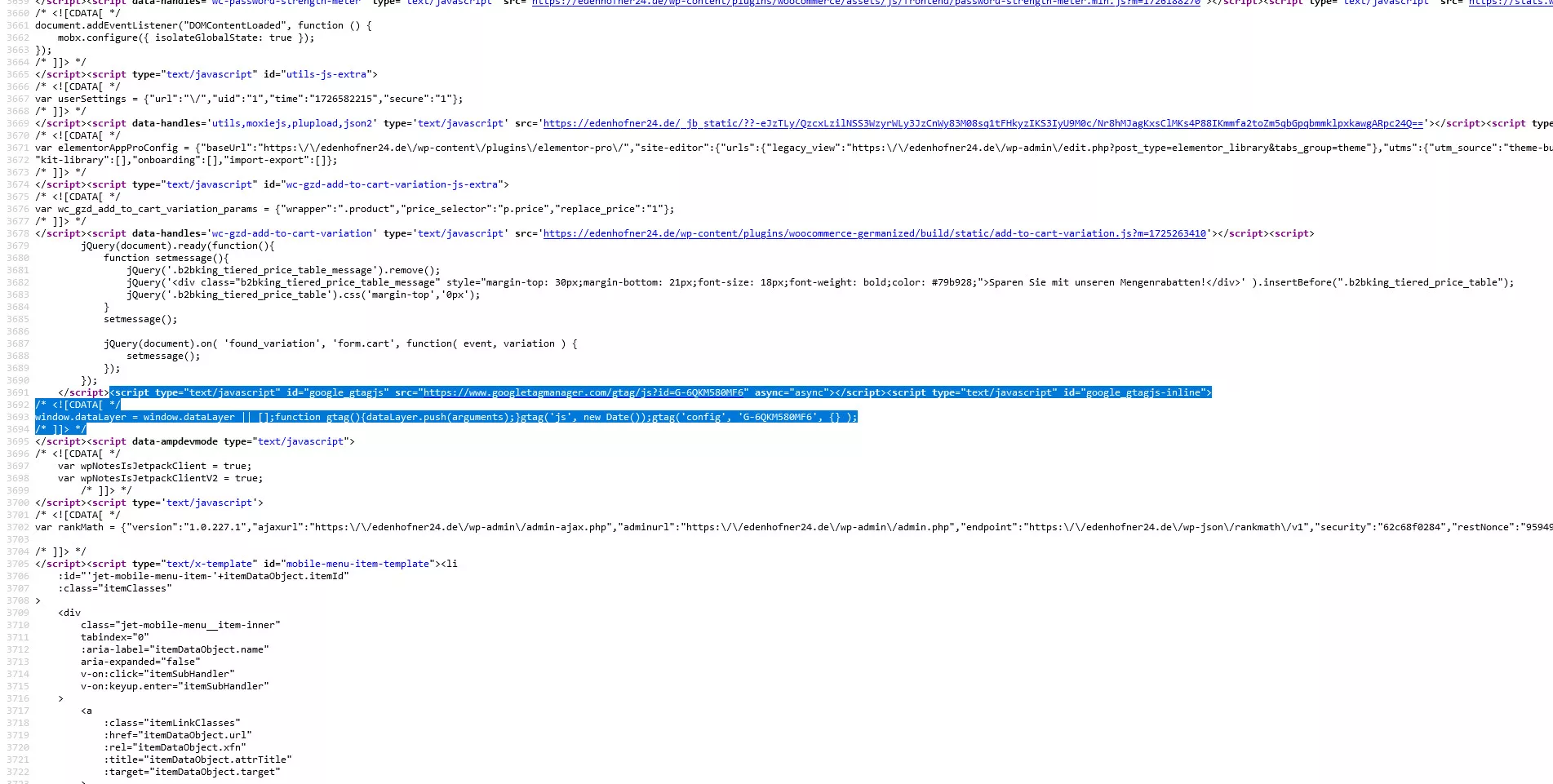
Hi Jaideep,
is there any update to our last message?
Best regards.
AndyHello,
Please navigate to WP Dashboard > Rank Math SEO > General Settings > Analytics and disable the Install Analytics Code option. If the option is already disabled, the code isn’t coming from our plugin. You must be using some other plugin to add the analytics code.
Hope that helps and please do not hesitate to let us know if you need our assistance with anything else.
Hello Jaideep,
in the Analytics tab, there is no option to enable or disable the installation of Analytics code. We have disconnected the Rank Math / Analytics connection, but without success.
As the wrong code disappears when deactivating Rank Math and returns when activating ist again, it definetely is not a third party plugin problem, it’s Rank Math.
So we have to as for further assistance, because the resulting 404 error ist giving us problems with Google.
Hello,
Ensure you are using the latest version of Rank Math on your site: https://rankmath.com/changelog/
See the image below for a pictorial illustration of where the
Install analytics codetoggle:

Hope that helps, and please do not hesitate to let us know if you need our assistance with anything else.
Hi Ike,
the link you provided leads to the change log of Rank Math PRO, we are currently using the FREE version 1.0.228. Can this be the reason, that we have no field to turn off the installation of analytics code?
Best regards.
AndyHello,
The option to
Install analytics codealso exists in the FREE version. You can find the changelog for the free version here: https://rankmath.com/changelog/free/If this issue persists, we might need to take a closer look at your settings: Please edit the first post on this ticket and include your WordPress logins in the designated Sensitive Data section.
Please do take a complete backup of your website before sharing the information with us.
It is completely secure and only our support staff has access to that section. If you want, you can use the below plugin to generate a temporary login URL to your website and share that with us instead:
https://wordpress.org/plugins/temporary-login-without-password/
You can use the above plugin in conjunction with the WP Security Audit Log to monitor what changes our staff might make on your website (if any):
https://wordpress.org/plugins/wp-security-audit-log/
We really look forward to helping you.
Hello,
Since we did not hear back from you for 15 days, we are assuming that you found the solution. We are closing this support ticket.
If you still need assistance or any other help, please feel free to open a new support ticket, and we will be more than happy to assist.
Thank you.
-



The ticket ‘Removing Open Graph Tag from the source code’ is closed to new replies.