Hello,
We apologize for the issue you are facing with your site’s visibility in search engines after installing the Rank Math SEO plugin. Thank you for raising this concern.
The "SEO Notice: Your site is set to No Index" message indicates that your site is currently configured to prevent search engines from indexing it. This can happen if the Search Engine Visibility setting in WordPress is enabled.
To resolve this, please follow these steps:
- Go to your WordPress dashboard.
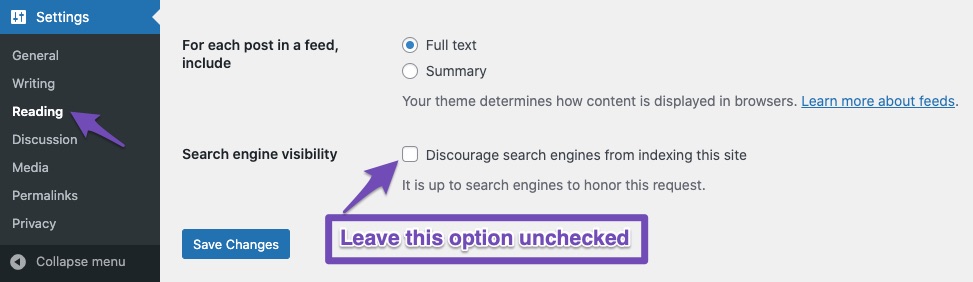
- Navigate to Settings → Reading.
- Look for the section labeled Search Engine Visibility.
- Ensure that the checkbox labeled Discourage search engines from indexing this site is unchecked.
- Click the Save Changes button at the bottom of the page.
Additionally, you should check if any specific pages or posts have a noindex meta tag set. You can do this by reviewing the settings in Rank Math for each individual post or page.
If you continue to experience issues after making these changes, we recommend monitoring your site’s indexation status using Google Search Console or the Index Status report in Rank Math’s Analytics. This will help you identify any further problems that may be affecting your site’s visibility.
If you have any doubts or need further assistance, please reply to this ticket, and a human agent from our support team will be happy to assist you further.
Sources:
Analyzing Your Site’s SEO with Rank Math’s SEO Analysis Tool
Fix Excluded by NoIndex Tag – Google Search Console Status » Rank Math
I went to Settings > Reading and I do not see that check box option available at all. I also did check every page in RankMath and the NoIndex box is not checked.
Do we have any resolve or updates? I’m consider deactivating it and asking for a refund as I only used it for not even a week and it’s obviously caused problems with my site that I am not getting any assistance with.
Hello,
Apologies for the inconvenience.
The notice should be cleared once you have set your site to index and cleared the notification by clicking the x button.
If it’s still showing, please try to clear Rank Math’s transient. Head over to your WordPress dashboard > Rank Math > Status & Tools > Database Tools > Remove Transients:

Once done, clear your website’s cache and click the close button again.
Let us know how this goes.
Yeah I did all that and it actually went away about 4 hours ago. However, some of the other plugins (WPForms) for example aren’t working correctly. And they all stopped working when I installed your plugin. Have you heard about this issue before? Because I’m leaning toward deactivating it and asking for a refund unless you can make everything work like it was before and assure me that it will continue to work.
Hello,
To investigate this issue further, we might need to take a closer look at your website and settings. Please follow these steps:
- Edit the first post on this ticket and include your WordPress and FTP logins in the Sensitive Data section. This is a secure section that only our support staff can access.

- Make sure you take a complete backup of your website before sharing the information with us.
- If you prefer, you can use this plugin to generate a temporary login URL to your website and share that with us instead: https://wordpress.org/plugins/temporary-login-without-password/
- You can also use this plugin to monitor what changes our staff might make on your website (if any): https://wordpress.org/plugins/wp-security-audit-log/
We appreciate your cooperation and patience.
In the meantime, there is no active subscription on the account you are using to contact us.
Can you please share the email address which you used to make the purchase or you can search and forward the receipt from FastSpring.com so we can locate your account?
We look forward to hearing back from you.
Thank you.
This issue has been resolved.
Hello,
We are glad that the issue has been sorted out.
Please feel free to reach out to us again in case you need any other assistance.
We are here to help.
Thank you.





