Hello,
We apologize for the issue you are facing with Rank Math conflicting with Elementor. To help resolve this, we recommend following these steps:
-
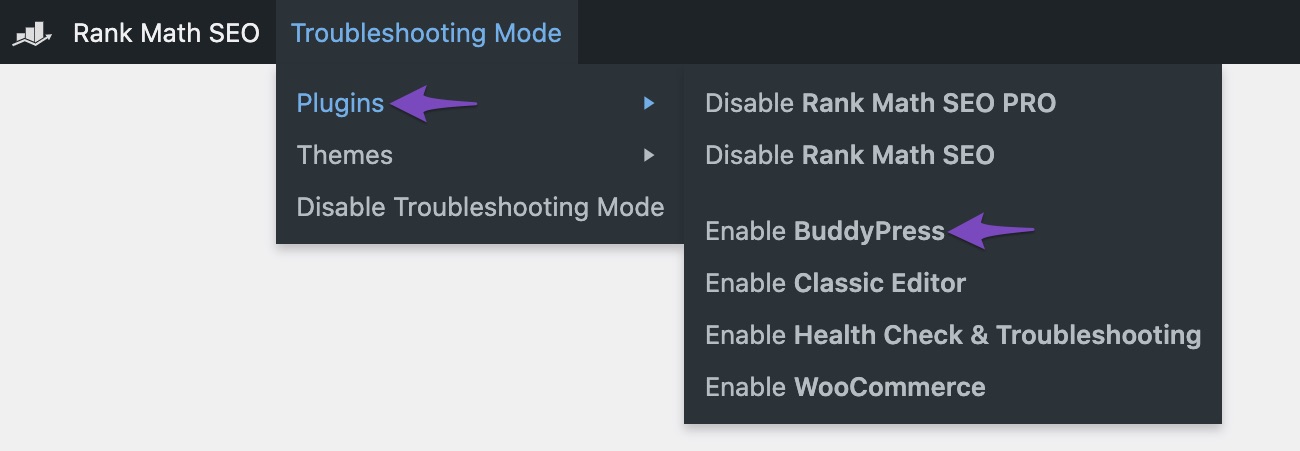
Enable Troubleshooting Mode: Navigate to the Troubleshooting Mode in the top bar of Rank Math. This allows you to test for conflicts without affecting your live site.
-
Activate Plugins One by One: In Troubleshooting Mode, activate the Rank Math plugin first and then Elementor. Check if the conflict persists. If it does, deactivate Elementor and activate other plugins one at a time to identify if any specific plugin is causing the conflict.
-
Check Theme Conflicts: If the issue continues, switch to a default WordPress theme (like Twenty Twenty-One) to see if the conflict is theme-related.
-
Provide Details: If you identify a specific plugin or theme causing the conflict, please let us know which one it is. Additionally, any error messages or behavior you observe can be helpful.
If the problem persists even with only Rank Math and a default theme active, please reply to this ticket with those details, and a human agent from our support team will assist you further.
Thank you for raising this concern! We’re here to help you resolve it.
Hello,
Thank you for contacting support.
The issue with the new Elementor PRO and Rank Math PRO conflict was corrected in a minor update we released 3 weeks ago: https://rankmath.com/changelog
If you don’t see the new update, can you please head over to WordPress Dashboard > Rank Math SEO > Status & Tools > Database Tools and clear the transients?
Then, proceed to WordPress Dashboard > Plugins and see if you are able to see a new version of the PRO plugin which you can update to, which should correct the issue after performing the update.
Please confirm you now have the new version of Rank Math PRO which is version 3.0.78. You can also download and install manually from: https://rankmath.com/my-account/
Here’s a guide you can follow to update manually: https://rankmath.com/kb/update-rank-math-manually/
We hope that helps.
Thanks.
Manually updated but still says Version 3.0.70. I’m so confused. Could Cloudflare be delaying the update?
Hello,
It seems that you’re currently using the Rank Math PRO plugin, but the account you used to open this ticket is a free account.
Can you please search and forward a receipt from FastSpring.com so we can locate your account and verify it?
Please access your FTP or your CPanel’s File Manager, locate your website’s root directory, navigate to /wp-content/plugins/, and delete the folder seo-by-rank-math-pro.
After doing that, please try to re-install the plugin on your website.
Please note that all the data from the plugin will remain intact on the database in this process.
Let us know how it goes.
Thank you.
Oh, got it, I logged in with Gmail and I downloaded the PRO update. I didn’t even realize I had 2 accounts. Geez.
It’s all good, the site is working now!
FYI, Order ID: RANKMATH240911-7367-48271
I’ll make sure I log in with the other acct from now on.
Thank you!
Hello,
We are glad to be of help
Do you still need our assistance with anything else or can we go ahead to close the ticket?
We look forward to helping you.
Thank you.
Hello,
Since we did not hear back from you for 15 days, we are assuming that you found the solution. We are closing this support ticket.
If you still need assistance or any other help, please feel free to open a new support ticket, and we will be more than happy to assist.
Thank you.



