Hello,
Thank you for contacting us and sorry for any inconvenience that might have been caused due to that.
Please follow this guide to remove the Rank Math App from your Google account: https://rankmath.com/kb/analytics-issues/#expired-google-oauth-token
After that, please reconnect your Google account from WP Dashboard > Rank Math > General Settings > Analytics with all the required permissions and see if that works for you.
Let us know how it goes. Looking forward to helping you.
(Thank you for responding)
Hi. I tried. And it does not work. Test connection is no longer showing either.
Both ‘search console and ‘Analytics’ have red dots instead of green.
When I remove google account and go through connection process, it brings me back to the 2 red dots.
When I hover over the red dots it says not connected.
Hello,
– Please ensure the Rank Math plugin is updated to the latest version: https://rankmath.com/changelog/free/
– Disconnect and reconnect your account from WordPress dashboard > Rank Math > Dashboard > Help

– Re-create tables by clicking WordPress Dashboard > Rank Math > Status & Tools > Database Tools and click the Re-create database Table button.

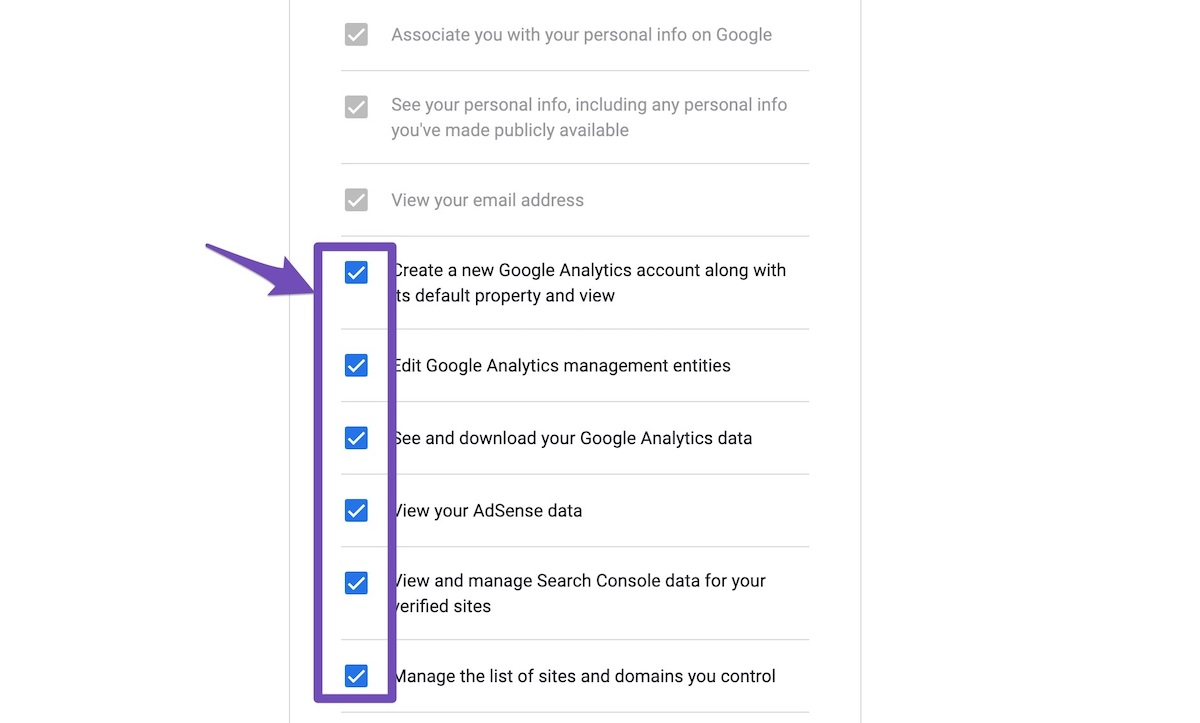
– Reconnect the account inside Rank Math by clicking here and ensure that you approve all the permission notices that show up:
WP Dashboard >> Rank Math >> General Settings >> Analytics tab, and click the Reconnect link

Allow all the permissions on the next screen.
https://rankmath.com/wp-content/uploads/2021/01/Allow-Permissions-to-Google-App-1.jpg
If that does not help, please paste the data from here:
WP Dashboard > Rank Math > Status & Tools > System Status and click the Copy System Info to Clipboard button

Let us know how it goes.
We are really looking forward to helping you.
Thank you.
Hello,
Since we did not hear back from you for 15 days, we are assuming that you found the solution. We are closing this support ticket.
If you still need assistance or any other help, please feel free to open a new support ticket, and we will be more than happy to assist.
Thank you.