
-
https://rankmath.com/kb/why-rank-math-meta-box-is-not-showing/
We’ve tried all the possible solutions mentioned in the article, but we still can’t see the ‘Add SEO Controls’ option in both the user settings and Rank Math settings pages.

-
Hello,
We apologize for the issue you are facing with the Rank Math Meta Box not showing. Since you’ve already tried the solutions mentioned in the article, let’s ensure that everything is set up correctly.
-
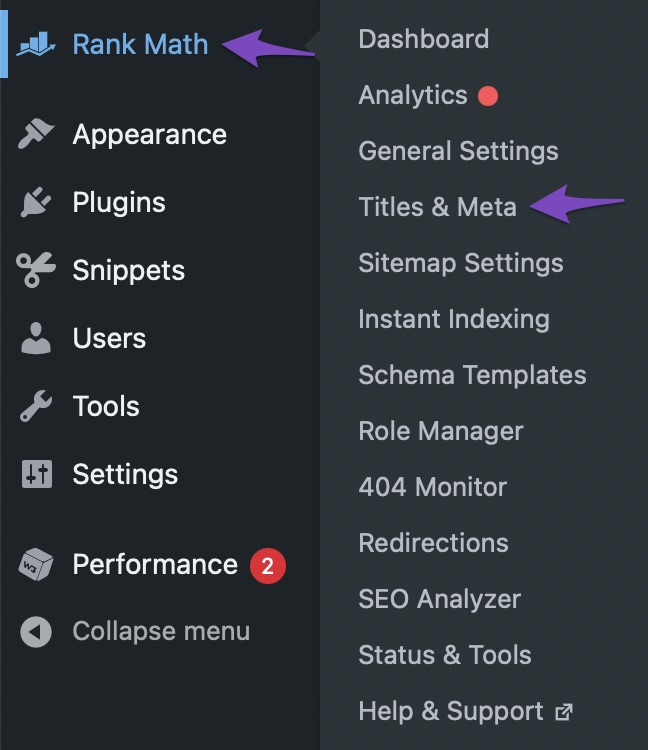
Navigate to Titles & Meta Settings: Go to Rank Math SEO → Titles & Meta from your WordPress dashboard. Make sure you have selected the correct post type or taxonomy where you want the Meta Box to appear.
-
Enable Add SEO Controls: In the Titles & Meta settings, scroll down to find the Add SEO Controls option and ensure it is enabled for the relevant post types.

-
Check User Profile Settings: If you are trying to access the Meta Box in user profile settings, navigate to Users → Profile and scroll down to see if the Meta Box appears there. If it doesn’t, check if there are any restrictions set in the Author Robots Meta settings that might be affecting visibility.

-
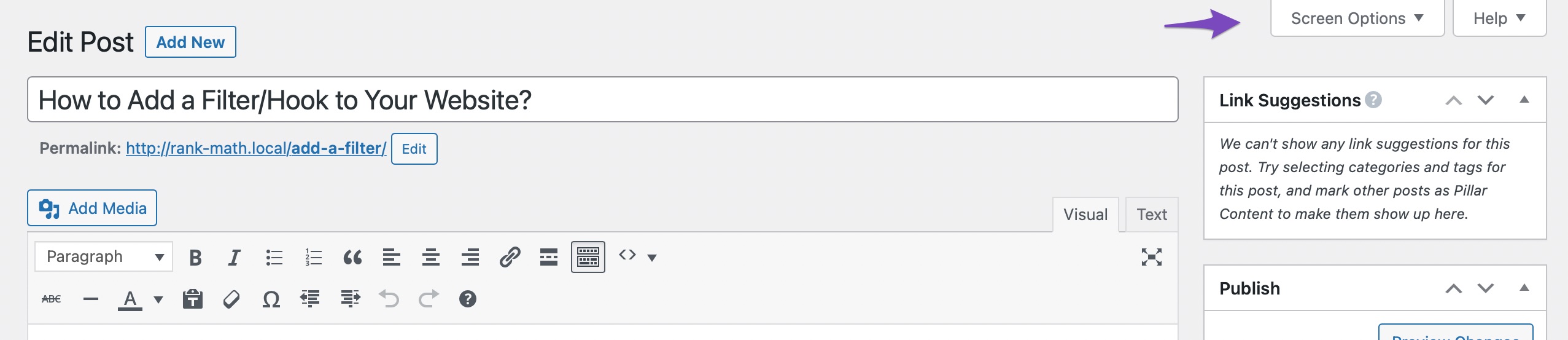
Screen Options in Classic Editor: If you are using the Classic Editor, click on Screen Options at the top-right of your screen and ensure that the Rank Math SEO checkbox is checked.
If after checking all these settings the Meta Box still does not appear, it may be beneficial to check for any plugin conflicts or theme issues that could be affecting Rank Math’s functionality.
If you continue to experience difficulties, please reply to this ticket, and a human agent from our support team will assist you further. Thank you for your patience!
Hello,
I have updated the sensitive data as requested. Can you please check further?
Thank you.
We have already attempted these solutions, but as mentioned, we are unable to see the ‘Add SEO controls’. Please refer to the screenshot on our site(https://imgur.com/a/CtYZmal). Additionally, as per the old reference, we have added the following priority in the functions.php file:
add_filter( ‘rank_math/metabox/priority’, function( $priority ) {
return ‘low’;
});
Below is a list of the plugins we are using:
Advanced Custom Fields PRO
Advanced Custom Fields: Table Field
Akismet Anti-spam: Spam Protection
Better Find and Replace
Classic Editor
Contact Form 7
Contact Form 7 Gated Content
Cookie Notice & Compliance for GDPR / CCPA
Duplicate Page and Post
Flamingo
Google Analytics for WordPress by MonsterInsights
GTM4WP – A Google Tag Manager (GTM) plugin for WordPress
HandL UTM Grabber v3
HubSpot All-In-One Marketing – Forms, Popups, Live Chat
Integration for Contact Form 7 and Salesforce Pro
Intuitive Custom Post Order
Max Mega Menu
Mouseflow for WordPress
Multi Step for Contact Form 7 (Lite)
NitroPack
OptinMonster
PDF Embedder
Popup Maker
PostX
Rank Math SEO
Regenerate Thumbnails
Spectra
Tawk.to Live Chat
Total Upkeep
UserFeedback Lite
Wordfence Security
WordPress Importer
WP Armour – Honeypot Anti Spam
WP File Manager
WP Mail SMTP
WP Plugin Manager
WP-Optimize – Clean, Compress, Cache
WP-PaginateHello,
Thank you for contacting Rank Math support.
We might need to take a closer look at the settings. Please edit the first post on this ticket and include your WordPress & FTP logins in the designated Sensitive Data section.
Please do take a complete backup of your website before sharing the information with us.
It is completely secure and only our support staff has access to that section. If you want, you can use the below plugin to generate a temporary login URL to your website and share that with us instead:
https://wordpress.org/plugins/temporary-login-without-password/
You can use the above plugin in conjunction with the WP Security Audit Log to monitor what changes our staff might make on your website (if any):
https://wordpress.org/plugins/wp-security-audit-log/
We really look forward to helping you.
Due to an NDA, we’re unable to provide FTP and admin access. However, we’ve included the server status and other relevant details for your review. Could you please check with these?
* Rank Math System Status:
### rank-math ###
version: 1.0.230
database_version: 1
plugin_plan: Free
0: undefined
1: undefined
2: undefined
active_modules: link-counter, analytics, seo-analysis, sitemap, rich-snippet, acf, content-ai, instant-indexing, role-manager, local-seo, amp
refresh_token: Token exists
permissions:
Search Console: Given
rank_math_404_logs: Not found
rank_math_redirections: Not found
rank_math_redirections_cache: Not found
rank_math_internal_links: 272 KB
rank_math_internal_meta: 16 KB
rank_math_analytics_gsc: 80 KB
rank_math_analytics_objects: 144 KB
rank_math_analytics_inspections: 112 KB### wp-core ###
version: 6.6.2
site_language: en_US
user_language: en_US
timezone: +00:00
permalink: /blog/%postname%/
https_status: true
multisite: false
user_registration: 0
blog_public: 1
default_comment_status: open
environment_type: production
user_count: 10
dotorg_communication: true### wp-dropins (2) ###
advanced-cache.php: true
maintenance.php: true### wp-active-theme ###
name: NetDepot 2023 (NetDepot2023)
version: 1.0
author: the Mindbees team
author_website: https://mindbees.com/
parent_theme: none
theme_features: core-block-patterns, post-thumbnails, widgets-block-editor, automatic-feed-links, title-tag, post-formats, menus, html5, custom-logo, customize-selective-refresh-widgets, wp-block-styles, align-wide, editor-styles, editor-style, editor-font-sizes, custom-background, editor-color-palette, editor-gradient-presets, responsive-embeds, custom-line-height, experimental-link-color, custom-spacing, custom-units, widgets
theme_path: /home/netdepot/public_html/wp-content/themes/NetDepot2023
auto_update: Disabled### wp-mu-plugins (1) ###
htpm-mu-plugin.php: author: (undefined), version: 1.0.8
### wp-plugins-active (35) ###
Advanced Custom Fields: Table Field: version: 1.3.26, author: Johann Heyne, Auto-updates enabled
Advanced Custom Fields PRO: version: 5.7.10, author: Elliot Condon (latest version: 6.3.9), Auto-updates enabled
Akismet Anti-spam: Spam Protection: version: 5.3.3, author: Automattic – Anti-spam Team, Auto-updates enabled
Better Find and Replace: version: 1.6.4, author: CodeSolz, Auto-updates enabled
Classic Editor: version: 1.6.5, author: WordPress Contributors, Auto-updates enabled
Contact Form 7: version: 5.9.8, author: Takayuki Miyoshi, Auto-updates enabled
Contact Form 7 Gated Content: version: 1.4.4, author: Apsis Labs, Auto-updates enabled
Cookie Notice & Compliance for GDPR / CCPA: version: 2.4.18, author: Hu-manity.co, Auto-updates enabled
Duplicate Page and Post: version: 2.9.5, author: Arjun Thakur, Auto-updates enabled
Flamingo: version: 2.5, author: Takayuki Miyoshi, Auto-updates enabled
Google Analytics for WordPress by MonsterInsights: version: 9.2.0, author: MonsterInsights, Auto-updates enabled
GTM4WP – A Google Tag Manager (GTM) plugin for WordPress: version: 1.20.2, author: Thomas Geiger, Auto-updates enabled
HandL UTM Grabber v3: version: 3.1.0, author: HandL Digital LLC, Auto-updates enabled
HubSpot All-In-One Marketing – Forms, Popups, Live Chat: version: 11.1.66, author: HubSpot, Auto-updates enabled
Intuitive Custom Post Order: version: 3.1.5.1, author: hijiri, Auto-updates enabled
Max Mega Menu: version: 3.3.2, author: megamenu.com, Auto-updates enabled
Mouseflow for WordPress: version: 5.1.3, author: Mouseflow, Auto-updates enabled
OptinMonster: version: 2.16.7, author: OptinMonster Popup Builder Team, Auto-updates enabled
PDF Embedder: version: 4.8.2, author: PDF Embedder, Auto-updates enabled
Popup Maker: version: 1.20.2, author: Popup Maker, Auto-updates enabled
PostX: version: 4.1.16, author: Post Grid Team by WPXPO, Auto-updates enabled
Rank Math SEO: version: 1.0.230, author: Rank Math, Auto-updates enabled
Regenerate Thumbnails: version: 3.1.6, author: Alex Mills (Viper007Bond), Auto-updates enabled
Spectra: version: 2.16.2, author: Brainstorm Force, Auto-updates enabled
Tawk.to Live Chat: version: 0.8.6, author: Tawkto, Auto-updates enabled
Total Upkeep: version: 1.16.5, author: BoldGrid, Auto-updates enabled
UserFeedback Lite: version: 1.1.1, author: UserFeedback Team, Auto-updates enabled
Wordfence Security: version: 7.11.7, author: Wordfence, Auto-updates enabled
WordPress Importer: version: 0.8.3, author: wordpressdotorg, Auto-updates enabled
WP-Optimize – Clean, Compress, Cache: version: 3.7.0, author: TeamUpdraft, DavidAnderson, Auto-updates enabled
WP-Paginate: version: 2.2.2, author: Max Foundry, Auto-updates enabled
WP Armour – Honeypot Anti Spam: version: 2.2.03, author: Dnesscarkey, Auto-updates enabled
WP File Manager: version: 8.0, author: mndpsingh287, Auto-updates enabled
WP Mail SMTP: version: 4.1.1, author: WP Mail SMTP, Auto-updates enabled
WP Plugin Manager: version: 1.2.6, author: HasThemes, Auto-updates enabled### wp-server ###
server_architecture: Linux 3.10.0-1160.76.1.el7.x86_64 x86_64
httpd_software: Apache
php_version: 8.1.30 64bit
php_sapi: fpm-fcgi
max_input_variables: 1000
time_limit: 30
memory_limit: 512M
max_input_time: 60
upload_max_filesize: 2M
php_post_max_size: 8M
curl_version: 8.10.1 OpenSSL/1.1.1w
suhosin: false
imagick_availability: false
pretty_permalinks: true
htaccess_extra_rules: true
current: 2024-10-26T09:17:32+00:00
utc-time: Saturday, 26-Oct-24 09:17:32 UTC
server-time: 2024-10-26T09:17:31+00:00### wp-database ###
extension: mysqli
server_version: 10.3.39-MariaDB
client_version: mysqlnd 8.1.30
max_allowed_packet: 268435456
max_connections: 151### wp-constants ###
WP_HOME: undefined
WP_SITEURL: undefined
WP_CONTENT_DIR: /home/netdepot/public_html/wp-content
WP_PLUGIN_DIR: /home/netdepot/public_html/wp-content/plugins
WP_MEMORY_LIMIT: 40M
WP_MAX_MEMORY_LIMIT: 512M
WP_DEBUG: false
WP_DEBUG_DISPLAY: true
WP_DEBUG_LOG: false
SCRIPT_DEBUG: false
WP_CACHE: true
CONCATENATE_SCRIPTS: undefined
COMPRESS_SCRIPTS: undefined
COMPRESS_CSS: undefined
WP_ENVIRONMENT_TYPE: Undefined
WP_DEVELOPMENT_MODE: undefined
DB_CHARSET: utf8
DB_COLLATE: undefined### wp-filesystem ###
wordpress: writable
wp-content: writable
uploads: writable
plugins: writable
themes: writable
fonts: not writable
mu-plugins: writableHello,
Please open the browser console and share the error logs in the console with us so we can advise further.
Just looking at the screenshot it’s impossible to tell unequivocally what is causing this issue.
Thank you.
https://imgur.com/a/GQ4EszL
error log
acf-input.min.js?ver=5.7.10:3 Uncaught TypeError: Cannot read properties of undefined (reading ‘getPostEdits’)
at acf.Model.onChange (acf-input.min.js?ver=5.7.10:3:26019)
at i (load-scripts.php?c=0&load%5Bchunk_0%5D=jquery-core,jquery-migrate,utils,wp-hooks&ver=6.6.2:2:86755)
at data.min.js?ver=7c62e39de0308c73d50c:2:19884
at Array.forEach (<anonymous>)
at n (data.min.js?ver=7c62e39de0308c73d50c:2:19872)
at Object.emit (data.min.js?ver=7c62e39de0308c73d50c:2:20019)
at s (data.min.js?ver=7c62e39de0308c73d50c:2:20143)
at data.min.js?ver=7c62e39de0308c73d50c:2:20667
at data.min.js?ver=7c62e39de0308c73d50c:2:18995
at v (data.min.js?ver=7c62e39de0308c73d50c:2:8167)Hello,
From the console error log you shared, it’s not pointing to any of the Rank Math asset files.
Assuming you are using the latest version of all the plugins and the themes (please update if not yet), it would seem like a conflict with one of the plugins or the theme you are using.
To determine that, please follow this troubleshooting guide:
https://rankmath.com/kb/check-plugin-conflicts/Here is a video you can follow as well:
https://www.youtube.com/watch?v=FcIWRhcUP2cOnly the site admin would know and your users won’t be affected by this
troubleshooting.Let us know how that goes. Looking forward to helping you.
Hello,
Since we did not hear back from you for 15 days, we are assuming that you found the solution. We are closing this support ticket.
If you still need assistance or any other help, please feel free to open a new support ticket, and we will be more than happy to assist.
Thank you.
-



The ticket ‘Rank math meta box not showing’ is closed to new replies.