Hello,
We apologize for the issue you are facing with Google Analytics not recording visits after installing Rank Math. Since you mentioned that you are not using the self-hosted option, there are a few steps you can take to troubleshoot this issue:
-
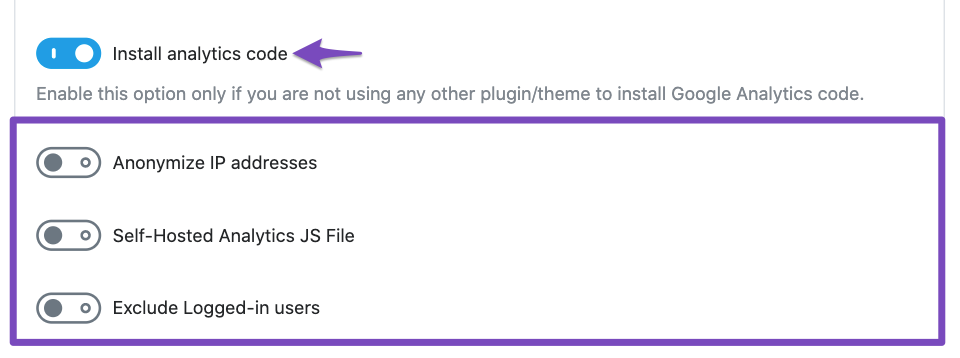
Check Analytics Settings: Ensure that the Install Analytics Code option is enabled in Rank Math. You can find this setting under Rank Math SEO → General Settings → Analytics.
-
Verify Google Account Connection: Make sure that your Google account is properly connected to Rank Math. If this is your first time setting it up, you may want to revisit the connection process.
-
Wait for Data Processing: Sometimes, it can take 24 to 48 hours for Google Analytics to process and display data. If you have just installed Rank Math, please allow some time for the data to appear.
-
Check for Conflicting Plugins: Ensure that there are no other plugins or themes that might be injecting the Google Analytics code, as this could cause conflicts.
-
Rebuild Index for Analytics: If you notice any discrepancies in the data or if the Rank Math SEO score shown in the Analytics module is incorrect, you can try rebuilding the index. Go to Rank Math → Status & Tools → Database Tools → Rebuild Index for Analytics.

If you have followed these steps and are still experiencing issues, please reply to this ticket, and a human agent from the Rank Math Support team will assist you further. Thank you for raising this concern!
Sources:
Resolving Rank Math Analytics Related Issues » Rank Math
Hello,
Could you please share the affected domain/URL so we can check?
You can check your site using https://tagassistant.google.com/ as well to verify that.
If the issue persists, could you please share an image from your Analytics dashboard and your organic traffic data from Google Search Console for the last 30 or 15 days so we can compare it with the data coming through in the Analytics module?
You can upload screenshots using this tool and add the link here.
Meanwhile, please note that the statistics shown in Rank Math’s Analytics section would not fully match the Google Search Console and Analytics because of the situation mentioned here:
https://rankmath.com/kb/anaytics-data-differs-from-ga-gsc/
Looking forward to helping you.
Hello,
Since we did not hear back from you for 15 days, we are assuming that you found the solution. We are closing this support ticket.
If you still need assistance or any other help, please feel free to open a new support ticket, and we will be more than happy to assist.
Thank you.



