Hello,
We apologize for the issue you are facing with Rank Math SEO regarding the score not saving when adding a keyword. This can sometimes happen due to various reasons, including conflicts with caching or security settings.
To troubleshoot this issue, we recommend checking if you have any caching plugins active or if your server has caching enabled. Additionally, if you are using Cloudflare, you may need to create page rules to whitelist certain Rank Math URLs. Here’s how you can do that:
-
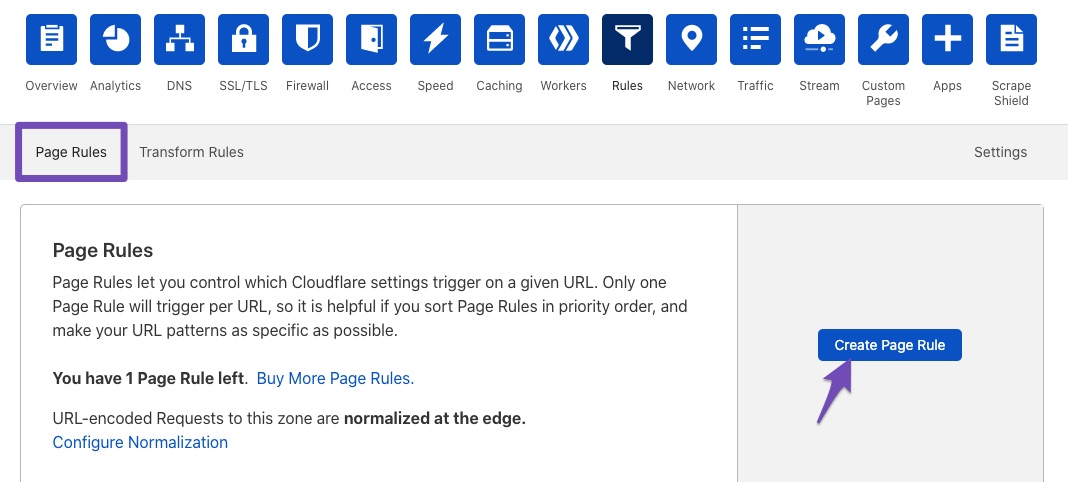
Create New Page Rule: Under the Rules tab in Cloudflare, click the Create Page Rule button.
-
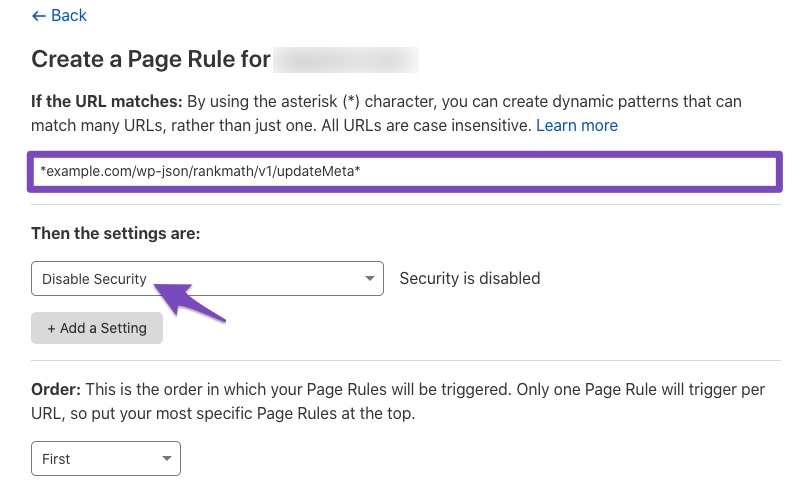
Enter the URL: In the field "If the URL matches", enter the following paths (replace example.com with your domain):
*example.com/wp-json/rankmath/v1/updateMeta*
*example.com/wp-json/rankmath/v1/updateSchemas*
*example.com/wp-json/rankmath/v1/updateRedirection*
*example.com/wp-json/rankmath/v1/getFeaturedImageId*
*example.com/wp-json/rankmath/v1/getHead*
Note that Cloudflare allows only one URL per page rule, so you will need to create multiple rules for each path.
-
Disable Security: In the field "Then the settings are", choose Disable security.
-
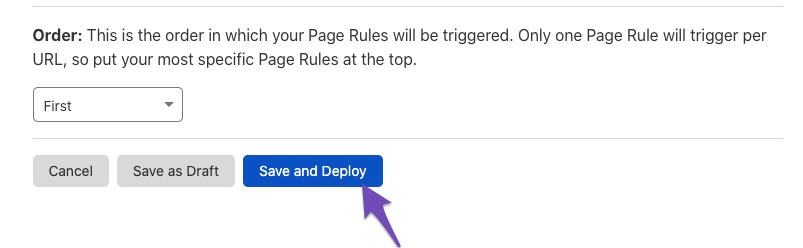
Save and Deploy: Click the Save and Deploy button to apply the changes.
After making these changes, try adding the keyword again and see if the score saves correctly.
If the issue persists, please reply to this ticket, and a human agent from the Rank Math Support team will assist you further. Thank you for bringing this concern to our attention!
Sources:
Why Your SEO Title, Description & Focus Keyword Aren’t Being Saved » Rank Math
My web have not Cloudflare.
Hello,
Thank you for contacting support.
When we logged in to the website now we can see that the page already has the focus keyword that you were trying to add in the video which would indicate the issue is fixed.
Please let us know if you require any further assistance.
We are here to help!
Hello,
I have updated the sensitive data as requested. Can you please check further?
Thank you.
Hello,
Please add the login credentials once again so we can check the situation one more time.
The last time we accessed the website all the scores were saved and were in the yellow on the page list.
Thank you.
Hello,
I have updated the sensitive data as requested. Can you please check further?
Thank you.
Hello,
You seemed to have marked this ticket.
When you marked a ticket as resolved, the information in the sensitive data section is removed.
We’re just following up with you to see if you have any other questions or concerns that we can assist you with. Or, if your issue has been resolved, please let us know so we can mark this ticket as closed.
Thank you for choosing Rank Math.




