Hello,
We apologize for the issue you are facing regarding the display of prices with VAT in the product schema for Google Shopping.
To configure your WooCommerce store to include VAT in the product prices, you can follow these steps:
- Navigate to WooCommerce → Settings → General.
- Under the General Options, look for the option to Enable Tax rates and Calculations and ensure it is checked.
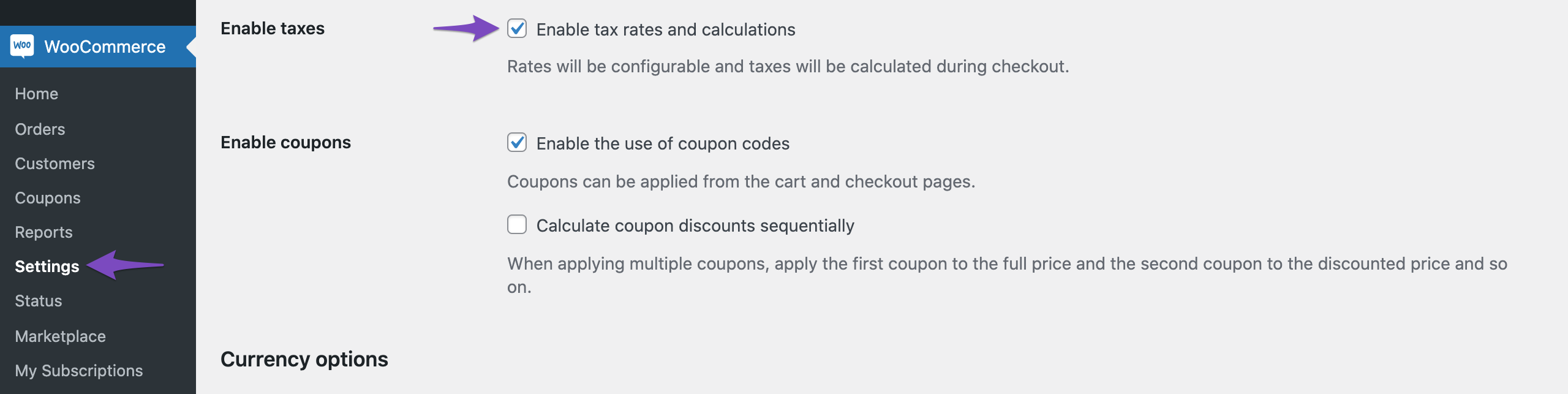
- After enabling this option, you can set up your tax rates accordingly. You can refer to this detailed guide on configuring tax options in your WooCommerce store: Setting Up Taxes in WooCommerce.
Once you have configured your WooCommerce settings to include VAT, Rank Math will automatically pull this information into the product schema.
If you have any further questions or need assistance, please reply to this ticket, and a human agent from the Rank Math Support team will assist you further.
Thank you for raising this concern!
Sources:
How to Use Product Schema for WooCommerce Products » Rank Math
This step si already done.
Hello,
Please note that the pricing should match everything, not only on the Schema but if you update the Schema to include the price with taxes, the data displayed to your users also needs to be the same.
However, if you want to force this in the Schema markup only, you can add the following filter to your site:
add_filter( 'rank_math/snippet/rich_snippet_product_entity', function( $entity ) {
    global $product;
    $price_with_taxes = wc_get_price_including_tax($product);
    $entity['price'] = $price_with_taxes;
    return $entity;
});
Here’s a guide to adding the code to the website:
https://rankmath.com/kb/wordpress-hooks-actions-filters/
Hope that helps.
Hello,
Unfortunately, the solution you provided didn’t work, but it seems to have pointed me in the right direction toward finding the solution.
My solution:
add_filter( 'rank_math/snippet/rich_snippet_product_entity', function( $entity ) {
    global $product;
    $price_with_taxes = wc_get_price_including_tax($product);
    $entity['offers']['price'] = $price_with_taxes;
    $entity['offers']['priceSpecification']['price'] = $price_with_taxes;
    $entity['offers']['priceSpecification']["valueAddedTaxIncluded"] = true;

    return $entity;
});
Could you also please let me know if this meta tag comes from RankMath? <meta property=”product:price:amount” content=”16.9″> If so, how can I edit it, please?
Hello,
Yes, we do have a way to edit that tag. Please refer to the code below:
add_filter( "rank_math/opengraph/facebook/product_price_amount", function( $content ) {
	$content = '22';
	return $content;
});
Hope that helps. Thank you.
Hello,
We are super happy that this issue is already resolved. If you have any other questions in the future, know that we are here to help you.
If you don’t mind us asking, could you please leave us a review (if you haven’t already) on
https://wordpress.org/support/plugin/seo-by-rank-math/reviews/#new-post
about your overall experience with Rank Math? We appreciate your time and patience.
If you do have another question in the future, please feel free to create a new forum topic, and it will be our pleasure to assist you again.
Thank you.




